

Prebuilt vs Custom PC for Golf Simulators
Explore the pros and cons of prebuilt PC for golf simulators versus custom builds to find the best golf simulator setup suited for your needs.
COMPUTERS
Golf Tech Buzz Editorial Team - Led by AJ “Buzz” Eichman
5/5/20267 min read
If you’ve ever set foot into a simulator room that feels smoother than a tap-in putt, you know the PC behind the curtain makes all the difference. When it comes to golf simulators, your PC isn’t just another piece of hardware; it's the heart of your entire setup. Running high-res graphics, tracking your swing, processing sensor data—this rig needs to be up to the task for the magic to happen. If you want to understand how everything connects at a system level, start with Golf Sim Computers.
The big question? Do you go prebuilt PC for golf simulators or roll up your sleeves with a custom PC build? I’ve been around enough simulators (and cigars) to share what really works and what’s just hype.
Here’s the deal: Your choice between prebuilt and custom isn’t just about price or specs; it’s about your goals, patience level, and how much you care about future-proofing. So, let’s break down the nitty-gritty so you can pick the right rig to shave strokes—not stress—from your game.
Quick Verdict
Prebuilt PCs deliver plug-and-play convenience, tested compatibility, and peace of mind with warranties—perfect if you want to jump straight into golf without the tech headache.
Custom PCs offer maximum flexibility: tailor your components, boost performance as you go, and save some cash if you know your way around building.
A powerful GPU matters more than you might think; both options need to pack enough punch for smooth visuals and real-time shot data.
Don’t overlook your setup space or the number of ports required for all those sensors and monitors—size and compatibility count.
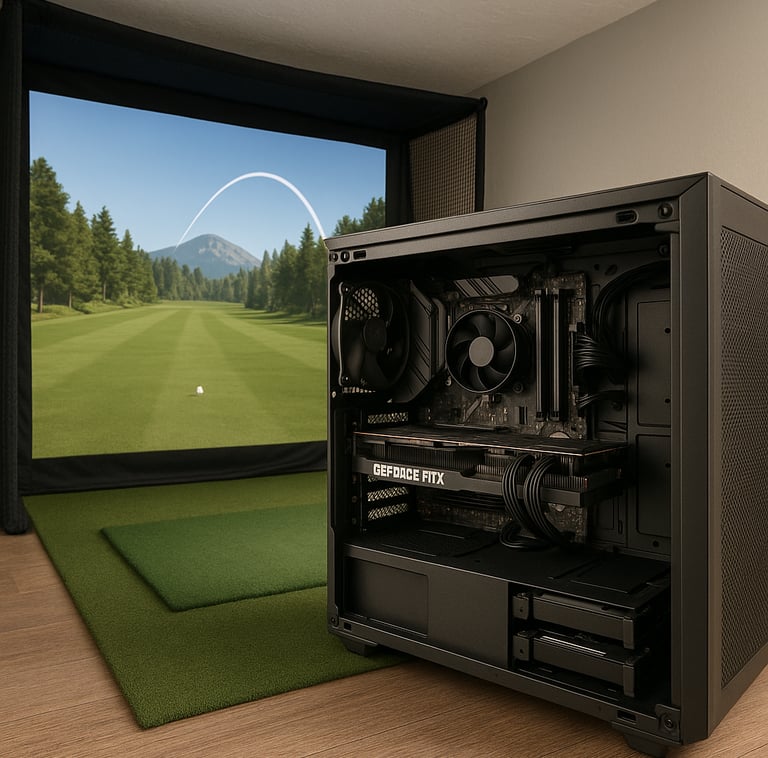
Overview of Golf Simulator PC Requirements
I’ve seen guys try this and get it wrong: thinking a standard gaming PC will magically handle everything golf simulators throw at it. Here’s the lowdown — golf simulator software demands solid graphics horsepower to render realistic courses and ball physics. You’re talking GPUs that can push high frame rates without lag. The CPU can’t be slouchy either; fast, multi-core processors crunch shot analysis data and manage all the connected devices smoothly. Budget at least 16GB of RAM, and go SSD for storage because quick loading times and smooth multitasking aren’t optional here. If you want a deeper breakdown of how different software impacts performance, see Golf Simulator PC Requirements by Software or the full Complete Golf Simulator Computer Guide.
But remember, not every piece of golf sim software is the same. Some games demand more GPU, others lean heavily on CPU multitasking. Knowing your software’s needs helps decide what kind of machine you want—whether prebuilt or custom.
What Is a Prebuilt PC and Its Benefits?
Picture this: you order a high-performance golf simulator PC and get it delivered ready to rumble. All the specs optimized for gaming and simulation, certified drivers pre-installed, tested for compatibility with popular launch monitors and sensors. That’s your prebuilt PC in a nutshell.
Here’s where prebuilts shine:
Convenience: No hunting for parts or troubleshooting compatibility headaches.
Warranty and Support: Manufacturer backing means if your machine throws a fit, you have someone official to call.
Tested Compatibility: Many manufacturers design prebuilt models specifically with simulation and gaming in mind—less guesswork for you.
Time Savings: You want to get on the course faster, not spend days building and tweaking.
If you’re comparing ready-to-go systems, you’ll find strong options in Best Computers for Golf Simulators or higher-end builds in Best Golf Sim Computers Under $1000.
If you’re just starting or want a hassle-free experience, prebuilts deliver. But keep in mind, some prebuilt systems might come with bells and whistles you don’t need, inflating the price a bit. Also, the internal build quality might be less exciting to your tinkerer side.
What Is a Custom PC Build and Its Benefits?
Now, for the guys who love rolling their own—building a golf simulator PC from scratch is like crafting the perfect club set tailored to your swing. You pick every component: CPU, GPU, RAM, storage, motherboard, case, cooling, power supply—you name it.
The perks?
Flexibility: Optimize every bit, from the fastest GPU for your favorite software to quieter cooling solutions for indoor setups.
Cost Efficiency: With smart shopping and patience, you can get more bang for your buck compared to some markup-laden prebuilts.
Upgradeability: Custom rigs usually have room for future upgrades and modifications—important if golf simulator technology or software demands evolve.
Personal Satisfaction: Nothing beats booting up a system you built yourself humming like a well-oiled wedge.
If you’re going this route, start with Best PC Parts for a Golf Simulator Build.
The catch here is you need some tech chops or a good buddy who does. Compatibility issues, driver installations, and tweaking BIOS settings can get tricky and eat up time. But if you dig the challenge and want total control, custom is king.
Performance Comparison: Prebuilt vs Custom
If I’m being honest, both prebuilt and custom PCs can deliver top-notch performance for golf simulators if you pick the right components. The major difference lies in how they arrive in your hands and what level of customization you want going forward.
Prebuilts are optimized out of the box, usually with GPUs like NVIDIA’s RTX series or AMD’s Radeon cards that can handle everything from smooth rendering of golf courses to processing sensor streams in real time. CPUs are typically recent-gen Intel or AMD processors with sufficient cores and speed.
Custom builds let you push that envelope further. Want the absolute latest GPU? No problem. Need more RAM because you’re running simulators alongside video capture and analytics software? Easy upgrade. Plus, you decide on cooling solutions—get serious liquid cooling if heat in your sim room is a concern.
However, beware of prebuilt models with proprietary parts or cramped cases that limit future upgrades. Some budget prebuilts might skimp on cooling or power supply, which can throttle performance under load.
Setup and Compatibility Considerations
Don’t just grab a PC and shove it somewhere. Your golf simulator setup needs deliberate planning around space, connections, and airflow.
For home setups with a dedicated room and ample space, larger towers—either prebuilt or custom—offer more ports and better cooling options. But if you’re squeezing your rig into a garage or compact corner, smaller form factors or mini-ITX custom builds might be preferable. Prebuilt small form factor PCs exist but watch ventilation closely to avoid overheating.
Port availability is another big deal. Launch monitors and sensors often connect via USB or even specialized input ports. Check the PC’s I/O panel closely. Having a prebuilt with all the necessary ports or a custom build tailored with expansion cards can save headaches. Also, think about future peripherals—don’t expect to plug everything into USB hubs indefinitely. If you're comparing setups, see Gaming PC vs Laptop for Golf Simulators.
Upgrading Your Golf Simulator PC
One misconception I’ve busted a dozen times is that prebuilt PCs can’t be upgraded. They absolutely can, but it depends on how “closed off” the design is. Some prebuilt chassis are tricky to open, and certain brands use proprietary parts making swapping tough. Still, in general, you can upgrade GPUs, add RAM, and swap storage drives.
Custom PCs win a gold star here. By design, they’re all about upgrading and tweaking. Need more GPU muscle? Pop in a new card. Want to add more sensors or external displays down the line? Plenty of PCIe slots and SSD bays usually await.
Common Buyer Mistakes and How to Avoid Them
Overbuying Power: Guys often get caught up in the “bigger = better” mindset, dropping serious cash for a GPU that’s overkill for their golf sim software’s demands. Know what your software needs before splurging.
Price-Only Shopping: Cheaping out without vetting compatibility leads to systems that can’t connect with your launch monitor or software crashing mid-swing.
Ignoring Airflow and Size: Buying a beefy PC without considering space or cooling results in noisy, overheated rigs that cut sessions short.
Undervaluing GPU over CPU: For golf simulations, the GPU shoulders most of the graphics rendering. Skimping here but getting a high-end CPU is backward.
Thinking Prebuilts Aren’t Upgradeable: They often are, but research the model’s chassis and parts before buying.
Neglecting Port Needs: Missing crucial USB or display ports makes your setup incompatible and frustrating.
If you’re comparing real-world performance differences, check RTX 3060 vs RTX 4080 for Golf Simulators.
FAQs on Choosing Between Prebuilt and Custom PCs
What are the minimum PC specifications needed for popular golf simulator software?
Most mainstream golf simulators recommend at least an Intel i5 or AMD Ryzen 5 processor, 16GB RAM, and an NVIDIA GTX 1660 or equivalent GPU. Storage-wise, an SSD for the software and HDD for video data is common.
Is it better to buy a prebuilt PC or build a custom one for golf simulation?
It boils down to convenience vs. customization. Prebuilts save time and come with warranty support. Custom builds offer tailored performance and easier future upgrades but need more technical know-how.
How important is the graphics card for golf simulators?
Very. The graphics card handles rendering realistic courses and ball physics, keeping things smooth and immersive. A good GPU prevents lag and graphical glitches during your swing analysis.
Can I upgrade a prebuilt PC later if needed?
Usually yes, but it depends on the specific prebuilt model’s internal design and parts compatibility. Check before you buy.
What space and setup considerations affect the choice of PC for a golf simulator?
Available physical space, ventilation, number of required ports for sensors and displays, and mobility needs all influence PC size and form factor.
How do I ensure compatibility between the PC and golf simulator hardware?
Reference the hardware and software manufacturer guidelines for connectivity and system requirements, and double-check available ports and supported operating systems.
What are common issues when setting up a PC for golf simulators?
Incompatible hardware, insufficient cooling causing throttling, missing ports, undervaluing GPU power, and neglecting driver/software updates.
How does budget influence the decision between prebuilt and custom PCs for golf simulators?
Custom builds can be more cost-effective if you know your components, but risk hidden costs from trial and error. Prebuilts often carry a premium for ease and warranty but may include unnecessary extras.
Final Thoughts
Here’s the bottom line: if you want a fuss-free experience and don’t want to mess with setups, a prebuilt PC for golf simulators is a solid bet. You get reliable performance, support, and the ability to tee off quickly. But if you enjoy getting under the hood, optimizing every part for peak performance, and upgrading over time, a custom golf simulator PC build will better suit your needs—and your wallet.
No matter which route you take, remember to size your PC to your space, match it carefully to your golf simulator software demands, and keep an eye on ports and ventilation. Done right, your PC will be the silent caddy guiding you through countless rounds—steady, smooth, and ready for that perfect swing.
Now go get that rig dialed in and start shaving strokes off your game—because in simulators and on the course, the right PC is your best swing partner.
© 2026 GolfTechBuzz. All rights reserved.
Golf Tech Buzz
Performance Through Data
Practical guides, real-world setups, and unbiased comparisons for golfers building smarter practice environments.
General Inquiries: