

Golf Simulator PC Requirements by Software
Not all golf simulator software is built the same — and that’s exactly why so many setups underperform.
Some platforms are lightweight and forgiving. Others demand serious GPU power and will expose weak builds instantly.
This guide breaks down what your PC actually needs based on the software you plan to run, so you don’t overbuild, underbuild, or waste money in the wrong places.
If you need a full system breakdown first, start with Golf Sim Computers.
If you’re trying to match performance levels instead, see Best Computers for Golf Simulators.
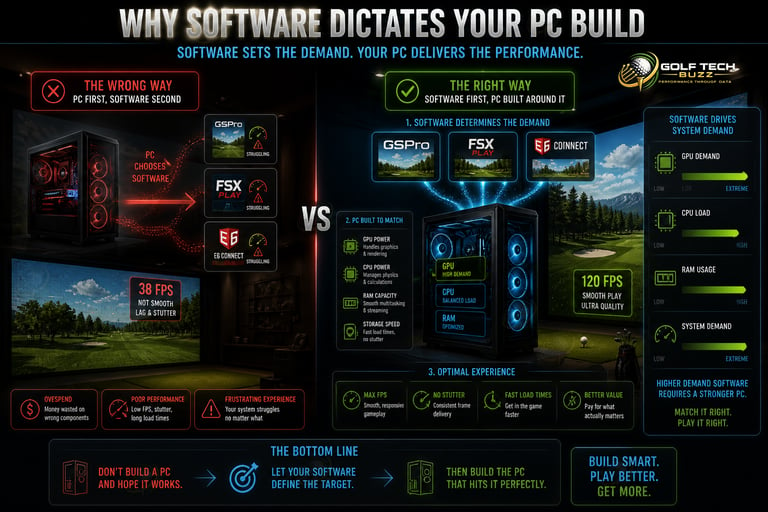
Why Software Dictates Your PC Build
Most people build a PC first… then pick software.
That’s backwards.
Your simulator software determines:
GPU requirements
CPU load
RAM usage
Overall system demand
👉 Full baseline: What PC Specs Do You Need for a Golf Simulator?
👉 Real expectations: Minimum vs Recommended Golf Simulator PC Specs (What Actually Matters?)
If you get this wrong, you’ll either:
Overspend on unnecessary hardware
Or end up with a system that struggles
GSPro Requirements
(High Demand, Realism Focused)
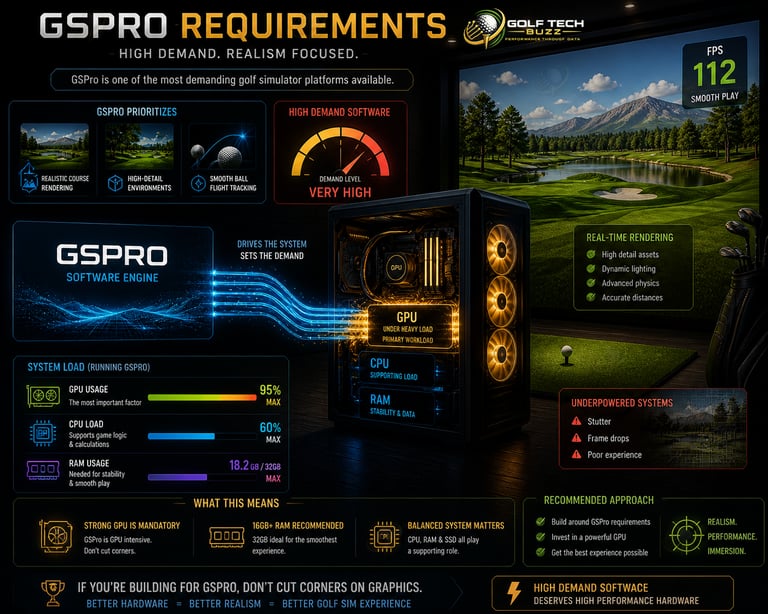
GSPro is one of the most demanding golf simulator platforms available.
It prioritizes:
Realistic course rendering
High-detail environments
Smooth ball flight tracking
This means:
Strong GPU is mandatory
Mid-to-high CPU recommended
16GB+ RAM for stability
Where setups fail:
Weak GPUs causing stutter
Trying to run high settings on entry-level builds
👉 Full breakdown: Can Your PC Run GSPro? (Full System Requirements + Performance Checker)
👉 GPU requirements: What GPU Do You Need for a Golf Simulator? (Real Performance Guide)
👉 Performance expectations: 1080p vs 4K Golf Simulator Performance (Is It Worth It?)
If you're building for GSPro, don’t cut corners on graphics.
E6 CONNECT Requirements
(Balanced Performance)
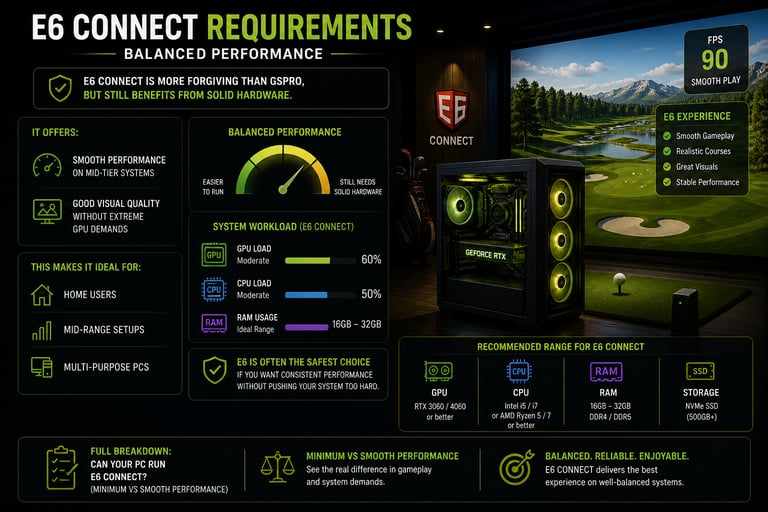
E6 CONNECT is more forgiving than GSPro, but still benefits from solid hardware.
It offers:
Smooth performance on mid-tier systems
Good visual quality without extreme GPU demands
This makes it ideal for:
Home users
Mid-range setups
Multi-purpose PCs
👉 Full breakdown: Can Your PC Run E6 CONNECT? (Minimum vs Smooth Performance)
E6 is often the safest choice if you want consistent performance without pushing your system too hard.

The Golf Club 2019
(Lower Demand, Still Relevant)
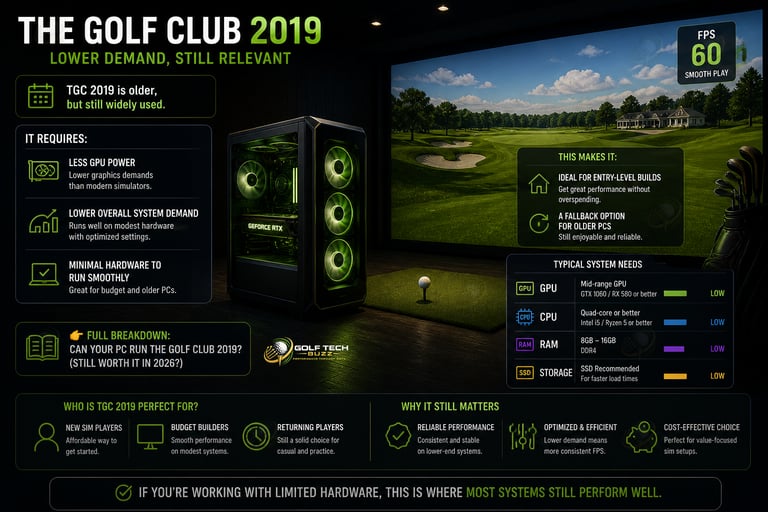
TGC 2019 is older, but still widely used.
It requires:
Less GPU power
Lower overall system demand
Minimal hardware to run smoothly
This makes it:
Ideal for entry-level builds
A fallback option for older PCs
👉 Full breakdown: Can Your PC Run The Golf Club 2019? (Still Worth It in 2026?)
If you’re working with limited hardware, this is where most systems still perform well.

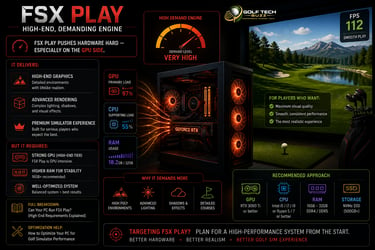
FSX Play
(High-End, Demanding Engine)
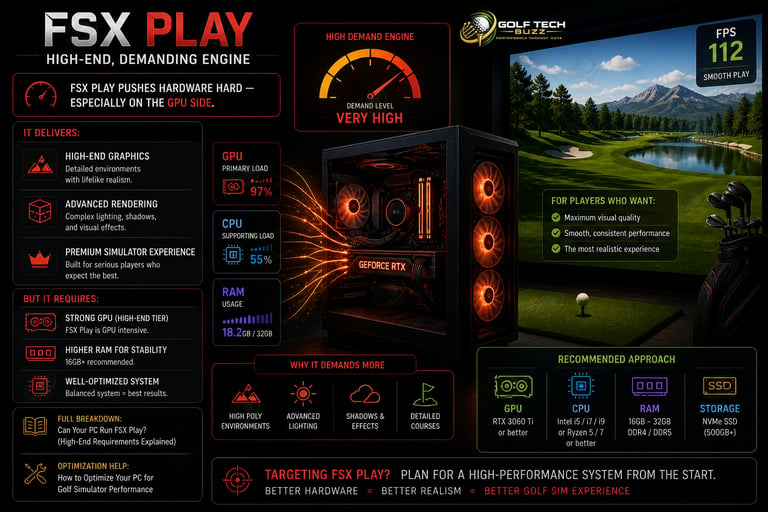
FSX Play pushes hardware hard — especially on the GPU side.
It delivers:
High-end graphics
Advanced rendering
Premium simulator experience
But it requires:
Strong GPU (high-end tier)
Higher RAM for stability
Well-optimized system
👉 Full breakdown: Can Your PC Run FSX Play? (High-End Requirements Explained)
👉 Optimization help: How to Optimize Your PC for Golf Simulator Performance
If you're targeting FSX Play, plan for a high-performance system from the start.
TrackMan Software Requirements
(System + Ecosystem Driven)
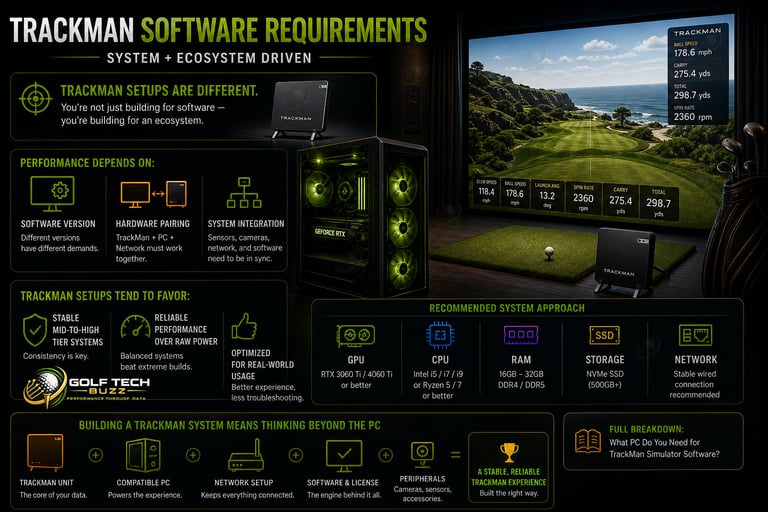
TrackMan setups are different.
You’re not just building for software — you’re building for an ecosystem.
Performance depends on:
Software version
Hardware pairing
System integration
👉 Full breakdown: What PC Do You Need for TrackMan Simulator Software?
TrackMan setups tend to favor:
Stable mid-to-high tier systems
Reliable performance over raw power
Performance Tiers
(What You Actually Feel — Not Just Specs)
Entry-Level
(1080p Playable)
Best for:
Budget builds
Casual use
Simpler graphics settings
Typical setup:
Mid-range CPU
16GB RAM
Entry-level GPU
👉 See real options in Best Golf Sim Computers Under $1000
Mid-Tier
(Best Value)
Best for:
Smooth gameplay
Better graphics
Most home setups
Typical setup:
Mid-to-high CPU
16–32GB RAM
Mid-to-high GPU
👉 Recommended builds: Best Golf Sim Computers Under $2500
High-End
(Premium Experience)
Best for:
4K simulation
Ultra settings
Professional Use
Typical setup:
High-end CPU
32GB RAM
Top-tier GPU
👉 See builds here: Best Golf Sim Computers Under $5000
👉 Full tier breakdown: Best Computers for Golf Simulators - Best Laptops for Golf Simulators
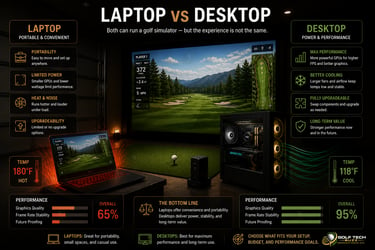
Laptop vs Desktop:
The Trade-Off Nobody Explains Clearly
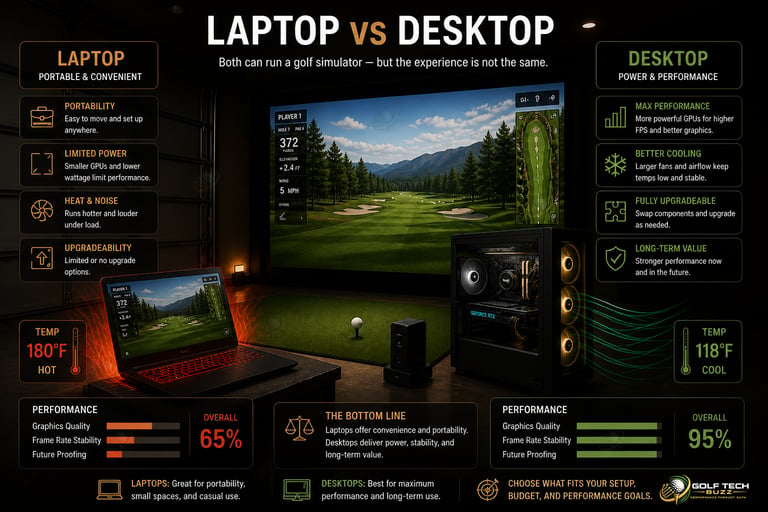
This decision isn’t about preference — it’s about constraints.
Choose a Laptop If:
You need portability
You run a mobile golf business
Space is limited
👉 Options: Best Laptops for Golf Simulators
👉 Business setups: Best Golf Sim Laptops for Mobile Business Use
Choose a Desktop If:
You want maximum performance
You plan to upgrade later
You want long-term stability
👉 Full breakdown: Golf Simulator Computers: Laptop vs Desktop (What Actually Works?)
👉 Direct comparison: Gaming PC vs Laptop for Golf Simulators (Performance, Cost & Setup)
For most setups, desktop wins long-term.
Building Before Choosing Software
This is the #1 mistake — and the most expensive.
Underestimating GPU Requirements
Especially with GSPro and FSX Play.
👉 Learn more: What GPU Do You Need for a Golf Simulator? (Real Performance Guide)
Ignoring Performance Settings
Even powerful PCs can struggle without proper configuration.
👉 Fix issues: Why Your Golf Simulator Is Lagging (And How to Fix It)
👉 Increase FPS: How to Increase FPS in Golf Simulator Software
👉 Tune visuals: Best Graphics Settings for GSPro, E6, and FSX Play
Assuming All Simulator Software Is the Same
Each platform has different requirements — and different performance expectations.
Common Mistakes When
Matching PC to Software
Frequently asked questions
Which golf simulator software requires the most powerful PC?
GSPro and FSX Play are the most demanding due to their advanced graphics and real-time rendering. They require strong GPUs and higher-end systems for smooth gameplay, especially at higher resolutions. For full requirements, see Can Your PC Run GSPro? (Full System Requirements + Performance Checker) and Can Your PC Run FSX Play? (High-End Requirements Explained).
Can the same PC run multiple golf simulator software programs?
Yes, but your PC must meet the requirements of the most demanding software you plan to use. If your system can run GSPro or FSX Play smoothly, it will handle E6 CONNECT and The Golf Club 2019 without issues. Compare requirements in Golf Simulator PC Requirements by Software (GSPro, E6, TrackMan).
What happens if your PC only meets the minimum software requirements?
The software will run, but performance will be inconsistent. You’ll likely experience lag, lower graphics quality, and reduced responsiveness. For a better experience, aim for recommended specs outlined in Minimum vs Recommended Golf Simulator PC Specs (What Actually Matters?).
Is GSPro harder to run than E6 CONNECT?
Yes. GSPro requires more GPU power and overall system performance, especially at higher settings. E6 CONNECT is more optimized for mid-range systems and delivers smoother performance on less powerful PCs. See Can Your PC Run GSPro? (Full System Requirements + Performance Checker) and Can Your PC Run E6 CONNECT? (Minimum vs Smooth Performance).
Can you run golf simulator software on a laptop?
Yes, but only if the laptop has a dedicated GPU and meets the software requirements. Many laptops struggle with high-end software like GSPro or FSX Play. For limitations and expectations, see Can You Run a Golf Simulator on a Laptop? (What Actually Works).
Does resolution (1080p vs 4K) change software requirements?
Yes — significantly. Running simulator software at 4K requires much more GPU power than 1080p. Many systems that run smoothly at 1080p will struggle at 4K. Compare performance expectations in 1080p vs 4K Golf Simulator Performance (Is It Worth It?).
Do different launch monitors affect PC requirements?
Yes. Some launch monitors rely more heavily on your PC for processing and rendering, while others offload more work to their own systems. TrackMan setups, for example, have specific system requirements. See What PC Do You Need for TrackMan Simulator Software?
Should you choose your software before building your PC?
Yes — always. Your software determines the hardware requirements, especially GPU performance. Building first can lead to overspending or performance issues. Start with What PC Specs Do You Need for a Golf Simulator? (Full Breakdown) to plan correctly.

Final Thoughts
Your golf simulator PC should be built around one thing:
👉 The software you plan to run
If you match your hardware to your software correctly:
Performance stays smooth
Graphics stay consistent
Your system lasts longer
If you don’t:
You’ll fight lag
Waste money
Or need to upgrade sooner than expected
If you’re ready to move forward:
👉 Start here: Best Computers for Golf Simulators
👉 Or compare portable options: Best Laptops for Golf Simulator
© 2026 GolfTechBuzz. All rights reserved.
Golf Tech Buzz
Performance Through Data
Practical guides, real-world setups, and unbiased comparisons for golfers building smarter practice environments.
General Inquiries: