

Can Your PC Run E6 CONNECT?
Discover if your PC meets the E6 CONNECT system requirements to deliver smooth gameplay, vivid graphics, and realistic golf simulation indoors.
COMPUTERS
Golf Tech Buzz Editorial Team - Led by AJ “Buzz” Eichman
5/28/20268 min read
If you’re gearing up to bring the golf course indoors with E6 CONNECT, one question looms large: can your PC handle it? Like any high-quality golf simulator software, E6 CONNECT demands a certain level of hardware muscle to deliver smooth gameplay, crisp visuals, and realistic physics. Jumping in without checking your PC’s specs is like showing up to a league tournament with the wrong clubs—possible, but you’re likely to struggle.
If you’re still planning your overall setup, our Golf Sim Computers guide and Golf Simulator Computers — Laptop vs Desktop breakdown both help explain what kind of systems work best for modern simulator software.
This guide breaks down the minimum and recommended PC system requirements for E6 CONNECT so you can make an informed decision—no guesswork, no jargon. Whether you’re upgrading your rig or buying new, understanding these specs ensures your simulator runs smoothly and your golf game doesn’t suffer from lag or stutter. Let’s dive deep, then pare things back to essentials, so your next round indoors feels every bit as real as on the course.
Quick Verdict: E6 CONNECT PC Compatibility at a Glance
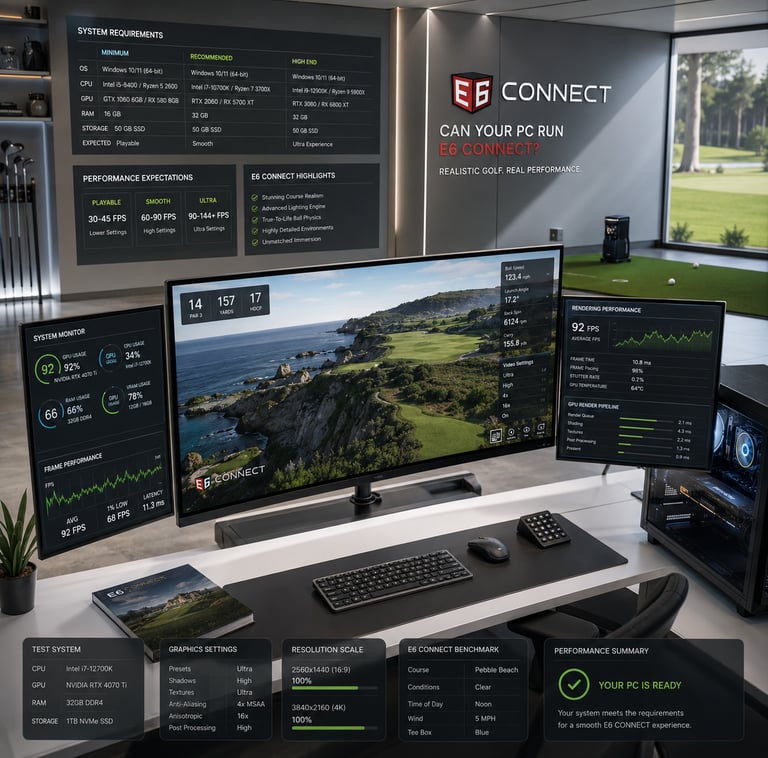
Minimum CPU: Quad-core processor like Intel i5 or AMD equivalent for basic functionality
Recommended GPU: Nvidia GTX 1060 or better for smooth, detailed graphics
RAM: 8GB minimum, ideally 16GB for better stability and multitasking
Storage: SSD recommended for faster load times and overall responsiveness
Keep your OS and drivers updated for best compatibility
What is E6 CONNECT? An Overview of the Golf Simulator Software
E6 CONNECT is not your average golf game—it’s a sophisticated golf simulation platform designed to mimic real courses with stunning visual fidelity and accurate ball physics. Think of it as the brain and heart behind many commercial and home golf simulators, where every fairway, bunker, and breeze is rendered in real time to create an immersive experience.
Here’s where things get interesting from a hardware perspective: E6 CONNECT relies heavily on your PC’s CPU and GPU to process and render these high-detail environments smoothly. The CPU handles the underlying calculations, including ball physics and game logic, while the GPU brings all those vibrant landscapes and player movements to life with real-time 3D rendering. RAM and storage might not get as much attention, but they’re crucial for loading times and stability during extended play sessions.
Minimum System Requirements for E6 CONNECT
Starting with the barebones specs is smart because it helps you understand the entry point for running this software without fuss. Here’s what you absolutely need, at minimum:
CPU: A quad-core Intel i5 or AMD equivalent processor. This means four cores capable of multi-threading to handle the physics computations. Clock speed and CPU generation matter here; an older i5 might barely cut it, so try to get one from the last few years.
GPU: At least an NVIDIA GTX 750 or equivalent. This can run the software, but expect to run on reduced settings with lower frame rates. The key here is supporting DirectX 11 or higher to ensure the graphics pipeline works correctly.
RAM: 8GB minimum. This supports the application and the Windows OS running in the background but leaves little room for multitasking.
Storage: 30GB of free disk space (preferably on an SSD). E6 CONNECT files and course assets add up, and having an SSD means faster load times and fewer hiccups.
OS: Windows 10 64-bit recommended for compatibility.
Here’s what that actually means in real use: with minimum specs, you can get E6 CONNECT running for casual rounds and short sessions. However, expect some compromises in graphic quality, longer loading times, and potential hiccups when adding accessories like launch monitors or sensors.
If you’re trying to better understand the balance between entry-level and higher-end hardware, our guide on Minimum vs Recommended Golf Simulator PC Specs explains how different system tiers impact simulator performance.
Recommended PC Specs for Optimal Performance
If you want to dial up the realism, smoothness, and responsiveness, recommended specs guide you to a much better user experience:
CPU: High-performance quad-core or six-core Intel i5/i7 or AMD Ryzen 5/7 processors, preferably from recent generations with higher base clock speeds. This boosts how fast physics calculations run and reduces latency.
GPU: Mid to high-end graphics card like an NVIDIA GTX 1060, RTX 2060, or better. These cards handle detailed textures, shadows, and smooth frame rates without choking the system.
RAM: 16GB or more. This not only stabilizes the simulator during long sessions but also allows you to run other applications simultaneously, such as swing analysis software or streaming tools.
Storage: Solid-state drive (SSD) is a must here. The faster read/write speeds drastically cut down loading screens and prevent stutters when changing courses.
OS and Drivers: Keep Windows updated and ensure GPU drivers are the latest available to avoid compatibility issues.
For golfers deciding between portable and desktop setups, our Best Laptops for Golf Simulators guide breaks down some of the strongest gaming laptops currently available for E6 CONNECT and garage simulator setups.
If you’d rather build around maximum upgradeability and long-term performance, our Best Computers for Golf Simulators guide highlights some of the strongest desktop systems currently available.
Key Hardware Components: CPU, GPU, RAM, and Storage Explained
Why all this fuss over specs? Let’s break down the tech a bit:
CPU – The “brain” of the operation. E6 CONNECT’s real-time physics calculations depend on having multiple fast cores. Single-core performance still matters, so newer CPUs with better IPC (instructions per clock) will handle the processing more efficiently. This is crucial for ball flight and terrain interactions, where milliseconds count.
GPU – The “artist” of the setup. Generating vivid and realistic golf courses at 1080p or higher resolution requires a GPU that supports DirectX 11+ and has enough processing grunt. A weaker GPU means lower textures, dropped frames, and an overall less immersive experience.
RAM – Think of RAM as your workspace. Sufficient memory ensures the simulator and Windows run comfortably without constant swapping to disk, which kills performance. If you multitask or run advanced analytics software alongside E6 CONNECT, err on the side of 16GB or more.
Storage – SSDs really shine here. The difference in load times between a mechanical HDD and an SSD can be huge, saving you from frustrating waits between rounds or course changes.
Setting Up Your PC for E6 CONNECT: Compatibility and Updates
Even if your hardware ticks the boxes, setting your PC up correctly is key. That means:
Ensuring your operating system is 64-bit Windows 10 (or newer) and fully updated
Installing the latest GPU drivers directly from Nvidia or AMD
Enabling necessary DirectX components and Visual C++ redistributables, which E6 CONNECT requires to run
Having sufficient USB ports and checking compatibility for any launch monitors or sensors you plan to connect
Avoiding cluttered background apps that might eat up CPU or RAM resources during play
Common Mistakes When Choosing a PC for E6 CONNECT
I’ve seen folks jump into golf simulation and get tripped up by a few avoidable pitfalls. Here’s the rundown:
Underestimating GPU requirements. People often assume a basic graphics card is fine if the CPU checks out. In reality, a weak GPU leads to poor visuals and lag—killing immersion.
Overlooking CPU generation and clock speed. Just having “quad-core” isn’t enough; older CPUs may struggle despite meeting core counts.
Neglecting RAM and storage type. Skimping on RAM or sticking with HDD storage makes load times painful and reduces stability.
Forgetting software updates. Running outdated OS or drivers can cause crashes or incompatibility issues.
Ignoring peripherals. Launch monitors and sensors add extra system demands. Not planning for them can lead to connection or latency problems.
Buying to minimum specs only. Minimum specs get you in the door but often result in a frustratingly subpar experience.
If you’re trying to balance performance against total build cost, our guide on How Much Does a Golf Simulator PC Cost? helps explain where your money actually goes when building a simulator-ready setup.
Real-World Use Cases and Setup Scenarios
Here’s where the rubber hits the road—what your PC needs look like in different simulation contexts:
Casual Home Player: If you’re playing mostly for fun, occasional indoor rounds, and don’t mind dialing down graphics, a system near minimum specs might suffice.
Serious Amateur or Club League Player: You want better realism, faster load times, and smooth gameplay during practice sessions. Recommended specs or higher will pay dividends.
Commercial or Training Facility: These setups need robust, reliable performance with peripherals, multiple displays, and analytics software running concurrently. High-end CPU/GPU and max RAM are musts.
VR Integration: If you’re going full virtual reality, anticipate hardware specs beyond the typical E6 CONNECT recommended specs, including top-tier GPUs and CPUs.
Upgrading Your PC for E6 CONNECT: What You Need to Know
Already have a PC but worried it won’t cut it? Good news—you can selectively upgrade components to boost your experience:
GPU Upgrade: The first and most impactful upgrade. Moving from an entry-level card to an NVIDIA GTX 1060 or better can dramatically improve graphical fidelity.
Add More RAM: Increasing from 8GB to 16GB smooths multitasking and enhances stability.
Switch to SSD: If you’re still on HDD, swapping to SSD cuts load times and smooths course switches.
Upgrade CPU: More complex, as this often means a new motherboard, but crucial if your current processor is several generations old or dual-core.
Most importantly, check compatibility between new components and your existing motherboard and power supply before making moves.
FAQ
What are the minimum PC specs required to run E6 CONNECT?
You need at least a quad-core Intel i5 or AMD equivalent CPU, an NVIDIA GTX 750 GPU or similar, 8GB RAM, and 30GB free space on an SSD preferred.
Which graphics card is best for E6 CONNECT?
The NVIDIA GTX 1060 or better is recommended for smooth visuals and performance. Higher-tier GPUs will improve detail and frame rates further.
Can I run E6 CONNECT on a laptop or do I need a desktop PC?
You can run it on laptops that meet the recommended specs, but desktops generally offer better cooling and upgrade paths, which helps performance and longevity.
Is 8GB of RAM enough for E6 CONNECT?
8GB meets minimum requirements but 16GB is preferable for stability, multitasking, and smoother performance.
Does E6 CONNECT require an internet connection to run?
Internet is needed for initial installation, updates, and online features but not strictly required for offline play once installed.
What CPU is recommended for the best E6 CONNECT experience?
A recent generation Intel i5/i7 or AMD Ryzen 5/7 with high clock speeds and multiple cores is ideal.
How much storage space does E6 CONNECT need?
Around 30GB free space is recommended, preferably on an SSD for faster load times.
Can I upgrade my current PC to meet E6 CONNECT requirements?
Yes, upgrading your GPU, adding RAM, switching to SSD, and possibly upgrading your CPU can help your PC meet or exceed recommended specs.
Conclusion
E6 CONNECT promises a deeply immersive and realistic golf simulation experience, but the quality of that experience hinges heavily on your PC’s hardware. Knowing your system’s specs and how they stack up against E6 CONNECT’s minimum and recommended requirements is the first step to setting yourself up for success. Don’t fall into the trap of underpowered GPUs or older CPUs that bottleneck your simulation and leave you frustrated.
If you’re serious about bringing the golf course indoors with fluid visuals and accurate game physics, aim for a rig with a solid mid-range CPU, a capable GPU like the GTX 1060 or better, 16GB RAM, and an SSD. Keep your software and drivers updated and pay attention to peripheral compatibility for a smooth overall setup.
Now, go ahead—overthink your hardware once so you can swing freely every time. After all, the last thing you want is tech trouble knocking your golf game offline.
© 2026 GolfTechBuzz. All rights reserved.
Golf Tech Buzz
Performance Through Data
Practical guides, real-world setups, and unbiased comparisons for golfers building smarter practice environments.
General Inquiries: