
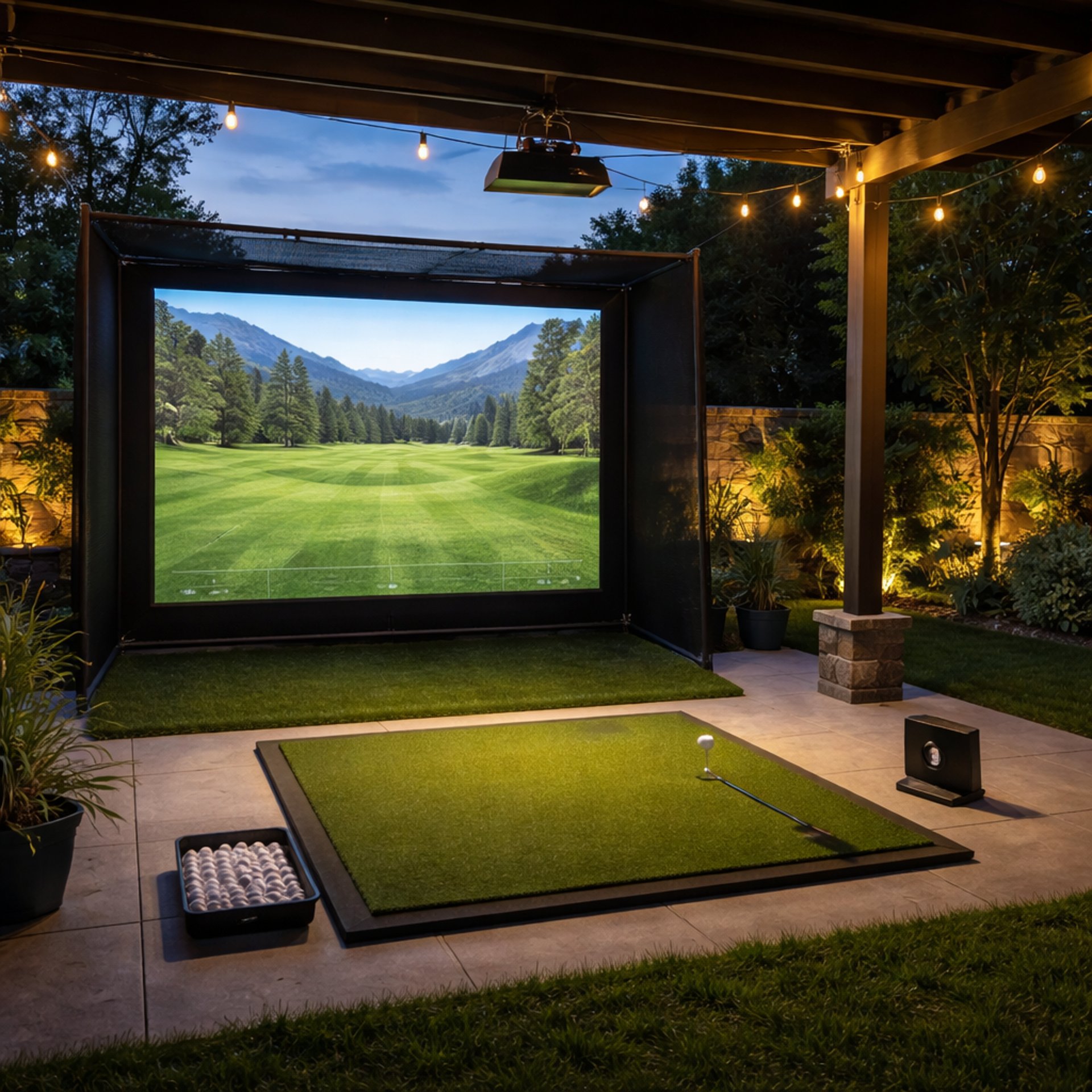
Golf Simulator Accessories Guide
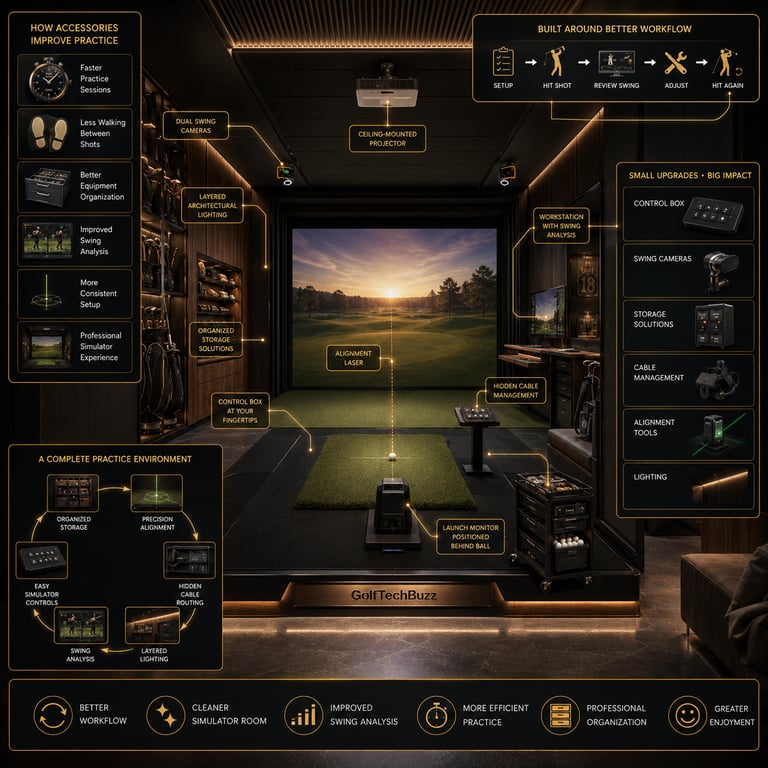
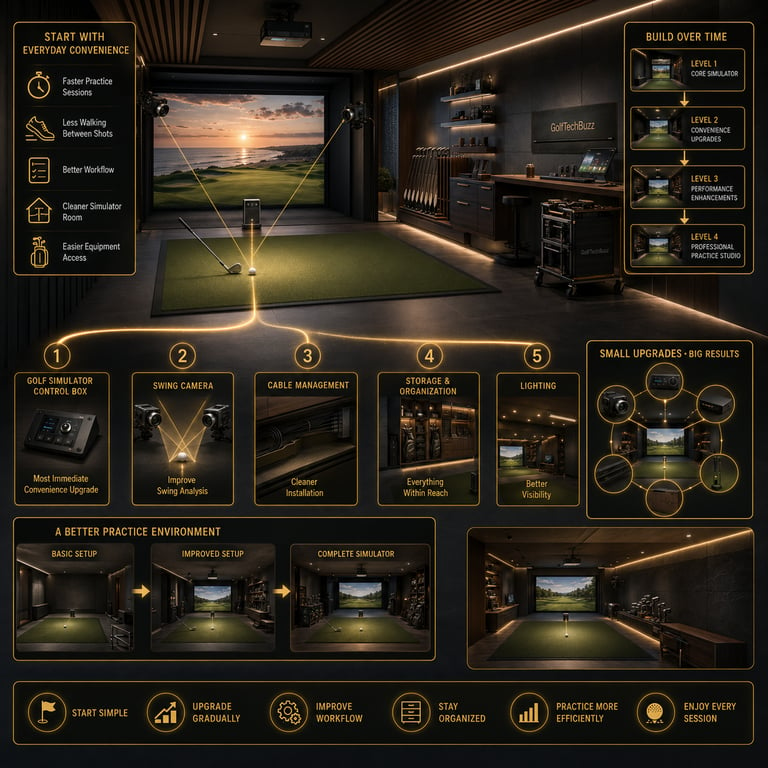
Building a golf simulator doesn't stop after choosing a launch monitor, impact screen, and projector. The right accessories can make every practice session more convenient, improve your swing analysis, keep your simulator organized, and create a more enjoyable overall experience.
Some accessories save time by reducing trips back to the computer, while others help improve video analysis, organize equipment, or create a cleaner simulator room. While none of these upgrades are required to play, many become everyday essentials once they're part of your setup.
This guide covers the most useful golf simulator accessories, explains which ones are worth buying, and helps you prioritize upgrades based on your simulator and budget. If you're still planning your build, start with our Golf Simulators guide to understand how all the major components fit together.
Why Golf Simulator Accessories Matter
The best golf simulator accessories don't necessarily improve your golf swing—they improve the experience of practicing. A well-organized simulator room allows you to stay focused on hitting golf shots instead of adjusting equipment, searching for accessories, or walking back and forth to your computer.
Small upgrades often make the biggest difference over hundreds of practice sessions.
Benefits of quality simulator accessories include:
Faster practice sessions
Improved simulator workflow
Better swing analysis
Cleaner, more organized golf rooms
Reduced equipment clutter
Greater overall convenience
As your simulator grows, these accessories help transform a basic setup into a polished practice environment.

Golf Simulator Control Boxes
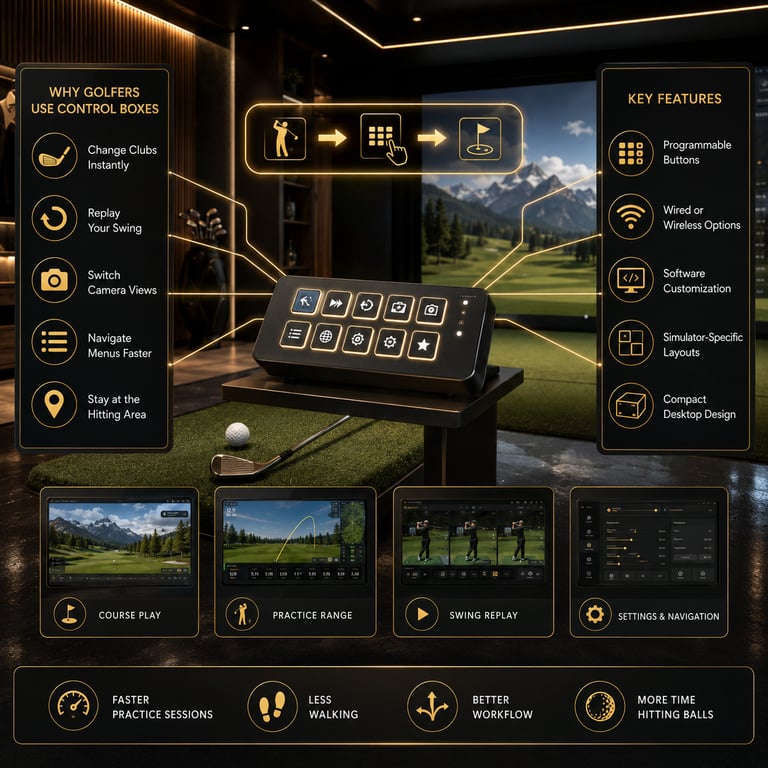
A golf simulator control box is designed to make every practice session faster and more enjoyable by placing your most-used simulator commands within easy reach of the hitting area. Instead of walking back to your computer after every shot to change clubs, replay a swing, switch camera angles, or navigate menus, you can perform these actions with dedicated buttons positioned right beside your mat.
Most control boxes function like programmable keyboards, sending common commands directly to your simulator software. Many are designed specifically for platforms like GSPro, SkyTrak, OptiShot, E6 Connect, and TGC, while others allow complete customization for different software. Some prioritize simplicity with just a handful of essential buttons, while premium models provide larger layouts that put nearly every command at your fingertips.
When shopping, consider whether you prefer a wired or wireless model, how many buttons you'll realistically use, and whether the controller is designed specifically for your simulator software. For golfers who spend several hours each week practicing indoors, a quality control box quickly becomes one of those upgrades you wonder how you ever lived without.
If you're ready to simplify your simulator setup, explore our Best Golf Simulator Control Boxes guide to compare the top options for every budget.

Golf Simulator Swing Cameras
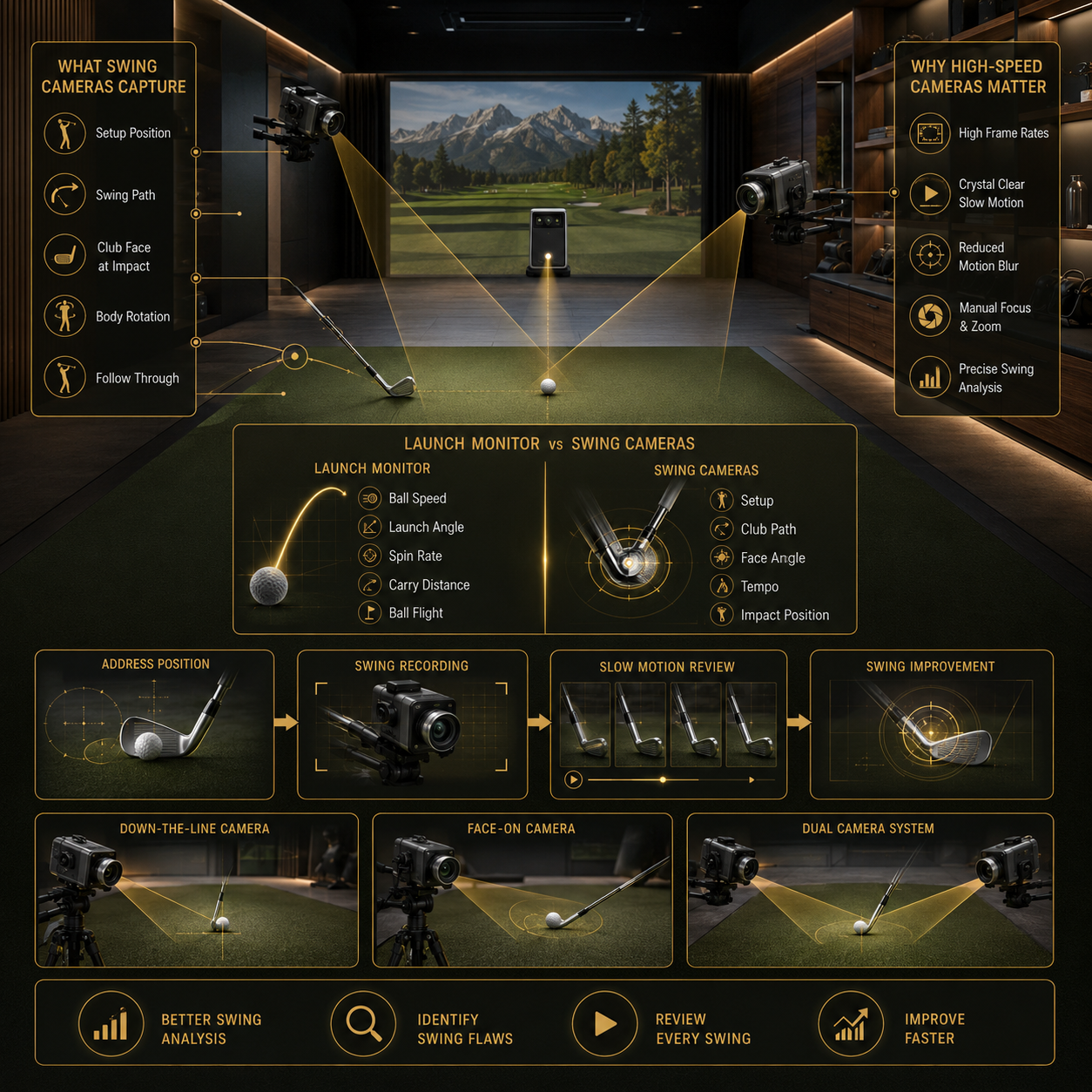
Launch monitors provide detailed information about ball flight, but they can't show what your body and golf club were doing during the swing. That's where swing cameras become one of the most valuable accessories you can add to a simulator. By recording your swing in slow motion, they help identify setup flaws, swing path issues, and impact positions that are impossible to see at full speed.
Dedicated golf swing cameras are built to capture fast movement with greater clarity than a standard webcam. Higher frame rates create smoother slow-motion playback, while features like manual zoom lenses and global shutter sensors reduce motion blur during the fastest parts of the swing. Many golfers use one camera from behind the target line and another facing the golfer to create a complete view of every swing.
When choosing a camera, focus on frame rate, image quality, mounting options, and compatibility with your preferred swing analysis software. The right camera can transform a simulator from simply measuring shots into a complete swing improvement system.
Learn more in our Best Golf Simulator Swing Cameras guide.

Cable Management
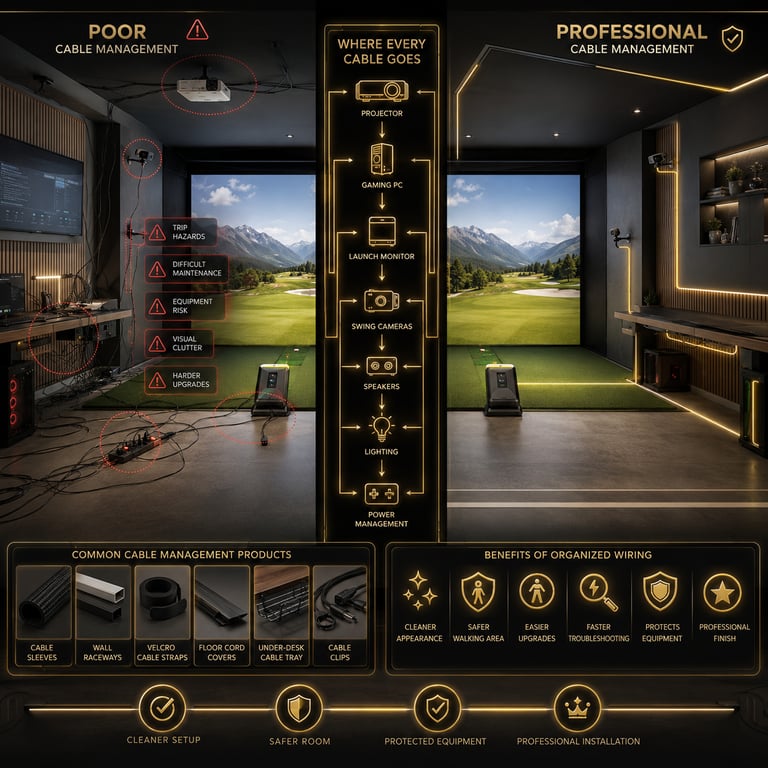
As golf simulators become more advanced, they also become more connected. Projectors, launch monitors, swing cameras, computers, speakers, and lighting systems all require power and data cables, which can quickly turn a clean simulator room into a tangled mess if left unmanaged.
Good cable management improves more than appearance. Properly routed cables reduce trip hazards, protect expensive equipment from accidental damage, simplify future upgrades, and make troubleshooting much easier if you ever add or replace components. Many golfers use cable sleeves, raceways, Velcro straps, under-desk trays, and floor cord covers to keep wiring organized while maintaining a clean, professional-looking simulator room.
Even a few inexpensive cable management products can dramatically improve the overall look and functionality of your simulator while making future maintenance much easier.

Simulator Storage & Organization
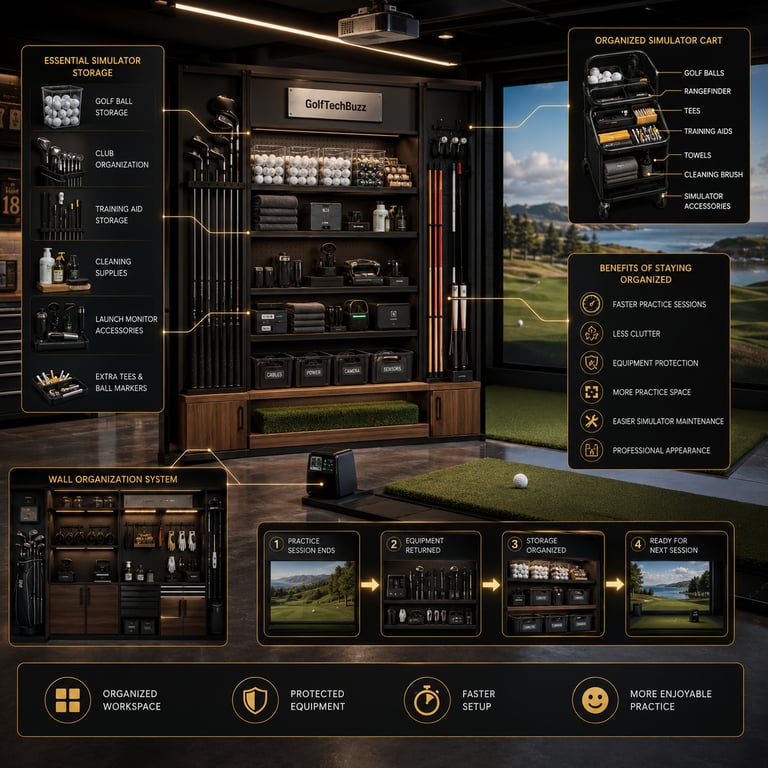
Every golf simulator collects accessories over time. Golf balls, tees, alignment sticks, cleaning supplies, extra clubs, towels, launch monitor accessories, and training aids all need a dedicated place to avoid cluttering the hitting area.
Storage solutions help organize your simulator while protecting your equipment from unnecessary wear. Wall-mounted racks, rolling storage carts, shelving units, club organizers, and ball containers keep frequently used items within easy reach without taking away valuable practice space. A well-organized simulator room also makes it easier to transition between practice sessions, simulator rounds, and everyday garage use.
Keeping your equipment organized not only creates a cleaner appearance but also helps ensure everything you need is ready whenever it's time to practice.

Golf Simulator Lighting
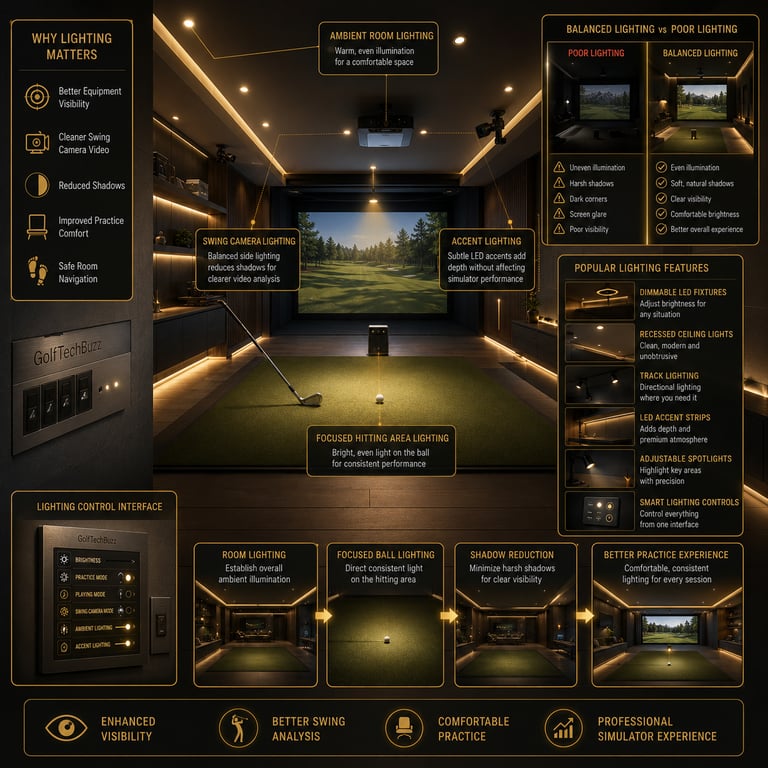
Lighting is one of the most overlooked parts of building a golf simulator, yet it affects nearly every aspect of the experience. Good lighting makes it easier to see your equipment, improves swing camera image quality, and creates a more comfortable environment without reducing projector performance.
Many simulator owners combine bright overhead lighting with focused LED fixtures positioned around the hitting area. This helps reduce shadows during swing analysis while keeping enough ambient light for safe movement around the room. Dimmable lighting is especially popular because it allows golfers to balance visibility with projector brightness depending on whether they're practicing or playing a simulated round.
The right lighting setup improves both the appearance and functionality of your simulator while making every practice session more enjoyable.

Alignment & Setup Tools
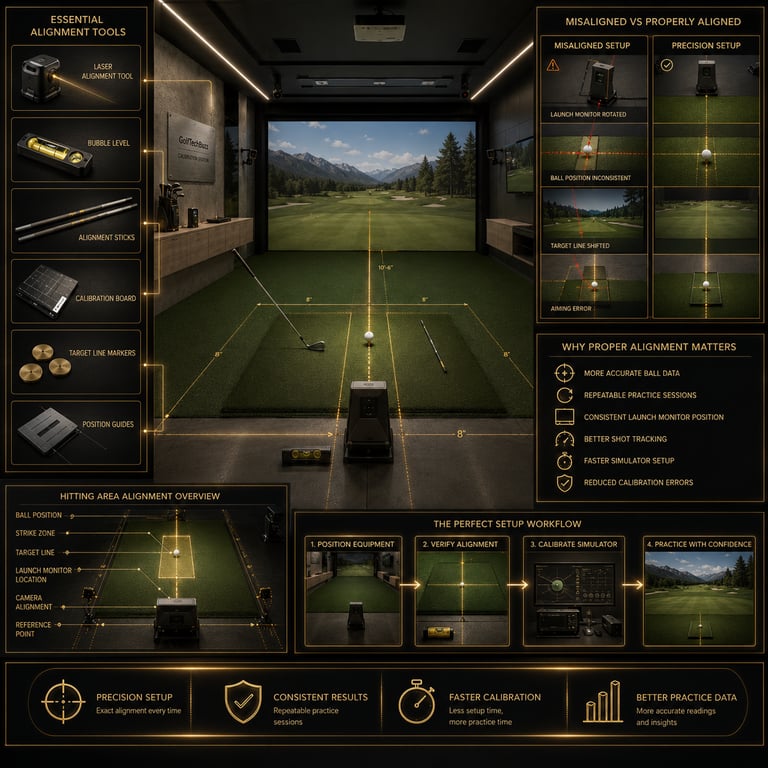
Consistent simulator performance begins with consistent setup. Even small changes in launch monitor position, hitting mat placement, or ball location can affect shot accuracy and create inconsistent results between practice sessions.
Alignment tools help golfers position equipment the same way every time they practice. Bubble levels, laser alignment devices, alignment sticks, and calibration tools simplify setup while ensuring launch monitors and hitting areas remain properly aligned with the target line. These inexpensive accessories are especially valuable for golfers who frequently move portable launch monitors or convert garages into multipurpose spaces.
Taking a few extra minutes to properly align your simulator can improve shot consistency, reduce setup frustration, and help ensure your practice data remains as accurate as possible every session.

Which Golf Simulator Accessories Should You Buy First?
If you're just starting your simulator journey, focus on accessories that provide the biggest improvements to convenience and everyday use.
A good order of priority is:
Golf Simulator Control Box
Golf Simulator Swing Camera
Cable Management
Storage & Organization
Lighting
Alignment Tools
Once your core simulator equipment is installed, these upgrades help create a cleaner, more efficient, and more enjoyable practice space without requiring major investments.
Your priorities may also depend on where your simulator is installed. A permanent dedicated simulator room often benefits from cable management and lighting upgrades early in the process, while portable garage simulators may benefit more from storage solutions and alignment tools that make setup and teardown faster. Think about the accessories you'll use every practice session before investing in items that simply add convenience.

Frequently asked questions
What accessories do you need for a golf simulator?
The essentials include your simulator itself, but many golfers also add control boxes, swing cameras, cable management products, storage solutions, lighting, and alignment tools to improve their overall experience.
Is a golf simulator control box worth it?
For golfers who practice regularly, a control box can significantly improve convenience by keeping common simulator controls within reach of the hitting area.
Do I need a swing camera?
A swing camera isn't required to enjoy a golf simulator, but it's one of the best upgrades for golfers who want detailed swing analysis and measurable improvement.
How do I organize golf simulator cables?
Cable raceways, sleeves, Velcro straps, and under-desk organizers are inexpensive ways to keep simulator wiring neat, protected, and out of the way.
Does lighting matter in a golf simulator?
Yes. Good lighting improves visibility, enhances swing camera performance, and helps create a more comfortable and professional-looking simulator room.
What accessories should I buy first?
Most golfers benefit most from starting with a control box and a swing camera, followed by cable management, storage, lighting, and alignment tools as their simulator setup evolves.
Final Thoughts
The best golf simulator accessories don't replace your core equipment—they make it easier and more enjoyable to use. Whether you're adding a dedicated control box, upgrading your swing analysis with a high-speed camera, or simply organizing cables and equipment, these accessories help create a simulator room that's built for long-term practice.
As your setup grows, investing in the right accessories can save time, reduce frustration, and make every practice session more productive. Start with the upgrades you'll use every day, then continue improving your simulator one accessory at a time.
© 2026 GolfTechBuzz. All rights reserved.
Golf Tech Buzz
Performance Through Data
Practical guides, real-world setups, and unbiased comparisons for golfers building smarter practice environments.
General Inquiries: