
Golf Impact Screens Guide
How to Choose the Right Screen for Your Simulator
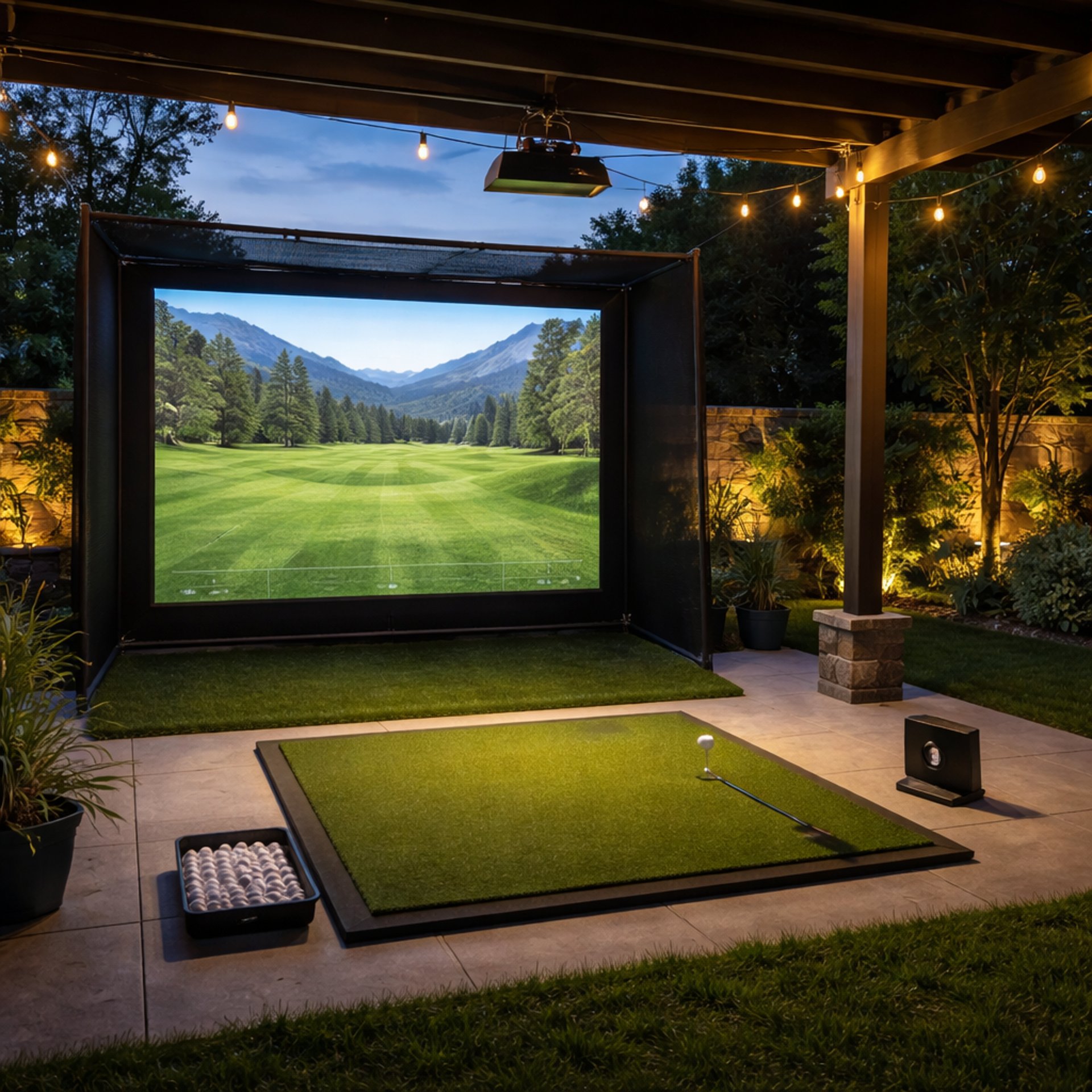
If you're building a golf simulator, the impact screen is one of the most important decisions you'll make, and understanding how it fits into the full system inside Golf Simulators is what separates a great setup from a frustrating one.
It’s not just something to hit into — it controls how your simulator looks, feels, and performs.
Most golfers get this wrong. They focus on launch monitors or software, then treat the screen like an afterthought.
The reality is simple:
A bad impact screen can ruin an otherwise great setup.
This guide breaks down everything you need to know so you can choose the right screen based on your space, budget, and goals.
What a Golf Impact Screen Actually Does
An impact screen has three jobs:
Stops the ball safely
Displays your simulator image
Controls rebound and noise
If it fails at any one of these, your setup suffers.
Cheap screens might stop the ball — but they bounce it back too hard.
Others might look good — but wear out quickly.
The best screens balance all three.
If you’re deciding where to prioritize performance, comparing setups like Impact Screens vs Impact Screens With Enclosure helps clarify how structure affects durability and rebound.
Types of Golf Impact Screens
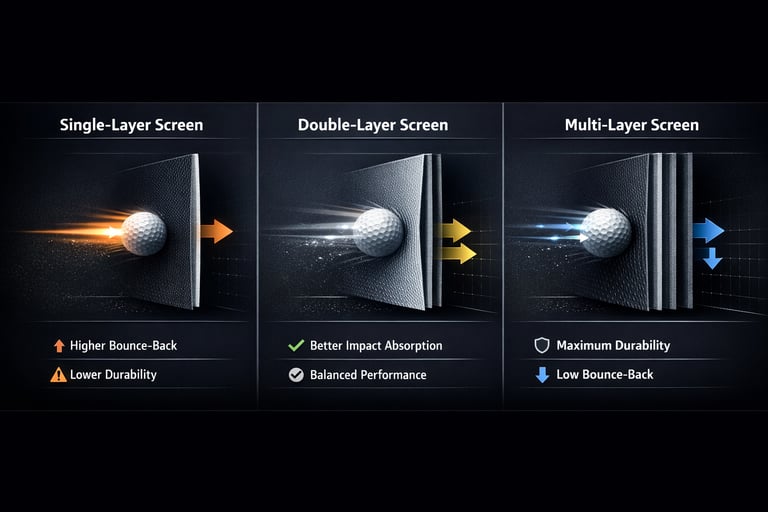
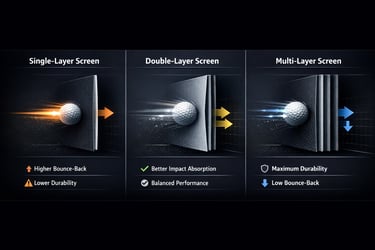
Single-Layer Screens
These are the most common budget option.
They’re:
Lightweight
Affordable
Easy to install
But they also:
Wear out faster
Have more bounce-back
Offer lower image quality
👉 Best for light use or budget setups.
Double-Layer Screens
These add an extra layer for durability and better performance.
They:
Absorb impact better
Reduce bounce-back
Improve projection quality
👉 Best for most home simulator setups.
For most home setups, this is the sweet spot, especially when you understand long-term performance factors covered in Impact Screen Durability Explained.
Premium Multi-Layer Screens
These are built for high-end setups.
They:
Offer the best image clarity
Handle high ball speeds
Last significantly longer
👉 Best for dedicated simulator rooms.
Screen Material Matters More Than You Think
Not all screens are built the same.
Higher-quality materials:
Absorb energy better
Reduce noise
Improve image sharpness
Lower-quality materials:
Stretch over time
Wear out quickly
Produce dull or blurry projections
This is one of the biggest differences between budget and premium setups, and understanding What Material Is Best for Impact Screens is key to making the right call for your environment.
Understanding Bounce-Back (This Is Critical)
Bounce-back is one of the most overlooked issues in simulator setups.
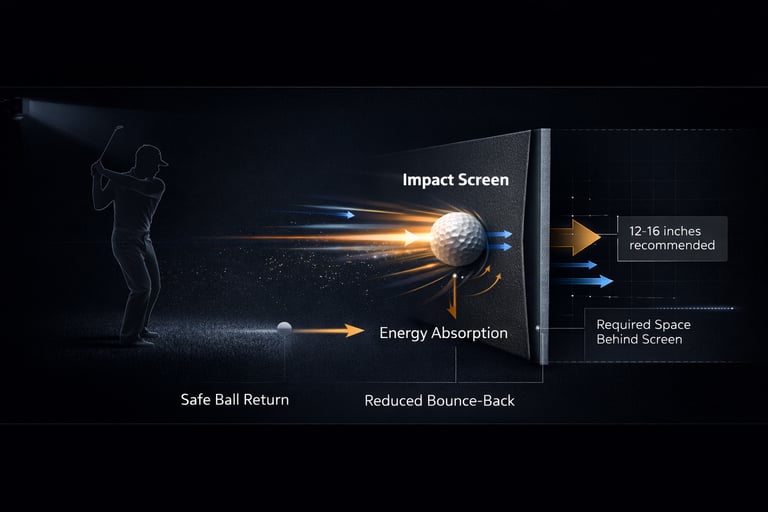
It happens when the screen can’t absorb enough energy from the golf ball.
This leads to:
Balls coming back toward you
Less realistic impact feel
Potential safety concerns
In tighter setups, applying strategies from Do You Need a Backing Net for Impact Screens can significantly reduce rebound and improve safety.
How to Reduce Bounce-Back:
Use thicker or multi-layer screens
Leave space behind the screen
Avoid over-tightening
👉 A properly set up screen should absorb impact — not reflect it.
How Much Space Do You Really Need?
Space is one of the biggest limiting factors.
Recommended Minimums:
Width: 10–12 feet
Height: 8–9 feet
Depth behind screen: 12–16 inches
If you don’t leave space behind the screen, even a good screen will perform poorly.
If you're working with limited depth, combining proper spacing with guidance from Do You Need a Backing Net for Impact Screens can help protect your setup without sacrificing performance.
Projector Compatibility (Don’t Overlook This)
If you’re using a simulator, your screen is also your display surface.
Better screens:
Produce sharper images
Reduce light bleed
Improve contrast
Lower-end screens:
Look washed out
Lose detail
Reduce immersion
👉 If visuals matter to you, don’t cheap out here.
For full system builds, pairing your screen choice with setups like Best Golf Enclosure with Impact Screens ensures better alignment between projection, space, and performance.
Noise Levels
(What Most People Don’t Expect)
Impact screens can be loud — especially in enclosed spaces.
Thicker, higher-quality screens:
Absorb sound better
Produce a deeper, quieter impact
Thin screens:
Create a sharper, louder noise
This matters more if you’re:
In a garage
Near living spaces
Practicing frequently
Common Mistakes to Avoid
Buying the cheapest screen available
Ignoring bounce-back and safety, especially without understanding solutions like Do You Need a Backing Net for Impact Screens
Not leaving space behind the screen
Over-tightening the screen
Expecting a net to perform like a screen
How to Choose the Right Screen for Your Setup
Budget Setup
Go with a reinforced single or double-layer screen.
Focus on safety and basic performance.
Mid-Range Setup
Choose a double-layer screen with good durability and projection quality.
This is the sweet spot for most golfers.
High-End Setup
Invest in a premium multi-layer screen.
This is where performance, durability, and visuals all come together.
Frequently asked questions
What is the best material for a golf impact screen?
Multi-layer polyester blends are the most common for performance screens. They balance durability, image clarity, and impact absorption better than thinner materials.
For a deeper breakdown, What Material Is Best for Impact Screens covers how different materials perform in real setups.
Can you use a regular projector screen for golf?
No. Standard projector screens are not designed for impact and will tear quickly. You need a screen specifically built to handle golf balls.
How long does an impact screen last?
It depends on usage and material. Budget screens may last months under heavy use, while premium screens can last years with proper setup.
Lifespan varies heavily by usage, and Impact Screen Durability Explained breaks down what to expect over time.
Do impact screens stretch over time?
Yes, especially lower-quality ones. Proper tensioning and spacing can help reduce stretching and extend lifespan.
Can you use foam balls with an impact screen?
Yes, but it’s not necessary. Impact screens are designed for real golf balls, though foam balls are useful for ultra-budget or low-space setups.
What causes wrinkles in an impact screen?
Wrinkles usually come from improper tensioning or mounting. Adjusting tension and ensuring even installation typically resolves this.
Is a thicker impact screen always better?
Not always. While thicker screens reduce bounce-back, they can also reduce image clarity if the material isn’t high quality.
Do you need a backing behind an impact screen?
Not always, but in tighter spaces or higher-speed setups, adding one makes a big difference. Do You Need a Backing Net for Impact Screens explains when it’s worth it and how it protects your setup.
Final Thoughts
Your impact screen isn’t just another part of your simulator — it’s the centerpiece.
Get this right, and everything else works better.
Get it wrong, and you’ll feel it every time you hit a ball.
Take the time to match your screen to your setup, and you’ll build something that actually feels like a real simulator.
© 2026 GolfTechBuzz. All rights reserved.
Golf Tech Buzz
Performance Through Data
Practical guides, real-world setups, and unbiased comparisons for golfers building smarter practice environments.
General Inquiries: