

What is a Backing Net and How Does It Work?
Discover why a backing net is crucial for your golf simulator setup to enhance impact screen durability and protect your space from stray shots.
SIMULATORS
Golf Tech Buzz Editorial Team - Led by AJ “Buzz” Eichman
4/15/20267 min read
If you’re serious about your golf simulator setup, here’s the real talk: a backing net behind your impact screen is often the unsung hero that keeps things running smooth and safe. If you’re still building things out, understanding how all components work together inside Golf Simulators makes a big difference for long-term performance. I’ve seen guys try to skip it, thinking their impact screen alone can handle the pounding of high-speed shots—and more often than not, they end up with holes, flapping fabric, or worse, dents in their walls. So, what’s the deal with backing nets? Are they a must-have or just extra fluff?
Let’s unpack it, no BS.
Quick Verdict
A backing net reduces wear and tear on your impact screen by absorbing some of the ball’s force.
Backing nets add a crucial safety layer, catching stray or missed balls before they wreck your walls or gear.
Not every golf simulator setup needs a backing net—smaller or lower power setups might manage fine without one.
Choosing and installing the right backing net means considering space, hardware compatibility, and net material quality.
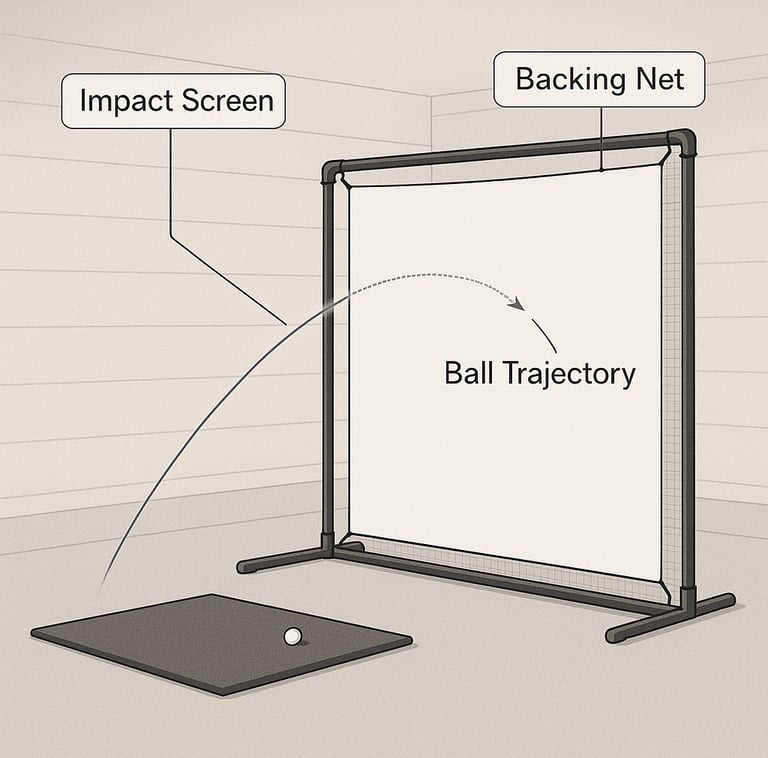
What is a Backing Net and How Does It Work?
Picture this: you’ve got a sweet impact screen set up in your garage or basement. When you swing, that ball comes off the club with some serious speed, slamming the screen to simulate your shot’s flight. If you’re still dialing in your setup, the Golf Impact Screens Guide helps break down how everything works together from materials to layout. These screens are made of a tightly woven fabric designed to absorb and display ball flight data, but they’re not invincible.
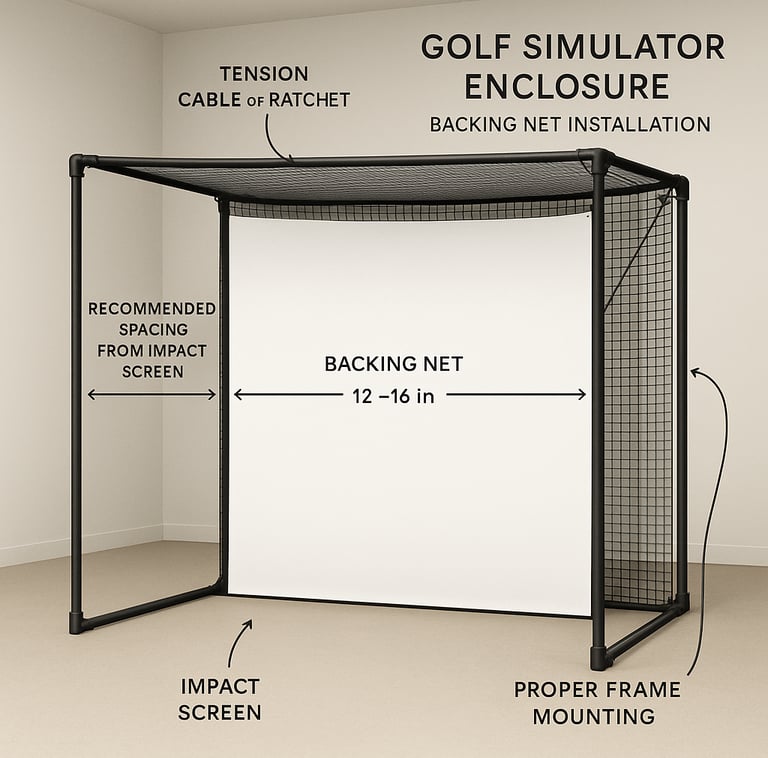
A backing net is a highly durable nylon or polyethylene mesh positioned a few inches behind the impact screen, mounted on its own frame. Its job? To catch balls that either slice through or just miss the screen and prevent damage beyond it. This net soaks up part of the impact energy, helping keep that precious screen from wearing out prematurely.
Think of it as a safety net for your simulator home run—because nobody wants a stray ball smashing the wall, breaking a sensor, or worse, hitting a bystander.
Benefits of Using a Backing Net with Impact Screens
Here’s where it gets interesting. Backing nets don’t just protect your walls; they’re a game changer for your gear’s lifespan and overall safety.
Extends Impact Screen Durability
Impact screens aren’t cheap. They’re designed to take the hit, but over time those repeated blows break down the fibers. A backing net absorbs some of that force, sharing the load so your screen doesn’t take the full brunt each time you sock a drive. If you want to understand exactly how wear builds over time, Impact Screen Durability Explained goes deeper into what actually causes screens to fail.
Increased Safety
Beyond the screen, your garage or indoor space might have walls, windows, or equipment that aren’t built for golf ball abuse. Even a well-aimed swing occasionally goes sideways. The net catches those stray shots, preventing damage or accidents. For families or busy commercial sims, this safety net is a no-brainer.
Minimal Impact on Sensor Accuracy
If installed properly, backing nets don’t mess with your simulator’s data tracking. It’s a common fear, but with the right spacing and tension, your sensors read the ball flight just as accurately as if there was no net.
Better Peace of Mind
Knowing you’re protected lets you swing freely. No one’s idea of fun is babysitting every shot to avoid breaking stuff.
When is a Backing Net Necessary?
So, when’s the right time to pull the trigger on a backing net?
High-Speed Simulators and Powerful Shots
If you’re running a high-performance setup that sends balls flying at 150+ mph, the extra support is critical. Without a net, the impact screen wears out faster, and the risk of damage behind goes up. Comparing setups like Impact Screens vs Impact Screens With Enclosure can also help you decide how much built-in protection you actually need.
Tight Spaces and Wall Protection
In garages, basements, or commercial spaces where damage could be costly, a backing net guards your surroundings. If you’re hitting near drywall, expensive windows, or fragile equipment, it’s cheap insurance.
Frequent Use Environments
If you’re running winter leagues, clinics, or commercial simulator lounges battering balls all day, a net helps your setup stay ready and reduces downtime for screen replacement.
When You’re on a Budget or Tight Space: Possible to Skip
If you’ve got a small setup, moderate swing speeds, and plenty of room, you might get away without it. Some folks use reinforced, high-tensile impact screens that can take more hits solo. If you’re comparing options, the Best Golf Impact Screens can help you find models that handle heavier use without extra layers. But heads up: that’s not bulletproof and potentially more costly long-term.
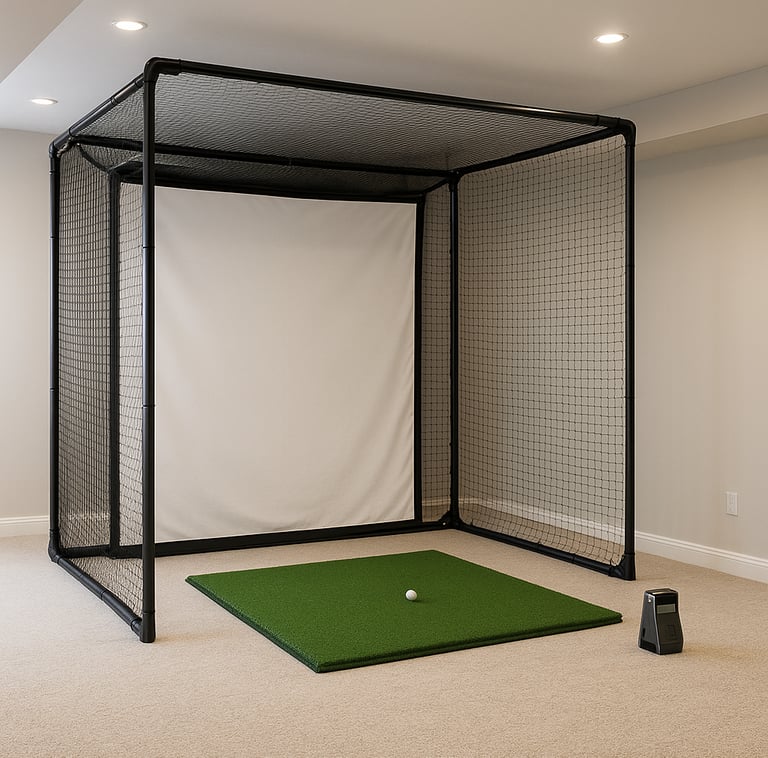
How to Choose and Install a Backing Net
Here’s what I’ve learned from building and fixing countless simulators: picking the right net and installing it properly is the difference between “works great” and “what a pain.”
Net Material Matters
Go for high-strength nylon or polyethylene mesh. Cheap nets may degrade quickly or not absorb impact well, causing sag and reduced protection.
Frame and Mounting
Backing nets need their own sturdy frame with proper tension. It’s common to mount them a foot or two behind the impact screen. This distance must be enough to cushion the impact without disrupting ball flight. If you’re unsure how to set spacing correctly, following a How to Install a Golf Impact Screen setup gives you a solid baseline.
Measure Twice, Install Once
Measure the width and height to cover the entire screen area plus spillover. Overlooking this is the fastest way to end up with balls sneaking around your setup.
Hardware Compatibility
Some simulators have mounting rails or hardware that can complicate adding a backing net. Make sure your frame and net system can integrate without interfering with sensors or screens.
Keep It Taut
A sagging backing net defeats the purpose. Use tensioning cables or ratchets to keep it tight.
Common Setup Mistakes to Avoid
Misjudging the Power of Your Simulator
I’ve seen guys think their fiberglass impact screen will handle every shot—until that nice high-speed drive punches a hole. Never underestimate the force; check your ball speeds.
Incorrect Sizing or Placement
A net that’s too small or positioned too close or far back leads to gaps or ineffective impact absorption.
Cheap Nets That Fail Fast
Save a few bucks here and pay double later. A quality net keeps its shape and strength year-round.
Ignoring Mounting Hardware Needs
Using makeshift or incompatible mounts leads to safety hazards and frustrated swings.
Overcrowding the Space
If adding a backing net squeezes your play area, you might be trading protection for comfort. Plan space carefully.
Neglecting to Test Sensor Calibration
After installation, make sure your simulator tracks ball data correctly. Backing nets typically don’t cause issues, but you want to be sure.
Backing Nets vs. Reinforced Impact Screens
Here’s the classic debate: should you beef up your impact screen instead of adding a backing net?
Reinforced screens are thicker, tougher, and designed for heavy hitters. They’re definitely less “flappy” and handle more wear, but they come with some caveats:
Cost
High-end screens can run hefty, sometimes more than a basic screen plus a backing net combined.
Weight & Installation Complexity
Thicker screens can be heavier and harder to mount tautly without sag.
Damage Risk
They still take the full hit—no net to absorb shock. That means your screen wears out sooner and any missed shots still risk your walls.
In practice, many setups do best with the combo: a decent impact screen paired with a backing net. It balances protection, durability, and cost. If you're comparing full builds, the Best Golf Enclosure with Impact Screens often include integrated protection systems that reduce the need for separate nets.
Real-World Setup Examples and Use Cases
Home Setups in Garages
Space is usually tight, so backing nets protect drywall and stored gear. Warm-up drills and daily practice mean a net pays off quickly.
Pro Training Facilities
High usage and high ball speeds mean these places rely on heavy-duty backing nets and reinforced screens for maximum lifespan.
Commercial Simulator Lounges
With dozens of players swinging daily, backing nets prevent costly repairs and downtime.
Budget and Compact Sims
Some budget setups ditch backing nets, instead opting for careful shot placement and reinforced screens—but risk and replacement costs are higher.
FAQs About Backing Nets for Golf Simulators
Do I really need a backing net for my golf simulator impact screen?
If you’re hitting moderate to high ball speeds or have limited space around your setup, yes. It’s a smart investment for protection and durability. For casual setups with power below 120 mph and plenty of room, you might get by without one.
Can a backing net prevent all damage to my walls or setup?
No safety system is foolproof, but a properly installed backing net significantly reduces the risk of damage from stray shots and passes-through.
How do I install a backing net properly behind an impact screen?
Build or buy a sturdy frame to position the net at least 1-2 feet behind the impact screen, keep it taut using tension cables, and cover the entire screen area. Make sure mounting hardware doesn’t interfere with sensors.
Are backing nets compatible with all golf simulator brands and models?
Most nets are universal, but double-check your simulator’s mounting system and space constraints before buying.
What materials are best for backing nets to ensure durability?
High-strength nylon or polyethylene mesh are tops. Avoid cheap polyester or non-durable fabrics.
Will a backing net affect gameplay or simulator sensor performance?
If installed with proper spacing and tension, no. Incorrect setup might cause sensor glitches.
Can I retrofit a backing net to an existing simulator setup?
Usually, yes. You may need to add a separate frame and ensure you have enough room behind your screen.
What is the difference between a backing net and a reinforced impact screen?
Reinforced impact screens are thicker and more durable but don’t provide extra safety beyond the screen itself. Backing nets act as a second layer catching missed shots, reducing impact wear and adding protection.
Conclusion
Here’s the bottom line, buddy: if you want your golf simulator to last and run safely—especially if you’re swinging for serious distance—a backing net isn’t just a nice accessory; it’s a smart necessity. It takes the edge off the impact, protects your gear, and keeps your setup ready for that next winter league or weekend grind without costly repairs or headaches.
Sure, it adds a bit more complexity and requires some space and hardware considerations, but the payoff is peace of mind and longer-lasting equipment. On the flip side, if you’re a casual player in a big open room with modest swing speeds, you might pass on it. Just don’t come crying when the screen wears out prematurely or a ball punches a hole in your drywall—that’s on you.
Swing smart, protect well, and keep those drives flying long and true. Your setup—and wallet—will thank you.
© 2026 GolfTechBuzz. All rights reserved.
Golf Tech Buzz
Performance Through Data
Practical guides, real-world setups, and unbiased comparisons for golfers building smarter practice environments.
General Inquiries: