

How Much Does a Golf Simulator PC Cost?
Discover the true golf simulator PC cost, from budget to high-end, and learn what hardware and specs deliver the best simulation performance.
COMPUTERS
Golf Tech Buzz Editorial Team - Led by AJ “Buzz” Eichman
5/5/20267 min read
Alright, so you’re gearing up to build or upgrade your golf simulator. You’ve got your projector, hitting mat, maybe even a launch monitor or two—but wait, what about the PC running the whole show? If you’re building this out properly, everything starts with the Golf Sim Computers hub so you understand how all the pieces connect.
Here’s the deal: not every computer is cut out for the job, and the price tags can vary wildly depending on what you really need to get that virtual golf experience feeling smooth and realistic.
I’ve been around enough golf sims to know that picking the wrong PC can mean lag, jittery graphics, or worse—a setup that just tanks your flow. So let me break down not just how much a golf simulator PC costs, but what’s worth spending on, what’s overkill, and where you can save some green without losing green on the screen.
Quick Verdict
Expect to spend anywhere from $800 up to $2,500+ depending on performance needs.
Gaming-grade PCs with solid CPUs (think Intel i5/i7 or Ryzen 5/7) and dedicated GPUs (NVIDIA RTX or AMD RX series) deliver the smoothest experience.
At minimum, 16GB RAM and an SSD are must-haves for load times and performance.
Watch out for compatibility—your PC needs the right ports and drivers to talk to sensors and software.
What Is a Golf Simulator PC and How Does It Work?
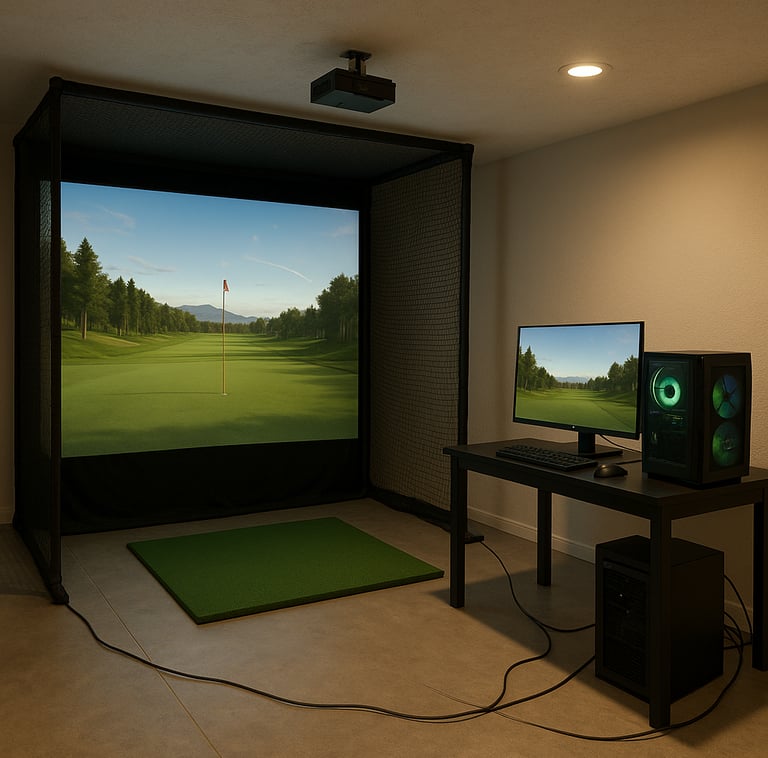
Think of your golf simulator PC as the brain behind the whole operation. It’s not just running some basic software; it’s crunching sensor data from your launch monitors, rendering realistic graphics of fairways and greens, and processing physics to make sure every shot feels legit. This means it has to be powerful enough to juggle multiple processes at once without getting bogged down.
If you’re using popular simulator software like TrackMan, Foresight Sports’ FSX, or The Golf Club, your PC needs to handle specific requirements. It’s usually a Windows-based machine with decent multi-core processors, a dedicated graphics card to handle the visuals, and enough RAM to keep everything nimble. If you want a deeper breakdown of how software impacts your build, see Golf Simulator PC Requirements by Software or the full Complete Golf Simulator Computer Guide.
Typical Cost Ranges for Golf Simulator PCs
Now, let’s talk numbers. I’ve seen guys set up rigs for under a grand, and I’ve seen others drop three grand or more chasing that butter-smooth 4K experience on a massive screen. Here’s the lowdown:
Budget Builds ($800 – $1,200): These are usually stripped down gaming PCs with Intel i5 or Ryzen 5 CPUs, 16GB RAM, SSD, and entry-level dedicated GPUs like an NVIDIA GTX 1650 or AMD RX 5500. They’re fine for casual use and less demanding software but might struggle with ultra-detailed graphics or multi-sensor setups. If you're staying in this range, start with Best Golf Sim Computers Under $1000.
Mid-Range ($1,200 – $2,000): This is where you get sweet spots. Intel i7 or Ryzen 7 processors, 16GB–32GB RAM, SSD storage, and mid-tier GPUs like NVIDIA RTX 2060/3060 or AMD RX 5600 XT. Great for smooth gameplay, solid sensor processing, and compatibility across a wide range of software. This is where most people land using Best Computers for Golf Simulators.
High-End ($2,000+): These setups might include Ryzen 9 or Intel i9 CPUs, 32GB+ RAM, premium SSD NVMe drives, and high-end GPUs such as NVIDIA RTX 3080/4080 or AMD RX 6800 XT. For simulators pushing 4K or multi-screen setups, or trainers needing ultra-precise analytics, this is where it pays off. If you want top-tier performance, look at Best Computers for Golf Simulators.
Key Hardware Components Affecting Price and Performance
Let me cut to the chase: not all PC components impact your simulator experience evenly. Here’s what to focus on—and what you can skimp on, if you have to.
CPU – The workhorse of your PC. Golf simulation needs a multi-core processor that can handle both physics calculations and sensor data. Intel i5/i7 or Ryzen 5/7 processors do the job well. The difference between generations matters, too; newer chips bring better performance per watt and improved multi-threading for smoother operations. If you’re unsure how much CPU matters, see Does CPU Matter for Golf Simulators?.
GPU – Your golf simulator’s graphic card isn’t about gaming frags, it’s about rendering smooth, realistic course visuals. Dedicated GPUs like NVIDIA’s GTX or RTX series or AMD’s RX line greatly improve in-game realism and sensor data processing speed. Don’t expect onboard graphics to cut it here—this is one area you don’t want to cheap out on. If you're deciding, check What GPU Do You Need for a Golf Simulator?.
RAM – At least 16GB of RAM is the sweet spot for most simulators. It prevents lag when loading courses, data from launch monitors, and running background processes. Some high-end users might push to 32GB for ultra-intensive setups. If you're planning upgrades, read How Much RAM Do You Need for a Golf Simulator?.
Storage – A solid-state drive (SSD) is an absolute must. It loads simulation software, maps, and assets fast, cutting down wait times between rounds. A minimum 512GB SSD is recommended.
Connectivity – Sensors and launch monitors require USB 3.0 or better ports. You don’t want to be scrambling for adapters or losing data mid-swing because of poor connections. Some sims use wired or wireless options, but wired is generally more reliable.
Display Compatibility – If you’re running multi-screen or high-res projectors, double-check your PC’s GPU and output ports. HDMI 2.0, DisplayPort 1.4, or better will serve you well.
Minimum and Recommended PC Requirements for Popular Golf Simulator Software
Different software demands slightly different specs, but here’s a general idea based on TrackMan, Foresight, and other popular sim platforms. If you want a full breakdown of how these compare, see Minimum vs Recommended Golf Simulator PC Specs.
Minimum specs:
CPU: Intel Core i5 or AMD Ryzen 5 (6th gen or newer)
GPU: NVIDIA GTX 1650 or AMD RX 560
RAM: 16GB
Storage: 512GB SSD
OS: Windows 10 64-bit
Ports: USB 3.0 for sensors
Recommended specs:
CPU: Intel Core i7 or AMD Ryzen 7 (10th gen or newer)
GPU: NVIDIA RTX 2060/3060 or AMD RX 5600 XT/6600 XT
RAM: 16GB–32GB
Storage: 1TB SSD NVMe
OS: Windows 10/11 64-bit
Ports: Multiple USB 3.1/USB-C for simultaneous sensors
Affordable vs. High-End Golf Simulator PC Options
Here’s where many get tripped up. I’ve seen guys buy ultra-high-end gaming PCs because they think max specs equals max golf sim glory. Truth is, a well-tuned mid-range PC often outperforms overpriced “gaming” rigs with the wrong balance of components.
Affordable PCs offer solid performance without breaking the bank but might limit you in future-proofing or running ultra-high-res graphics. High-end rigs shine with next-gen graphics and multi-sensor setups but come with steep price tags.
Common Mistakes Buyers Make When Choosing a Golf Simulator PC
Buying without checking software minimum specs. Some guys grab a gaming PC, only to find their launch monitors won’t connect smoothly.
Skimping on the GPU. I’ve seen setups freeze up because the integrated graphics couldn’t handle the course renderings.
Ignoring connectivity. Not enough USB ports or the wrong types can kill your sensor setups.
Overpaying for ultra-high specs that don’t actually improve the simulator experience.
Forgetting about future upgrades. Pick a PC you can easily upgrade GPU or RAM on without swapping the whole system.
If you’re stuck choosing between form factors, see Gaming PC vs Laptop for Golf Simulators.
Tips for Upgrading Your Golf Simulator PC
One of the perks of most PCs today is upgradability. If you buy a mid-tier PC now, you can usually slide in a better graphics card or add more RAM a year or two down the line to squeeze out more power.
Keep these in mind when investing:
Make sure your motherboard and power supply can handle GPU upgrades.
If you have limited ports, consider adding USB hubs or expansion cards.
Swap out HDDs for SSDs if you started on a budget.
Regularly update drivers and software to keep the system humming.
If you're building instead of upgrading, start with Best PC Parts for a Golf Simulator Build.
Frequently Asked Questions About Golf Simulator PCs and Costs
How much does a basic golf simulator PC cost?
You can put together a basic setup for about $800 to $1,200 that meets minimum specs for most casual simulators.
What are the minimum PC requirements for popular golf simulator software?
At minimum, Intel i5 or Ryzen 5 CPUs, 16GB RAM, and a dedicated GPU like NVIDIA GTX 1650 are recommended. SSD storage and Windows 10 OS are essential.
Can I use my existing gaming PC for a golf simulator?
If it meets or exceeds the minimum specs (multi-core CPU, dedicated GPU, enough RAM), it can likely handle most golf simulator software just fine.
Which components should I prioritize when buying a golf simulator PC?
Focus on a balanced CPU and GPU combo, enough RAM (16GB+), SSD storage, and the right ports for your hardware.
Are pre-built PCs for golf simulators worth the extra cost?
Sometimes yes—pre-built systems tailored for golf sims guarantee compatibility but often come at a premium. You can save money building or customizing your rig.
How easy is it to upgrade a golf simulator PC?
Generally, quite easy if you buy a standard tower PC with upgrade-friendly components. Laptops or all-in-ones can be trickier or impossible.
Does the PC need special ports or connectivity for golf simulator hardware?
Yes, USB 3.0 or newer ports are standard, sometimes multiple. Check your sensor and launch monitor’s requirements before buying.
What software is most compatible with standard PC builds?
TrackMan, Foresight Sports, The Golf Club, and E6 Connect usually work well on standard Windows-based gaming PCs that meet minimum specs.
Conclusion
If you’re serious about your golf simulator, the PC you pick shouldn’t be an afterthought. It’s the engine that keeps everything running smooth, accurate, and fun. While prices range widely, most of us will find a sweet spot somewhere between $1,000 and $2,000 for a PC that handles the job—more if you want to push ultra-realistic visuals or multi-monitor setups.
Don’t skimp on CPU power, dedicated graphics, or SSD storage, but don’t blow your budget chasing specs that you won’t use in your actual sim software. Keep an eye on connectivity and expandability so your setup can grow with you.
At the end of the day, the right golf simulator PC will make those virtual drives feel like the real deal—no lag, no choppiness, just pure, smooth golf right in your own basement or garage. Now, grab some cigars, set up your rig, and let’s hit the digital links the right way.
© 2026 GolfTechBuzz. All rights reserved.
Golf Tech Buzz
Performance Through Data
Practical guides, real-world setups, and unbiased comparisons for golfers building smarter practice environments.
General Inquiries: