

What GPU Do You Need for a Golf Simulator?
Discover the ideal GPU for golf simulator setups to achieve smooth, realistic gameplay and future-proof your golfing experience.
COMPUTERS
Golf Tech Buzz Editorial Team - Led by AJ “Buzz” Eichman
5/5/20266 min read
If you’re serious about building a golf simulator that doesn’t feel like a glorified video game, then the GPU—the graphics processing unit—is where the magic starts. Think of it as the engine that drives your simulated golfing experience, handling everything from crisp, sun-soaked fairways to those nerve-jangling bunker shots. Without the right GPU powering your setup, expect lag, choppy frame rates, and a simulation that’s about as immersive as a flip phone screen.
Before locking in your build, it’s worth reviewing What PC Specs Do You Need for a Golf Simulator? and comparing setups in Golf Simulator PC Requirements by Software.
Here’s the deal: the right GPU doesn’t just make your simulator look good—it makes it feel real. It pushes those detailed 3D environments smoothly while keeping latency low and responsiveness sharp, so your swing feels natural, not like you’re fishing for input from a lagging console. Whether you’re just dabbling in home practice or running a winter league setup, choosing the right graphics card sets the foundation for serious fun and improvement.
Quick Verdict
A mid-range gaming GPU like the NVIDIA GeForce RTX 3060 or AMD Radeon RX 6600 XT works great for most golf simulators at 1080p to 1440p resolutions.
Avoid integrated or low-end GPUs unless you're okay with lag and poor graphics quality.
Make sure your GPU pairs well with your CPU and has sufficient VRAM (4GB minimum recommended).
Future-proof by aiming slightly higher than your current needs; golf sim software can get more demanding as it evolves.
Why a GPU Matters in Golf Simulators
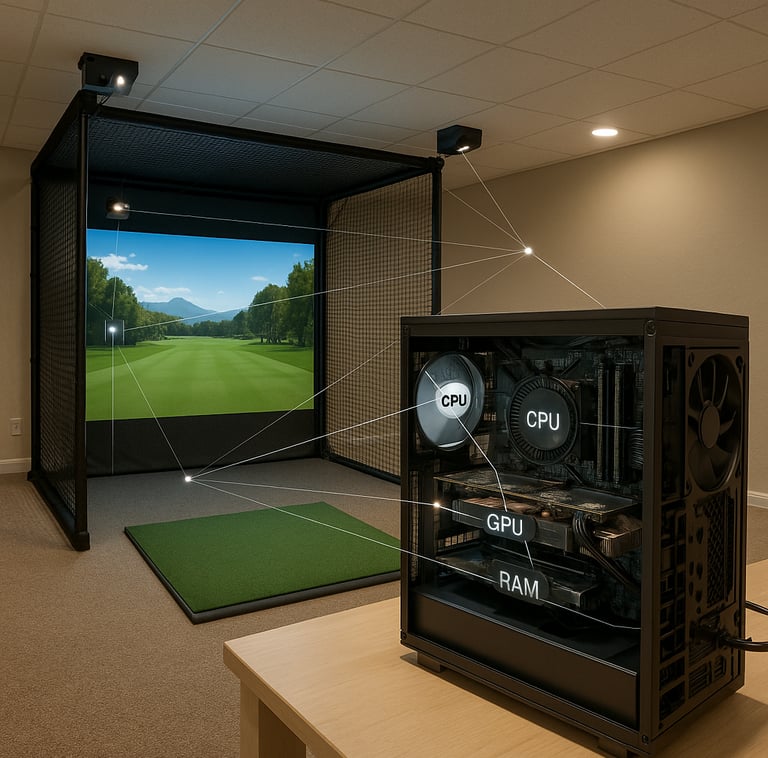
You might be wondering why a GPU even matters for a golf simulator. After all, golf is about precision swings and putting, not frantic explosions or fast-paced action, right? True, the gameplay isn’t a twitch shooter. But the visuals in a golf simulator—think authentic course textures, realistic shadows, dynamic weather effects, and smooth camera transitions—are compute-heavy tasks for your PC.
The GPU crunches all this data and renders the 3D scenes in real time, which influences how fluid and immersive your simulation looks and feels. A weak GPU will drop frame rates and cause lag, making the experience feel off, which messes with timing your shots and ultimately, ruins practice or play.
If you’re seeing performance issues, check Why Your Golf Simulator Is Lagging.
Minimum and Recommended GPU Specifications for Golf Simulators
Every golf simulation software has its own set of minimum and recommended specs, but I can speak from running a bunch of them (and fixing more setups than I care to count). Here’s a practical rundown:
Minimum: Something like an NVIDIA GTX 1650 or AMD Radeon RX 570 can technically run many golf sim programs, but expect to dial down graphics settings to get smooth gameplay.
Recommended: Mid-tier cards like the NVIDIA GeForce RTX 3060 or RTX 3070, or AMD Radeon RX 6600 XT and RX 6700 XT, hit the sweet spot. They deliver great visuals at 1080p or 1440p without breaking the bank.
VRAM: Aim for at least 4GB of dedicated video memory. More VRAM helps handle detailed textures and expansive course environments without hiccups.
API support: Modern golf sims benefit from GPUs supporting DirectX 12 or Vulkan for better rendering features.
For a full breakdown of performance tiers, see RTX 3060 vs RTX 4080 for Golf Simulators.
Popular GPU Models for Golf Simulation
If you ask me what I’ve seen folks rely on for a smooth golf simulator experience without blowing the budget, the following GPUs keep popping up:
NVIDIA GeForce RTX 3060: A solid choice for 1080p to 1440p simulation, offering good ray tracing capabilities for more realistic lighting.
NVIDIA GeForce RTX 3070: When you want to crank settings higher or run multiple displays, this card steps up nicely.
AMD Radeon RX 6600 XT / RX 6700 XT: AMD’s counterparts bring great value and similar levels of performance, often with better prices depending on stock.
Gaming laptop GPUs like the RTX 3060 mobile variant: Perfect for portable golf simulators or setups with limited space but significant power needs.
If you’re shopping options, Best GPUs for Golf Simulators and Best Computers for Golf Simulators are good places to start.
Balancing Performance and Budget
Here’s where a lot of guys overthink it. You don’t need to drop a grand on the latest top-tier GPU unless you’re running multiple 4K displays or some VR setup that’s out of this world. Golf simulators demand a good balance — you want crisp graphics and responsiveness without getting gouged on price.
My advice: pick a GPU that meets or slightly exceeds the recommended specs of your simulator software and matches your display resolution. For most home setups, RTX 3060-level power gives you buttery smooth visuals. If you want to future-proof, lean towards the 3070 or AMD equivalent. But don’t waste cash chasing performance you won’t see.
Compatibility and Setup Requirements
One rookie move I always see is buying a great GPU, then ignoring the rest of the system. Your new shiny graphics card runs on a diet — it needs a solid CPU and enough RAM (16GB is a good baseline these days) to keep up.
Also, double-check your power supply. Mid to high-end GPUs often require at least a 500W PSU, sometimes more. You’ll also want to confirm PCIe slot compatibility and physical space in your PC case — some cards are monster-sized.
Driver updates are another must. Outdated GPU drivers can cause stubborn glitches and slowdowns. Keep those refreshed regularly, especially if you’re updating your simulator software.
For full system planning, Best Golf Sim Computers Under $2500 helps align GPU with the rest of your build.
Common GPU Mistakes to Avoid
I can’t tell you how many times I’ve seen these slip-ups:
Underestimating GPU needs: Buying an entry-level card and struggling with choppy graphics during the first swing.
Choosing GPUs just because they’re cheap: Not comparing against recommended specs, resulting in poor performance.
Ignoring entire system balance: Pairing a beast GPU with a weak CPU or insufficient RAM, creating bottlenecks.
Overlooking the display resolution and refresh rate: Running a 1440p/144Hz monitor on a card meant for 1080p will bite you.
Power supply and motherboard mismatches: Not ensuring your rig can physically handle the GPU.
Skipping future-proofing: Buying the bare minimum and then needing an upgrade within a year due to software evolution.
Upgrading Your GPU for Future-Proofing
Golf sim tech isn’t stuck in the stone age. Courses get more photorealistic, software updates squeeze more details, and VR/AR integration is inching closer to mainstream. If you want a setup that ages well, spend a little extra now to grab a card with some headroom.
That might mean opting for an RTX 3070 instead of a 3060, or a higher-tier AMD card. Better to have extra GPU power and not need it than to run into frustrating limits and shell out again.
If you’re building from scratch, Best Golf Sim Computers Under $1000 can show where budget limits start affecting GPU choices.
FAQs About GPUs and Golf Simulators
What is the minimum GPU required for running a golf simulator?
Many golf simulators list a GTX 1650 or equivalent as minimum, but for a smooth, enjoyable experience, something more powerful like an RTX 3060 is recommended.
Can I use an integrated GPU for a golf simulator?
If I’m being honest, integrated graphics just don’t cut it for real simulation. You’ll get lag, poor visuals, and no real immersion.
Which GPU brands and models are best for golf simulation?
NVIDIA’s RTX 3060 and 3070, along with AMD’s RX 6600 XT and 6700 XT, are the sweet spot balancing price and performance for most golfers.
How does GPU performance affect the golf simulator experience?
Better GPU performance means smoother frame rates, better image quality, more detailed course environments, and lower input lag. This translates directly to a more realistic and responsive swing feel.
Do I need to upgrade other hardware components along with the GPU?
Yes. The GPU needs a good CPU, enough RAM (16GB+), and an adequate power supply to perform optimally.
Is a gaming laptop GPU sufficient for portable golf simulators?
For mobility and moderate settings, yes. Gaming laptops with dedicated RTX 3060 mobile GPUs can handle golf simulators well.
How important is VRAM in selecting a GPU for golf simulation?
At least 4GB VRAM is advisable to manage textures and environment details smoothly. More VRAM helps future-proof your setup.
Will future golf simulator software require more powerful GPUs?
Almost certainly. As graphics grow richer and new features get added, having a GPU with extra power will help keep your setup current.
Practical Conclusion
Look, at the end of the day, a golf simulator’s GPU is like the caddie who knows the course inside and out—it guides your experience and makes sure your game feels tight and realistic. Skimping on the GPU is like swinging a rented club when you need your own irons: you can make do, but you won’t enjoy it or get the full benefit.
For the thoughtful golfer building or upgrading their simulator, aiming for a mid-tier gaming GPU like the NVIDIA RTX 3060 or AMD RX 6600 XT is a smart, cost-effective choice that won’t leave you stuck in the rough. Pair that with a solid CPU, enough RAM, and a compatible power supply, and you’re ready to tee off with smooth visuals and responsive gameplay all season long.
So, before you drop your cash, remember this: the right GPU makes your virtual rounds feel like the real deal—and that’s a swing worth investing in.
© 2026 GolfTechBuzz. All rights reserved.
Golf Tech Buzz
Performance Through Data
Practical guides, real-world setups, and unbiased comparisons for golfers building smarter practice environments.
General Inquiries: