

Does CPU Matter for Golf Simulators?
Explore why the CPU for golf simulators plays a crucial role in smooth gameplay, accurate ball physics, and overall simulation performance.
COMPUTERS
Golf Tech Buzz Editorial Team - Led by AJ “Buzz” Eichman
5/5/20266 min read
When you think about a golf simulator, the image that often comes to mind might be sleek sensors, stunning graphics, or a top-notch projector. But behind the scenes, there’s a less flashy yet critically important player driving the whole experience: the CPU. The Central Processing Unit might not be the MVP you see on screen, but it’s the brain handling everything from ball flight physics to real-time sensor data processing. If you want to see the full overview - check out Golf Simulator Computers.
Before dialing in your build, it helps to understand the full system in What PC Specs Do You Need for a Golf Simulator? and how setups compare in Golf Simulator Computers: Laptop vs Desktop.
This is where things get interesting—how much should your CPU really matter when you’re setting up or upgrading a golf simulator? Does it just crunch numbers, or does it actually shape how realistic and smooth your golf sessions feel? Let me overthink this so you don’t have to.
Quick Verdict
A strong CPU improves frame rates and smooths out gameplay, especially at higher resolutions or with graphically rich simulators.
High clock speeds and multi-core processors help with the real-time physics and sensor data handling that’s vital for accuracy and responsiveness.
Don’t overspend on ultra-high-end CPUs unless you’re running a commercial or highly competitive setup—balance is key.
Your CPU needs to work alongside your GPU, RAM, and sensors; otherwise, you risk bottlenecks that drag down simulator performance.
What Does the CPU Do in a Golf Simulator?
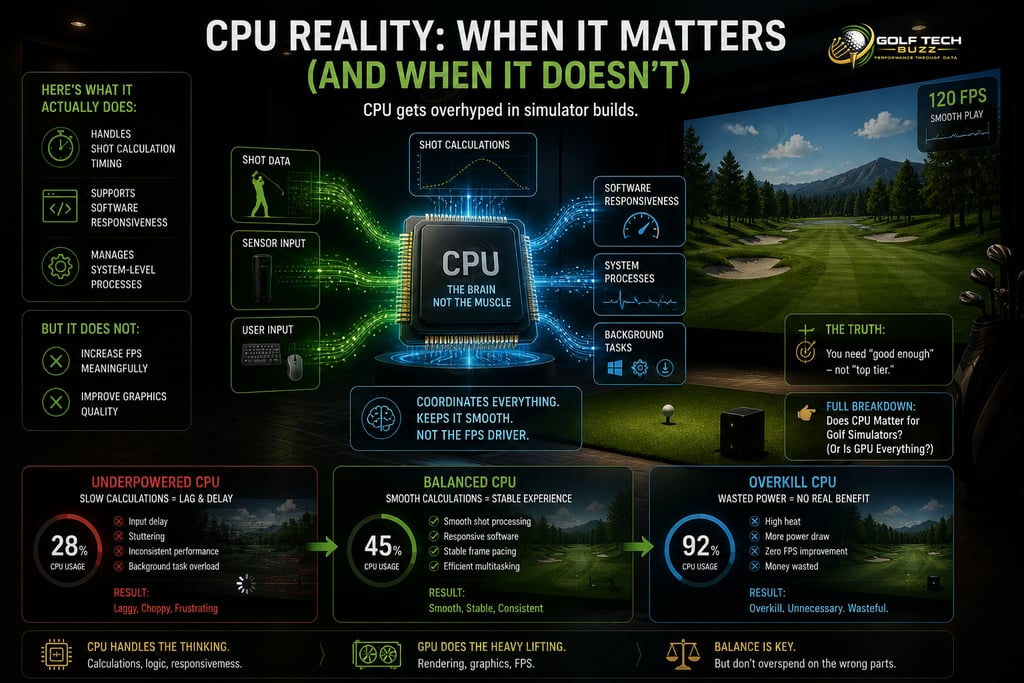
If you picture a golf simulator setup, the CPU isn’t the shiny driver or even the flashy ball-tracking sensor—it’s more like the pit crew chief. The CPU handles the heavy lifting of calculations behind the scenes:
Processing the game engine and physics models that determine ball flight.
Taking in sensor data from cameras, radar, or infrared devices and converting that into real-time feedback.
Running the simulation software and controlling the in-game environment, from weather conditions to graphics rendering commands.
Here’s what that actually means in real use: If the CPU isn’t up to scratch, your ball flight might stutter, frame rates can drop, and your swing feedback may lag. You won’t just lose “beauty points”—it impacts your ability to practice and enjoy the experience.
If you’re seeing delays, What Happens If Your PC Isn’t Powerful Enough for a Golf Simulator? explains the real-world issues.
How CPU Performance Affects Golf Simulator Experience
Smooth frame rates equal a smooth swing experience. The CPU’s clock speed (how fast it processes instructions) and core count (how many tasks it can juggle simultaneously) directly influence this.
Higher single-core clock speeds are particularly crucial because many golf simulators still rely on strong single-thread performance to simulate physics accurately.
Multi-core CPUs matter more in newer software optimized to distribute tasks like sensor data processing, rendering, and user input across multiple threads.
If your CPU stutters or encounters delays, you might notice jittery ball flight paths, delays in sensor corrections, or even freezing during play. On the flip side, a well-matched CPU means crisp, real-time responsiveness—and that’s where your practice feels more like the real course and less like a tech demo.
For performance tuning, check How to Optimize Your PC for Golf Simulator Performance.
Key CPU Specifications to Consider: Clock Speed vs Core Count
Let’s break down the specs without drowning in numbers:
Clock Speed (GHz): This is the beats-per-minute of the CPU’s brainwaves. For golf simulators, faster beats mean quicker calculations for ball physics, sensor input timing, and graphics updates. Aim for CPUs with clocks around 3.5 GHz or higher for a seamless experience.
Core Count: More cores mean multitasking muscle. A quad-core CPU handles a few simultaneous tasks well, but newer golf simulator software increasingly benefits from six or even eight cores, especially when running additional apps or multi-simulation setups. However, adding cores only helps if the software can leverage them.
Most people think a higher core count means better performance across the board. Not always true here. For golf sims, clock speed usually edges out core count in importance, but both matter.
If you're comparing tiers, Best Golf Sim Computers Under $2500 shows where CPU upgrades matter most.
Recommended CPU Requirements for Popular Golf Simulator Software
Here’s a quick breakdown referencing some common golf simulators:
E6 CONNECT: Recommends a quad-core CPU at 3.7 GHz or better.
TGC 2019: Suggests at least a quad-core with 3.5 GHz and benefits from six or more cores.
FSX 2020: Higher-end CPUs with stronger multi-core performance yield smoother gameplay, especially with high-res textures.
Gaming PCs vs Specialized Golf Simulator PCs: What CPU to Choose?
Here’s where the nerd in me kicks in. Many golfers jump to “gaming PC = best choice” because gaming rigs pack power. But is that right for golf sims?
Gaming PCs generally have strong CPUs and GPUs—but sometimes the CPU focuses on multi-core threads to handle complex game physics that aren’t golf-sim specific.
Specialized golf simulator PCs may optimize processor choices for simulation software, focusing on single-core intensity and sensor data throughput.
For casual players or home setups, a reliable gaming PC is often a cost-effective, solid choice.
For commercial or installation-heavy setups, investing in specialized hardware ensures long-term stability and support.
If you're deciding form factor, Best Laptops vs Desktops for Golf Simulators helps break this down further.
Common Misconceptions About CPUs in Golf Simulators
Here’s where I see a lot of confusion and mistake-making:
Underestimating CPU importance by focusing only on GPUs. Yes, GPUs handle graphics, but your simulator’s heart beats at the CPU level.
Buying top-tier CPUs without upgrading RAM or GPU, causing bottlenecks because the system isn’t balanced.
Overspending on CPUs with tons of cores or hyper-threading when the simulator only uses a few cores efficiently.
Ignoring the software’s recommended specs or not accounting for future updates that might push CPU demand higher.
Assuming a tablet or low-power laptop CPU is adequate for a smooth golf sim experience—usually, it’s not.
Tips for Upgrading Your CPU for Better Simulator Performance
If you’re thinking about swapping out your CPU, here’s what to keep in mind:
Match the upgrade to your budget and use case: Hardcore league players or instructors benefit most from faster, multi-core CPUs.
Don’t upgrade CPU alone; check if your motherboard supports the new CPU and whether GPU and RAM are compatible.
Consider thermal and power needs—higher-end CPUs require better cooling to maintain performance during marathon sessions.
Look out for software updates or forums suggesting increased CPU requirements in newer releases.
Test after upgrading! Monitor frame rates and latency during play to see real improvement.
If you’re planning a full build, What PC Specs Do You Need for a Golf Simulator? is worth reviewing.
Balancing CPU with Other Hardware Components
To get the smoothest golf simulator run, the CPU can’t work solo. It’s like having a great club with a rusty shaft—it won’t deliver.
Pair your CPU with sufficient RAM (typically 16 GB or more) to avoid slowdowns.
Ensure your GPU can handle the simulator’s graphical load to prevent choke points.
High-quality sensors need quick CPU processing to keep ball tracking accurate and latency low.
Optimized storage (SSDs over HDDs) also helps software load times and responsiveness.
This balance ensures your golf sim feels responsive, accurate, and immersive.
If you’re pairing hardware, Best GPUs for Golf Simulators helps align CPU + GPU performance.
Common Mistakes
Underestimating the importance of CPU in favor of flashy GPUs alone.
Buying an overpowered CPU without upgrading other components, creating system bottlenecks.
Ignoring specific CPU requirements listed by the simulator software.
Overpaying for CPU features irrelevant to golf sim tasks.
Assuming older or low-power laptops can handle advanced golf simulation software.
Frequently Asked Questions
Does a better CPU really make a difference in golf simulator accuracy?
Absolutely. The CPU processes physics calculations and sensor data that directly affect ball flight realism and latency. A stronger CPU means fewer hiccups and more precise feedback.
What is the minimum CPU requirement for popular golf simulator software?
Most require at least a quad-core CPU running around 3.5 GHz. Check your software’s official recommendations for best results.
Can I use a gaming PC for my golf simulator, or do I need special hardware?
Gaming PCs generally work well, offering good CPU and GPU power at reasonable prices. Specialized hardware is mainly for commercial or highly demanding users.
How do CPU clock speed and core count affect golf simulator performance?
Higher clock speeds improve single-threaded tasks like physics calculation, while more cores help handle multitasking such as sensor input and running multiple apps.
Is it worth upgrading my CPU for a golf simulator if the rest of my setup is mid-range?
Upgrading only helps if the CPU was the bottleneck. Check performance stats—if frame rates are choppy or latency high, an upgrade could help.
Do tablets or laptops with less powerful CPUs work well for golf simulators?
Generally, no. Most golf simulator software demands higher CPU performance than typical mobile devices offer.
How does CPU compare to GPU importance in golf simulator setups?
Both matter, but for accuracy and simulation responsiveness, the CPU often has a bigger impact. The GPU handles visuals, but the CPU runs core calculations.
Practical Conclusion
So, does CPU matter for golf simulators? In short: yes, a lot. It’s the unsung hero making your ball flight feel authentic and your swing feedback instant. Picking the right CPU is a balancing act—match clock speed and core count to your simulator software needs and budget while ensuring harmony with your GPU, RAM, and sensors.
For casual home golfers tinkering in the garage, a mid-range quad-core CPU with a solid clock speed often ticks all the boxes. Competitive players and commercial centers benefit from beefier multi-core CPUs to handle heavier loads and future updates.
Remember, a great golf simulator isn’t just about raw power—it's about a synced system where CPU, GPU, and sensors talk seamlessly. Nail that, and you’re on your way to a realistic, smooth, and truly immersive golf simulation experience.
Now go enjoy that tee time—your CPU’s got your back.
© 2026 GolfTechBuzz. All rights reserved.
Golf Tech Buzz
Performance Through Data
Practical guides, real-world setups, and unbiased comparisons for golfers building smarter practice environments.
General Inquiries: