

What PC Do You Need for TrackMan Simulator Software?
Discover the essential TrackMan simulator PC requirements for smooth, realistic golf simulation. Get expert tips on the best PC for TrackMan setups.
COMPUTERS
Golf Tech Buzz Editorial Team - Led by AJ “Buzz” Eichman
5/28/20267 min read
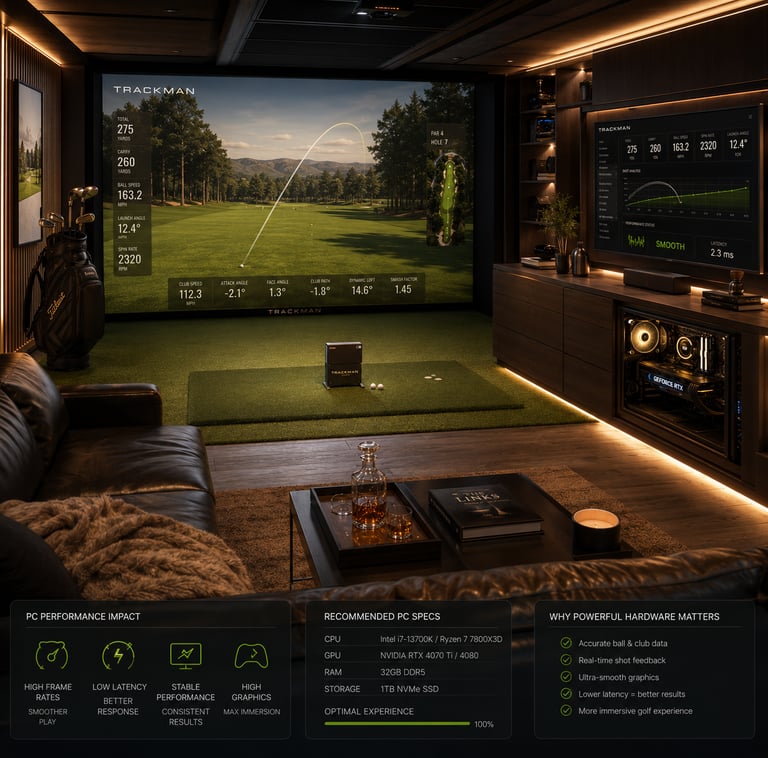
If you’re serious about setting up a TrackMan golf simulator, having the right PC isn’t just a nice-to-have—it’s the backbone of the whole experience. You can have the fanciest launch monitor and the coolest projector setup, but if your PC can’t keep up, you’re looking at choppy graphics, laggy swings, and just an all-around frustrating time. TrackMan simulator software is slick but demanding, blending precise ball flight data with lush golf course visuals that require muscle under the hood.
If you’re still trying to understand simulator hardware overall, our Golf Sim Computers guide and Golf Simulator Computers — Laptop vs Desktop breakdown both help explain what kind of systems work best for modern golf simulator software.
Here’s the deal: your PC needs to handle all that real-time data processing while rendering impressive graphics without skipping a beat. If you’ve tried running it on some budget box with integrated graphics, you already know how that ends—frames dropping like bad drives, freezes, and possible crashes during your swing analysis or practice round. So, whether you’re building a home sim to survive winter or running a pro-level fitting studio, nailing the PC specs upfront saves headaches down the line.
Quick Verdict
• A modern multi-core CPU (Intel i5/i7 or AMD Ryzen 5/7) is essential for smooth ball flight calculations.
• A dedicated GPU (NVIDIA GTX 1660 or better) keeps those graphics crisp and realistic.
• At least 16GB of RAM keeps everything running without hiccups.
• Solid-state drives (SSD) speed up software launches and course loading times drastically.
• Windows 10 or newer ensures compatibility and easy updates.
• USB 3.0 ports are a must-have for connecting your TrackMan launch monitor hardware flawlessly.

What is TrackMan Simulator Software?
Think of TrackMan simulator software as the brain behind your indoor golf setup. It takes data from the TrackMan launch monitor—stuff like ball speed, spin, launch angle, and club path—and turns that raw info into an immersive virtual golf experience. You get access to ultra-realistic courses, practice ranges, and even challenges that mimic playing on the actual links.
Unlike simple golf games, TrackMan is built on radar and camera tech with deep physics modeling that demands precision both in data and graphical output. It’s this combination of complex calculations and detailed visuals that makes the PC requirements more than your average gaming rig.
How TrackMan Simulator Technology Works
TrackMan’s tech uses Doppler radar to measure a crazy amount of data points (over 26 parameters on every shot). Then, the software uses your PC to process this info instantly so you see your ball’s trajectory and shot shape in real time on screen. The better your CPU, the faster and more accurate these calculations get.
Meanwhile, your PC’s graphics card kicks in to render textured fairways, trees, realistic ball flight trails, and weather conditions at a smooth frame rate. This creates that super believable golf course feel—something you definitely don’t want lagging or stuttering.
Minimum and Recommended PC Specifications
Let me cut to the chase. If you want to just run TrackMan simulation software and not have a train wreck, you need to meet these specs at a bare minimum:
CPU: Intel i5 or AMD Ryzen 5 (quad-core, 3.0 GHz or better)
GPU: Dedicated graphics card equivalent to NVIDIA GTX 1050 or better
RAM: 8GB minimum but you’ll itch for 16GB soon after
Storage: SSD highly recommended, 256GB+
OS: Windows 10 64-bit or newer
USB: At least one USB 3.0 port for TrackMan connection
Now, if you want to get the buttery smooth experience, here’s what I run and recommend for most setups—even my winter league rigs:
CPU: Intel i7 or AMD Ryzen 7 with six or more cores
GPU: NVIDIA GTX 1660 or better (RTX cards if budget allows)
RAM: 16GB or higher
Storage: 512GB SSD for quicker loads and room for future updates
OS: Windows 11 or latest Windows 10 build
USB: Multiple USB 3.0 ports for peripherals and launch monitor
If you’re trying to better understand how different hardware tiers impact simulator smoothness and graphics quality, our guide on Minimum vs Recommended Golf Simulator PC Specs breaks down the real-world differences between entry-level and stronger systems.
Key Hardware Components: CPU, GPU, RAM, and Storage
CPU
This is where TrackMan leans hard. The software relies heavily on the CPU for crunching all those ball flight and club path calculations. The difference between a decent i5 and a top-tier i7 Ryzen 7 in simulation responsiveness is night and day. If you skimp here, you’ll feel it in delays or misreads during swings.
GPU
The graphics card is equally crucial. TrackMan courses are highly detailed—you want a solid mid-range card at least, like the GTX 1660 or an equivalent AMD Radeon. Integrated graphics? Forget about it. They tank performance and ruin visuals faster than a shank.
RAM
You want a minimum of 16GB to keep everything running fluidly alongside other background apps, especially if you run video capture or streaming software while you practice.
Storage
SSDs are your friend. The speed of loading the software and golf courses on an SSD compared to a traditional hard drive is massive. Less waiting, more playing.
If portability matters for your setup, our Best Laptops for Golf Simulators guide highlights some of the strongest gaming laptops currently available for TrackMan simulator software.
Operating System and Connectivity Requirements
TrackMan simulator software runs on Windows 10 or newer—none of that legacy OS stuff, so keep your system updated. You’ll also want stable drivers for your GPU, so keep those updated regularly.
Don’t overlook your USB ports either. The TrackMan launch monitor needs a USB 3.0 port to communicate fast and reliably with your PC. Using USB 2.0 or hubs that throttle data can cause connection issues that feel like software bugs but really are hardware bottlenecks.
Setting Up Your PC for TrackMan Software
Once you’ve got the hardware, setting it up is straightforward but pay attention to the details. Install the latest Windows updates, download the latest TrackMan simulator software from the official site, and install GPU drivers from NVIDIA or AMD’s sites rather than relying on Windows defaults.
Plug your TrackMan device into a USB 3.0 port directly on the PC (not through a hub). And reserve some CPU headroom by closing unnecessary apps—no need running Chrome tabs or demanding background processes when you’re trying to nail a practice session.
Common Mistakes to Avoid When Choosing a PC
I’ve seen guys try this and make rookie errors that end up being expensive fixes down the line:
Buying PCs with only integrated graphics thinking “it’s a golf game, it can’t be that demanding.” Wrong. You need dedicated GPUs for smooth graphics.
Not checking for USB 3.0 ports or relying on USB hubs that introduce lag and connection drops.
Skimping on SSDs and sticking with old-school hard drives, leading to long load times and frustration.
Assuming any gaming PC will work without confirming the CPU and GPU meet TrackMan’s specs.
Forgetting to update drivers or OS, causing weird compatibility bugs.
If you’re trying to balance portability, cooling, and long-term performance, our Best Computers for Golf Simulators guide breaks down some of the strongest desktop systems currently available for TrackMan and high-end simulator setups. If you’re trying to decide whether a portable or fixed setup makes more sense, our The Best Laptops vs Desktops for Golf Simulators guide breaks down the real-world tradeoffs between mobility, cooling, upgradeability, and long-term performance.
Upgrading Your PC for Better Performance
If you’ve got an older rig, upgrading to an SSD and bumping RAM to 16GB are the easiest performance boosters. A better GPU might require a new power supply or case, so factor that into your budget.
Sometimes, a full new build or a gaming PC purchase makes more sense, especially if you want to future-proof your simulator or add streaming and content creation alongside practice.
Frequently Asked Questions About TrackMan PC Requirements
What are the minimum PC specs to run TrackMan simulator software?
Minimum would be Intel i5 or Ryzen 5 CPU, NVIDIA GTX 1050 GPU, 8GB RAM, SSD recommended, and Windows 10 64-bit.
Can I use a gaming PC for TrackMan simulations?
Absolutely. Many gaming PCs exceed the specs TrackMan requires. Just check CPU and GPU specs closely to ensure compatibility.
Is a dedicated graphics card necessary for TrackMan software?
Yes, integrated graphics won’t cut it for smooth, realistic rendering.
What operating system is compatible with TrackMan simulator software?
Windows 10 64-bit or newer versions like Windows 11. No official support for MacOS or Linux.
How much RAM does TrackMan software require?
At least 8GB minimum but 16GB is ideal to avoid lag during sessions.
Do I need a special USB port for TrackMan launch monitor?
Yes, a USB 3.0 port is required for optimal data transfer from the launch monitor.
Can I upgrade my current PC to meet TrackMan requirements?
In most cases, yes. RAM and SSD upgrades are usually straightforward. GPU upgrades depend on your PC’s power supply and space.
Will a laptop work for TrackMan simulator software?
High-end gaming laptops with proper CPU, GPU, and USB 3.0 ports can work well, but be sure to verify specs and cooling capabilities.
Conclusion
If you’re ready to invest in a TrackMan simulator rig, don’t let your PC become the weak link. TrackMan software is no joke when it comes to hardware demands—balancing a strong CPU, a dedicated GPU, plenty of RAM, and fast storage is the recipe for a smooth, realistic golf simulation experience. Skip the shortcuts, and you’ll get buttery ball flight and course visuals that’ll have you reaching for one more round instead of pulling your hair out.
Whether you’re hitting the virtual range in your garage or fine-tuning a pro fitting setup, the right PC makes all the difference. As your knowledgeable friend who’s been down this road (and built a few setups myself), take my word for it—invest smart now, and your offseason golf grind just got a whole lot better.
© 2026 GolfTechBuzz. All rights reserved.
Golf Tech Buzz
Performance Through Data
Practical guides, real-world setups, and unbiased comparisons for golfers building smarter practice environments.
General Inquiries: