

The Best Laptops vs Desktops for Golf Simulators
Explore laptops for golf simulators and desktops to find the best fit for your golf simulator setup, balancing performance, portability, and budget.
COMPUTERS
Golf Tech Buzz Editorial Team - Led by AJ “Buzz” Eichman
5/28/20267 min read
If you’re setting up a golf simulator and staring down the computer question—laptop or desktop—you’re not alone. Having run winter leagues and built more simulators than I care to count, let me cut through the noise. Both have their place in the golf simulator world. The trick is knowing what your setup needs and where you’ll use it. Not just for bragging rights or shiny specs, but for a smooth, lag-free swing experience that feels natural.
If you’re still figuring out your overall setup direction, our Golf Sim Computers guide and Golf Simulator Computers — Laptop vs Desktop breakdown help explain the biggest hardware differences that actually matter for simulator performance.
Here’s the deal: golf simulators lean heavily on your computer’s ability to process swing data, render graphics, and run complex software without hiccups. Get the wrong machine, and you’ll spend more time troubleshooting than sinking putts.
Quick Verdict
Desktops generally pack more power for less cash, ideal for serious indoor setups or dedicated simulator rooms.
Laptops win on portability and space savings, perfect for multi-use spaces or if you tote your sim around.
Make sure whatever you pick meets or exceeds the CPU, GPU, and RAM specs your simulator software demands.
Don’t skimp on graphics cards—display choppiness kills the vibe.
Desktops offer easy upgrades; laptops, not so much.
Think about where and how you’ll use your rig before throwing down the dollars.
How Golf Simulators Use Computers
Before jumping into the laptop vs desktop show, let's talk tech basics. Golf simulators rely on the computer to do three heavy lifting jobs:
Capture data — linking with launch monitors and sensors to grab shot speed, angle, spin, etc.
Process info — crunching these numbers to calculate ball trajectory and results.
Display visuals — rendering realistic courses and shot feedback in real time.
That means your computer isn’t just a glorified screen; it’s the brain and brawn of the operation. If it stutters or crashes, your experience goes from Tiger Woods in the making to frustration city. That’s why the “best golf simulator computer” really boils down to how well the hardware supports the software.
Key Computer Requirements for Golf Simulators
Most mainstream golf sim software packages (like E6Golf, TrackMan, FSX, or GSA Golf) recommend:
Multi-core processor (Intel i5/i7 or AMD Ryzen 5/7 or higher)
Dedicated graphics card (NVIDIA GTX 1660 or higher, or equivalent AMD)
At least 8GB of RAM, though 16GB gives you breathing room
SSD storage for fast game loading times
Multiple USB ports and HDMI or DisplayPort for connecting sensors and displays
Windows OS is the safe bet; macOS compatibility is limited and often sandboxed.
Skirting these specs might save cash upfront, but I’ve seen guys try this with subpar computers and end up with major lag or compatibility headaches. Trust me, get the right hardware the first time.
If you’re trying to understand the actual hardware side of simulator performance, our guide on What PC Specs Do You Need for a Golf Simulator? breaks down how CPUs, GPUs, RAM, and storage affect gameplay.
Advantages of Desktops for Golf Simulators
If you’ve got the room and want peak performance, desktops are tough to beat. Here’s why:
Power & Performance: Desktops can house full-size, beefy graphics cards that laptops can't match. Their processors often run cooler and can handle sustained loads better without throttling.
Upgradeability: Need a better GPU? More RAM? Swap it out down the line without buying a whole new setup. This flexibility keeps your rig future-proofed as sim software evolves.
Cost Efficiency: You generally get more horsepower per dollar. A top-tier desktop will often cost less than a comparable gaming laptop.
Stable Setup: Desktops stay put, so wiring, sensor hookups, and calibration remain consistent.
Better Cooling: Desktops handle heat better, which means longer gaming/sim sessions without worrying about CPU or GPU melt-downs.
If your golf simulator is the centerpiece of a dedicated indoor practice room or garage with room for a tower and monitor, desktops shine.
For golfers building permanent indoor setups, our Best Computers for Golf Simulators guide highlights some of the strongest desktop systems currently available for GSPro, TrackMan, and projector-based simulator rooms.
Advantages of Laptops for Golf Simulators
But what if space is tight, or you want to roll your sim out only when you feel like it? That’s where laptops come in.
Portability: You can pack it up, move it around, or even take your sim setup to a buddy’s place. Lightweight gaming laptops can handle this without feeling like lugging a brick.
Space Saver: No bulky towers or lots of cables crowding your man cave or apartment. Just open it up, plug in your sensors, and tee off.
Ease of Setup: Laptops are basically plug-and-play. This convenience is great if your simulator setup doubles as an office or living space.
Battery backup (sort of): Although you’ll run them plugged in, laptops can sometimes survive brief outages. Not that you’d want to game in the dark golf-wise.
That said, I won’t sugarcoat it—a laptop’s guts are typically constrained by size and heat dissipation. You’ll pay more for a laptop with specs that match a decent desktop. Not all laptops built for gaming are built equal for running golf simulators smoothly.
If portability matters most, our Best Laptops for Golf Simulators guide breaks down some of the strongest portable systems for garage golf bays, multi-use rooms, and flexible indoor setups.
Performance Comparison: Desktop vs Laptop
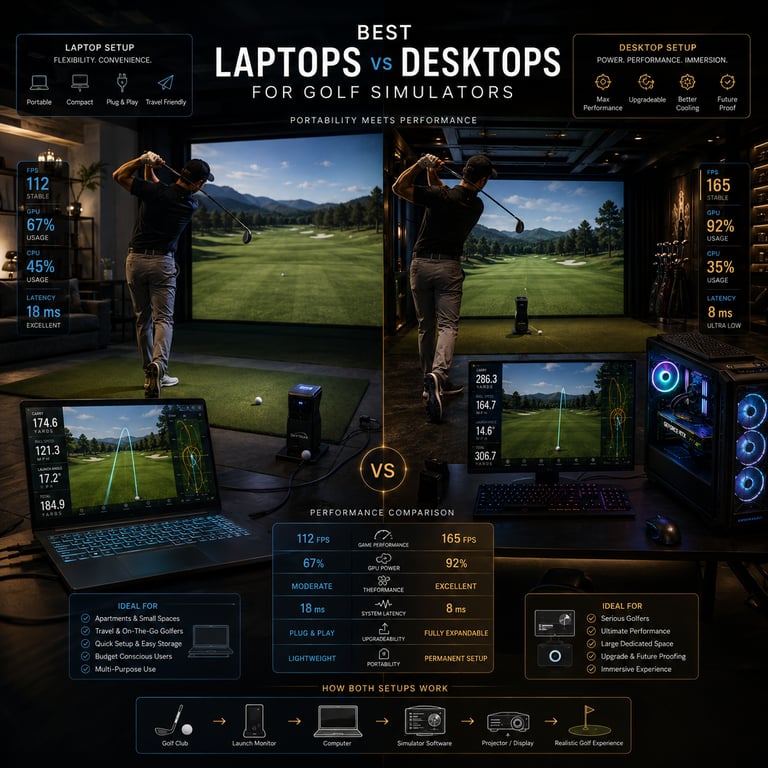
Here’s where the rubber meets the road. Say you’re eyeing a laptop with a GTX 1660 Ti versus a desktop with a GTX 1660. The desktop might edge out in raw power because it can sustain higher clock speeds longer thanks to better cooling. Over longer sessions, the desktop’s performance consistency can make a difference in smooth visuals and processing.
Meanwhile, laptops often throttle down after extended use to avoid overheating, leading to those frustrating frame drops or input delays you don’t want when you’re trying to fix your swing mid-round.
Processor-wise, desktops at the same price point usually offer more cores or better thermal design power (TDP), which translates to better multitasking and running complex sim scenarios without hiccups.
Laptops shine at quick setup and mobility but generally trade off some raw power and cost efficiency.
Setup and Space Considerations
You’ve got to think about your actual physical space. A desktop rig needs a dedicated desk or corner, good cable management, and maybe extra power surge protectors since these set-ups can draw a bit more juice.
If you live in a condo, shared apartment, or just want your sim to vanish when not used, laptops excel. You can store it away easily or surface the setup whenever the golfing mood strikes.
Also, desktops typically require external monitors, which add more cables and space considerations. Laptops come with built-in displays but hooking up to a big screen or projector can enhance the simulator feel dramatically.
Budget and Upgrade Options
Budget’s always a factor. Desktops usually give you more bang for your buck, meaning you can get stronger CPUs and GPUs, or squirrel away extra cash for nicer peripherals like pro-grade launch monitors or premium projectors.
Upgradability? Desktops take this one handily. If you want to boost your GPU or RAM next year, it’s straightforward and cheaper. Laptops? Often you’re stuck with what you bought, maybe swapping out the RAM or storage, but that’s about it.
Which Computer Type is Best For You?
Ask yourself these questions:
How often and where will you use your simulator? Permanent room or movable setup?
Do you want to upgrade hardware over time?
What’s your budget ballpark?
How important is portability versus raw performance?
How much space do you have for your rig?
If you’re all in for building a serious, permanent sim cave, go desktop. If you’re crunched for space or want something flexible that can vanish when not in use, lean laptop.
Common Mistakes When Choosing a Golf Simulator Computer
Don’t buy based on sticker price alone. I’ve seen guys pick budget laptops that couldn’t even run the simulator software properly—lag city and frustration galore.
Watch out for compatibility issues—some laptops have quirky hardware drivers that mess with sensor connections or display output.
Assuming all gaming laptops can handle golf sims is a rookie move. Verify CPU and GPU specs carefully.
Ignoring graphics card importance leads to choppy visuals that kill immersion.
If you’re unsure how much graphics power actually matters, our guide on What GPU Do You Need for a Golf Simulator? explains how different GPU tiers impact simulator performance and visual quality.
Failing to plan for desktop space and power needs results in cramped, messy setups.
Downplaying portability’s benefits can hurt users who want a sim in multi-use rooms or to travel with.
FAQs
Do I need a gaming laptop for a golf simulator?
Not necessarily, but you do want a laptop with a multi-core CPU, dedicated graphics card, and enough RAM. Many gaming laptops meet these specs, but not all non-gaming laptops do.
Can I use any desktop or laptop for golf simulator software?
Technically yes, but it needs to hit certain performance specs. Without a dedicated GPU and solid CPU, performance will suffer.
What are the minimum computer requirements for popular golf simulators?
Generally, a quad-core CPU, dedicated GPU equivalent to at least NVIDIA GTX 1650 or better, 8GB RAM, SSD storage, and Windows OS.
Is it better to have a desktop or laptop for portability?
Laptops win this one hands down due to easy storage and mobility.
How much should I budget for a golf simulator computer?
Expect $1000 to $2000 for a machine that runs smoothly. High-end desktops can go higher but offer greater power and upgrade options.
Can I upgrade a laptop to improve golf simulator performance?
Limited to RAM and storage upgrades mostly; GPU and CPU are usually soldered on.
What are common connectivity options needed between computer and golf simulator hardware?
USB ports for sensors, HDMI or DisplayPort for monitors/projectors, sometimes Thunderbolt for high-speed data.
Are there compact desktops that combine power with space-saving design?
Yes, small form factor (SFF) gaming PCs exist but may sacrifice some upgrade flexibility and cooling compared to full towers.
Wrapping It Up
If you asked me to sum it up like I would to a buddy over a cigar, here’s the straight talk: Desktops bring the muscle and upgrade ease that serious golf simulator users crave, especially if you have a dedicated space and want top performance at a better price. But if you’re short on space, crave portability, or run your sim in a multi-purpose room, a high-spec laptop is your friend—just don’t cheap out.
At the end of the day, it’s about matching your computer choice to your golf simulator setup goals. Get this right, and you’ll save time, money, and put more focus on what matters—improving your swing and lowering your score.
Happy swinging!
© 2026 GolfTechBuzz. All rights reserved.
Golf Tech Buzz
Performance Through Data
Practical guides, real-world setups, and unbiased comparisons for golfers building smarter practice environments.
General Inquiries: