

Can Your PC Run The Golf Club 2019?
Discover if your PC meets The Golf Club 2019 system requirements to enjoy smooth gameplay and optimal golf simulation performance.
COMPUTERS
Golf Tech Buzz Editorial Team - Led by AJ “Buzz” Eichman
5/28/20267 min read
If you’re diving into the world of golf simulators, The Golf Club 2019 is undoubtedly one of the top choices for both casual players and serious sim enthusiasts. But here’s where things get interesting—before you throw yourself into those virtual fairways, you need to be sure your PC isn’t going to throw a tantrum halfway through the round. Knowing your PC specs matters because it can save you from frustrating lag, crashes, or worst of all, the dreaded “game won’t start” message. Let me overthink this so you don’t have to.
If you’re still trying to understand simulator hardware overall, our Golf Sim Computers guide and Complete Golf Simulator Computer Guide both help explain what kind of systems modern golf simulator software actually needs.
Quick Verdict
Minimum specs require an Intel Core i3, 8GB RAM, and a DirectX 11 compatible GPU with at least 2GB VRAM.
Recommended specs suggest an Intel Core i5 or better, 16GB RAM, and a GPU like NVIDIA GTX 970 for smooth and visually appealing gameplay.
Adjusting graphics settings can help lower-end PCs run the game more fluidly without sacrificing too much visual quality.
An SSD and updated drivers greatly improve load times and stability during play.

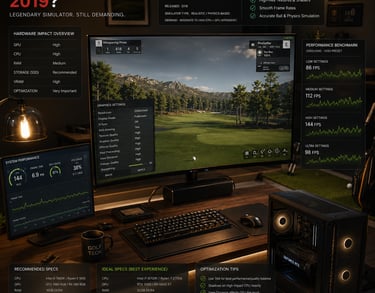
Understanding The Golf Club 2019 System Requirements
So, what makes The Golf Club 2019 tick on your PC? It boils down to a few critical hardware and software components: the CPU, GPU, RAM, storage, and operating system compatibility.
The CPU acts as the brain of the operation. For The Golf Club 2019, a quad-core processor is recommended, mainly because the game uses multiple threads for physics calculations and AI logic. You’ll often see Intel Core i3 listed as the minimum, which isn’t too surprising given it’s the base entry point for many PC games these days. However, pushing up toward an Intel Core i5 or similar AMD Ryzen 5 will result in smoother gameplay with fewer stutters.
The Graphics Processing Unit (GPU) is where things get visual. The Golf Club 2019 requires at least a DirectX 11 compatible GPU with 2GB of VRAM to render detailed textures and realistic courses. That’s the minimum baseline to expect anything playable. But the recommended specs call for GPUs like NVIDIA GTX 970 or better to fully enjoy high-quality textures, shadows, and lighting effects without compromises.
RAM is often underestimated but plays a vital role in keeping things running without hiccups. The minimum 8GB requirement keeps the game functional, but 16GB RAM lets you multitask mildly and run the sim without worrying about background applications slowing things down.
Storage matters more than people realize—especially when you’re loading large, detailed golf courses. The Golf Club 2019 runs best on an SSD, which dramatically cuts load times and can prevent those annoying pauses when your PC fetches new assets mid-round. Traditional hard drives (HDDs) will work but expect longer waits and potential hiccups.
Finally, Windows 10 or later is your OS playground here. The game requires DirectX 11 or higher, so keeping your system updated with the latest drivers and patches ensures compatibility and performance improvements.
Minimum vs Recommended PC Specs for Smooth Gameplay
Alright, here’s the nitty-gritty breakdown that tech nerds get excited about:
Minimum Specs
CPU: Intel Core i3 or equivalent
RAM: 8GB
GPU: DirectX 11 compatible, 2GB VRAM (e.g., NVIDIA GTX 760)
Storage: HDD or SSD, 30GB free space
OS: Windows 10 (64-bit)
Recommended Specs
CPU: Intel Core i5 or better
RAM: 16GB
GPU: NVIDIA GTX 970 or equivalent with 4GB VRAM+
Storage: SSD preferred, 30GB+ free space
OS: Windows 10 or later (64-bit)
Here’s what that actually means in real use: If your PC only meets minimum specs, expect to play on low to medium graphics settings, with possible drops in frame rates and texture pop-in on larger courses. But meet those recommended specs and you’ll unlock a smoother experience with fuller graphics detail—think crisp greens, realistic shadows, and smoother ball physics.
If you’re trying to better understand the difference between entry-level and stronger systems, our guide on Minimum vs Recommended Golf Simulator PC Specs explains how different hardware tiers affect simulator performance.
Graphics Settings to Optimize Performance on Your PC
Most people think cranking graphics to max is mandatory for immersion, but trust me, that’s not always practical. If your PC toes the minimum or mid-range line, tweaking settings can keep gameplay enjoyable without the frustration of lag.
Try this approach:
Lower texture quality if you notice textures loading slowly.
Dial back shadows and ambient occlusion—these are GPU-heavy features that don’t always impact gameplay mechanics.
Reduce resolution if frame rates drop noticeably; playing at 1080p is a solid balance, but dropping to 900p or 720p can help lower-end GPUs.
Turn off anti-aliasing or lower it to reduce GPU workload.
Balancing these settings can give your golf sim a boost and keep ball flight physics smooth even if the visuals aren’t ultra-HD perfect.
How to Check If Your PC Can Run The Golf Club 2019
If you’re unsure whether your PC can handle the game, here’s a straightforward checklist:
Check CPU model and speed in Task Manager under Performance > CPU.
Look up your GPU model listed in Device Manager > Display adapters.
Confirm RAM size in Task Manager > Performance > Memory.
Check available storage space in File Explorer under your system drive.
Ensure your Windows version supports DirectX 11 (press Windows + R, type dxdiag, and check the Display tab for DirectX version).
Update graphics drivers directly from NVIDIA, AMD, or Intel’s official websites to avoid compatibility issues.
Tools like “Can You Run It” websites can give you a quick compatibility scan, but verifying specs manually helps you understand exactly where your PC stands.
Common PC Hardware Mistakes and How to Avoid Them
Let’s get real; I’ve seen too many folks make the same mistakes when it comes to gaming PCs and golf sims, so here’s your heads-up:
Assuming any “gaming PC” is good enough: Not all GPUs or CPUs play nicely with The Golf Club 2019—check specific requirements rather than blanket terms.
Overlooking RAM and storage speed: You need sufficient RAM to avoid stuttering, and a slow HDD can bottleneck loading times even on decent CPUs/GPUs.
Forgetting to update drivers: Old or generic drivers cause crashes and poor graphics performance.
Setting graphics too high on low-end rigs: This leads to lag, crashing, or even corrupted textures.
Ignoring VRAM requirements: GPUs with less than 2GB VRAM struggle noticeably in texture-heavy sims.
Skipping OS and DirectX updates: These are critical for compatibility and improvements in how your PC runs the game.
If you’re trying to decide whether building or buying makes more sense, our guide on Prebuilt vs Custom PC for Golf Simulators breaks down the biggest differences in upgradeability, pricing, and long-term value.
Upgrading Your PC for Better Golf Simulation Experience
If your current setup struggles or you just want that buttery smooth experience, where should you focus your upgrade efforts? Here’s my prioritized list:
GPU Upgrade: Improves visuals and greatly smooths frame rates. Going from something like GTX 760 to a GTX 970 or better is significant.
Add More RAM: Moving from 8GB to 16GB helps multitasking and game stability.
Switch to SSD: A must for faster loading times, especially with big course files.
CPU: Upgrade to a quad-core or better CPU if you’re stuck on a dual-core; this reduces bottlenecks during gameplay.
Optimize Cooling: Better cooling keeps your components running at peak performance during long sessions.
For golfers wanting stronger desktop systems built specifically around simulator performance, our Best Computers for Golf Simulators guide highlights some of the strongest prebuilt options currently available.
Real-World Setup Examples: Home and Indoor Golf Simulator PCs
Here’s what a few common setups look like among golfers running The Golf Club 2019:
Casual Player Setup
Intel Core i3 or Ryzen 3 CPU
8GB RAM
NVIDIA GTX 760 or equivalent GPU
1TB HDD
Windows 10 home PC
Mid-Range Setup
Intel Core i5 or Ryzen 5 quad-core CPU
16GB RAM
NVIDIA GTX 970
256GB SSD + 1TB HDD combo
Windows 10 Pro
Enthusiast Setup
Intel Core i7 or Ryzen 7
32GB RAM
NVIDIA RTX 2060 or better
1TB SSD
Windows 11, latest drivers and DirectX 12
These examples show how investment scales with expected performance and visual quality.
FAQs About Running The Golf Club 2019 on PC
What are the minimum PC specs required for The Golf Club 2019?
Minimum specs include an Intel Core i3 CPU, 8GB RAM, DirectX 11 compatible GPU with 2GB VRAM, 30GB storage, and Windows 10 64-bit.
Can I run The Golf Club 2019 on a laptop with integrated graphics?
Integrated graphics might run the game, but expect low settings and reduced performance; dedicated GPUs are strongly recommended.
How do recommended specs improve gameplay versus minimum specs?
Recommended specs provide smoother frame rates, higher resolution textures, better shadows, and overall a more immersive golf simulation experience.
What graphics settings should I adjust if my PC runs the game slowly?
Lower texture quality, shadows, resolution, and disable anti-aliasing to improve performance.
Is an SSD necessary for better performance in The Golf Club 2019?
Not mandatory but highly recommended as it substantially reduces load times and prevents in-game stutters.
Does The Golf Club 2019 support Windows 11?
Yes, the game runs on Windows 10 and later versions including Windows 11, given your drivers and DirectX are up to date.
Can older GPUs like GTX 760 run The Golf Club 2019?
Yes, but only on minimum settings with possible performance compromises during intensive visual moments.
What peripheral hardware might affect PC requirements for golf simulation?
Using launch monitors, high-precision sensors, or multi-screen setups may require better PC specs to handle additional data streams and rendering tasks.
Conclusion
Whether you’re setting up a cozy indoor grotto or a dedicated golf simulator room, knowing your PC’s capability before launching The Golf Club 2019 is essential. Understanding the minimum and recommended specs—and how each component plays into the game—helps you avoid frustration and ensures you get the most out of your simulated golfing experience. You don’t need a rocket ship PC, but investing in the right hardware balance, updating drivers, and tweaking graphics settings can revolutionize your virtual tee time. So check those specs, make upgrades where needed, and get ready to crush that round without your PC holding you back. Fore!
© 2026 GolfTechBuzz. All rights reserved.
Golf Tech Buzz
Performance Through Data
Practical guides, real-world setups, and unbiased comparisons for golfers building smarter practice environments.
General Inquiries: