

Are Prebuilt Gaming PCs Good Enough for Golf Simulators?
Explore whether prebuilt gaming PCs meet the demanding specs for smooth golf simulator performance and what to look for in your setup.
COMPUTERS
Golf Tech Buzz Editorial Team - Led by AJ “Buzz” Eichman
5/5/20267 min read
If you’re diving into the world of golf simulators, you’ve probably stumbled across the debate: “Should I buy a prebuilt gaming PC or go custom?” As someone who’s spent years knee-deep in computer repairs and tech troubleshooting—and also spends plenty of time on the course—let me overthink this so you don’t have to. Prebuilt gaming PCs often get a bad rap as “gaming-only” rig setups, but here’s the kicker—they often line up pretty well with what golf simulators demand under the hood. If you want to understand how everything fits together, start with Golf Sim Computers.
This is where things get interesting: running a golf simulator isn’t just about turning on some software and swinging a club. It requires a PC that handles complex real-time data processing like ball tracking, swing analysis, and rendering crisp graphics without hiccups. Can prebuilt gaming PCs deliver that? Let’s dive in.
Quick Verdict
• Most mid-to-high-end prebuilt gaming PCs have the GPU, CPU, and RAM to run golf simulators smoothly.
• Key specs to look for include an Intel i5 or Ryzen 5 (or better), 16GB RAM, and a capable GPU like the NVIDIA GTX 1660 or higher.
• Prebuilt PCs give you convenience, warranty coverage, and decent support but may limit some customization and upgrades.
• Always check that the PC’s ports (USB, HDMI, DisplayPort) match what your simulator setup requires to avoid headaches during installation.
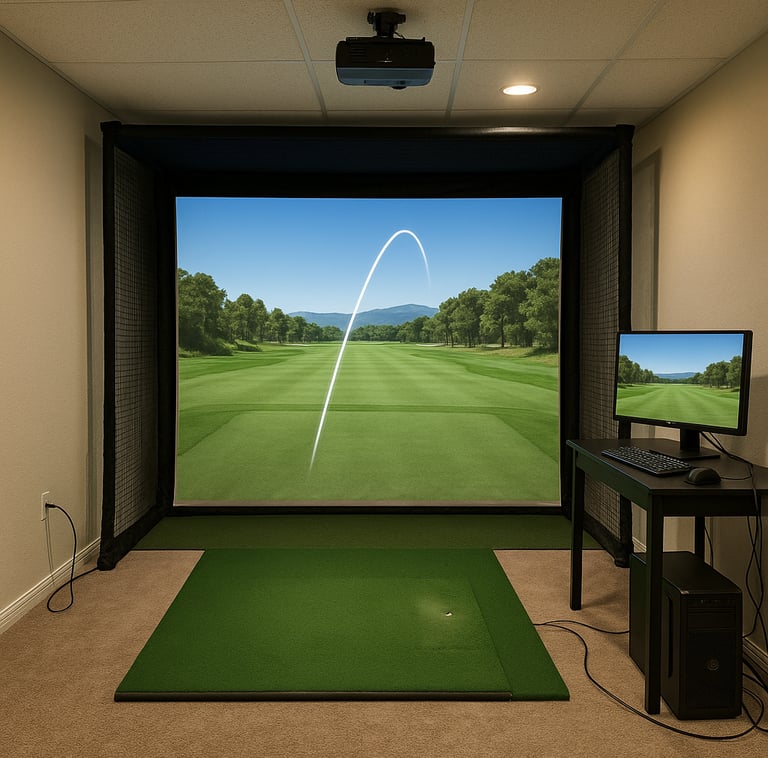
How Golf Simulators Use PC Hardware
Golf simulator software isn’t your casual game app—it’s more like a mini lab generating and processing enormous amounts of data in real time. These programs reconstruct your shots using cameras and sensors, calculate trajectory physics, and produce vibrant 3D course environments. Think of it as running a moderate-to-high-end video game combined with precise physics modeling and data analytics.
This means your PC needs:
A CPU with enough cores and processing power to run software like E6Golf or FSX 2020 smoothly.
A GPU capable of rendering detailed graphics at a steady frame rate.
Sufficient RAM to juggle all those calculations without bottlenecks.
Stable and fast USB connections to handle sensor inputs and peripherals simultaneously.
If you want a full breakdown of how software affects performance, see Golf Simulator PC Requirements by Software or Complete Golf Simulator Computer Guide.
Minimum and Recommended PC Specs for Golf Simulators
Here’s the nitty-gritty specs you want to keep in mind:
CPU: Intel Core i5 (10th generation or newer) or AMD Ryzen 5 series or better. Single-core speeds matter, but multiple cores help with multitasking sensor and graphic loads.
GPU: NVIDIA GTX 1660 or better (think GTX 2060, RTX 3060 for future-proofing). Integrated or lower-end cards won’t cut it for smooth visuals.
RAM: At least 16GB. This is where many prebuilt rigs can truly shine since 16GB has become standard on gaming PCs nowadays.
Storage: Fast SSDs (NVMe, if possible) help with loading times, especially if you’re using multiple courses or simulator software.
Ports: Multiple USB 3.0 ports are essential—you’ll need these for connecting launch monitor sensors, cameras, and Bluetooth dongles for peripherals. HDMI or DisplayPort outputs should match your projector or monitor input specs.
OS: Windows 10 or 11 is typically required for simulator software compatibility.
If you're comparing real-world performance needs, check What PC Specs Do You Need for a Golf Simulator?.
Pros and Cons of Prebuilt Gaming PCs for Golf Simulation
Let’s break down why buying a prebuilt PC might make sense—and where you might hit roadblocks.
Pros:
Convenience: Prebuilts arrive ready to go, with Windows installed and drivers configured. No hardware selection headaches or assembly anxiety.
Warranty & Support: You typically get manufacturer warranties covering components, plus tech support if something goes sideways. Low hassle.
Balanced Specs: Most mid-range gaming PCs already include 16GB RAM, a decent CPU, and a GTX-class GPU, ticking essential golf simulator boxes out of the gate.
Cost Efficiency: Sometimes prebuilt deals come in competitively priced versus buying parts separately, especially during sales.
If you're shopping options, start with Best Computers for Golf Simulators or performance-tier builds in Best Golf Sim Computers Under $2500.
Cons:
Limited Customization: Unlike custom builds, prebuilt cases, power supplies, and motherboards might restrict future upgrades, especially GPU swaps.
Potential Overkill or Underspec: Not all prebuilt gaming PCs are equal—some budget models might skimp on CPU strength or have insufficient USB ports. Always check details.
Size and Cooling: Small-form-factor prebuilts might struggle with cooling during intense simulator sessions, which can result in throttling.
Proprietary Parts: Some prebuilt designs use custom components that complicate repairs or upgrades down the line.
Comparing Prebuilt Gaming PCs vs Custom-Built PCs
Here’s the “overthinking moment”: Would a custom-built PC serve you better? The answer depends on your needs and willingness to tinker.
A custom PC is like ordering a bespoke golf club—precisely tailored to your grip and swing. You get to pick every component, optimizing for the exact simulator specs. It usually means better airflow, better power supply options, and choosing a GPU that matches your budget without unnecessary extras. Plus, upgrading later is easier since you control every part.
If you're considering that route, compare it with Prebuilt vs Custom PC for Golf Simulators.
However, custom builds require time, tech knowledge, and sometimes trial and error to find the perfect compatibility piece. For many casual simulator users, prebuilt PCs offer a “good enough” performance level with zero assembly stress.
Setting Up a Prebuilt PC with Your Golf Simulator
Once you’ve got your prebuilt PC, what next? Here’s a quick setup rundown that covers the important bases:
Check ports: Make sure your PC has enough USB 3.0 or better ports for launch monitor sensors, cameras, and other peripherals. Sometimes, a powered USB hub helps.
Connect display output: Use HDMI or DisplayPort to hook up your projector or monitor running the simulation environment.
Update software and drivers: Ensure Windows and your GPU drivers are fully updated for peak stability and performance.
Install the golf simulator software and verify recommended specs against your PC setup. Many software packages offer benchmarking tools or test runs for performance checks.
Run a “dry swing” test to calibrate sensors and troubleshoot any input lag.
Upgrade Options for Prebuilt Gaming PCs
Worried you might outgrow your prebuilt rig? Upgrading the GPU or RAM is often doable but be aware of limits:
RAM is usually easier to upgrade—check your PC's specs to find the maximum supported and whether there are free slots.
GPU swaps depend on case size, power supply wattage, and cooling capacity. Some prebuilts have limited space, making high-end GPUs tricky to fit.
CPU upgrades are generally harder, given motherboard socket compatibility and BIOS updates.
Keep an eye on cooling—adding more powerful hardware requires adequate airflow.
If you’re planning upgrades, start with Best PC Parts for a Golf Simulator Build.
Common Mistakes When Choosing PCs for Golf Simulators
I see these errors all the time, and they’re easy to avoid once you know what to look out for:
Assuming every prebuilt gaming PC is equally capable without verifying specs critical for golf simulators. Just because it’s “gaming” doesn’t mean it meets sensor and software needs.
Overlooking the number and speed of USB ports, which can cause frustrating disconnections or sensor lag.
Ignoring case size and airflow, leading to overheating and performance drops during long simulator sessions.
Forgetting to check simulator software minimum and recommended specifications before purchase.
Neglecting display/projector compatibility tied to PC output options—this can ruin your visual experience.
If you're troubleshooting issues later, see Common Golf Simulator PC Problems (And Fixes).
FAQs About Prebuilt Gaming PCs for Golf Simulators
Can a budget prebuilt gaming PC run golf simulator software smoothly?
If it meets minimum CPU and GPU specs and has 16GB RAM, yes, but budget prebuilts sometimes cut corners on ports and expandability.
What are the minimum PC specs needed for popular golf simulators?
Generally, Intel i5/Ryzen 5 CPU, NVIDIA GTX 1660 GPU, at least 16GB RAM, and multiple USB 3.0 ports.
Is a custom-built PC worth it over a prebuilt for golf simulation?
For casual users, prebuilts offer hassle-free setups. Custom builds shine in advanced, professional environments needing future-proofing and upgrades.
Can I upgrade components in my prebuilt gaming PC to improve golf simulator performance?
RAM is usually upgradable. GPU upgrades depend on power supply and case space. CPU upgrades are often limited.
What connection ports are required between a PC and golf simulator devices?
Multiple USB 3.0 ports for sensors and peripherals, HDMI or DisplayPort for displays, occasionally Bluetooth USB dongles.
Do I need a powerful GPU for golf simulation or mainly a strong CPU?
Both matter, but a solid mid-range GPU ensures smooth graphics rendering, while the CPU handles sensor data processing and physics calculations.
Are laptops with gaming specs suitable for golf simulators?
Some high-end gaming laptops can work, but they may throttle during extended use, and port limitations can pose challenges. If you're considering that route, see Can You Run a Golf Simulator on a Laptop?.
How much should I expect to spend on a prebuilt PC for a quality golf simulator experience?
A solid prebuilt gaming PC aligned with golf simulator specs typically ranges from $900 to $1,500, depending on the hardware.
Conclusion
Here’s what that actually means in real use: if you're looking to set up a golf simulator without getting buried in tech specs or the fuss of building your own rig, a well-chosen prebuilt gaming PC can absolutely do the job. Just remember to peek under the hood—check for at least an Intel i5 or Ryzen 5 CPU, a GTX 1660 or better GPU, 16GB RAM, and enough USB 3.0 ports to handle your sensors and devices.
Sure, a custom-built PC offers more customization and easier upgrades, but for most casual golfers or home setups, a good prebuilt saves time, headaches, and often money. Think of it like choosing a reliable set of irons that work great out of the box versus tinkering endlessly with custom shafts and grips. Both paths have their merits; it just depends on how deep into tech golf simulation you want to go.
So, ready to tee off with a gaming PC that works? Pick wisely, check those specs, and get swinging—your virtual 18 awaits!
© 2026 GolfTechBuzz. All rights reserved.
Golf Tech Buzz
Performance Through Data
Practical guides, real-world setups, and unbiased comparisons for golfers building smarter practice environments.
General Inquiries: