
Do You Need a Launch Monitor for Golf Improvement?
Explore how a launch monitor provides precise golf swing data, enhancing your practice and helping you improve your game effectively.
MONITORS
Golf Tech Buzz Editorial Team - Led by AJ “Buzz” Eichman
5/20/20267 min read
If you’ve been poking around the golf training scene, you’ve likely heard the buzz about launch monitors. These sleek tech gadgets promise to transform your practice by delivering precise data on your shots — ball speed, launch angle, spin rate, and the list goes on. If you're still exploring different setups inside the Launch Monitors category, understanding what these devices actually do before buying one can save you a lot of money and frustration. But here’s the million-dollar question: do you really need a launch monitor to improve your golf game? Or is this just another shiny gadget that might gather dust after a few rounds?
This is where things get interesting. As a shop owner who’s spent countless hours geeking out over tech and watching golfers try to make sense of all those numbers, I’m here to break it down simply. Let me overthink this so you don’t have to.
Quick Verdict
Launch monitors provide objective data that can significantly improve your golf swing analysis and practice quality.
Not all launch monitors are created equal—technology, accuracy, and features vary widely.
Your choice depends on your skill level, budget, and where/how you want to practice.
Using a launch monitor regularly and with the right mindset will maximize benefits; sporadic or casual use might not justify the investment.
What Is a Launch Monitor and How Does It Work?
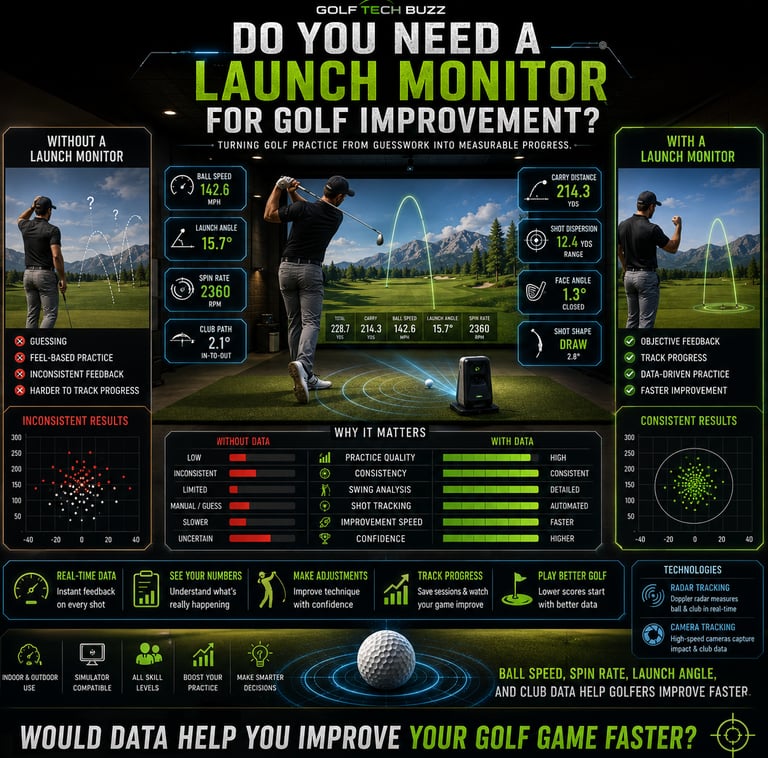
At its core, a launch monitor is a golf training tool designed to give you real-time feedback on your shots. It tracks critical data points like ball speed, launch angle, spin rate, carry distance, and club path to paint a detailed picture of how you’re swinging and how the ball is flying.
Here’s what that actually means in real use: instead of guessing how hard you hit the ball or whether your angle of attack was decent, you get hard numbers right after every swing. This UFO of golf tech comes in two main flavors:
Radar-based: Emits microwave signals to detect ball and club head movement.
Camera-based: Uses high-speed cameras to capture motion for analysis.
Both have their pros and cons, which we’ll get into. But the takeaway is that launch monitors turn subjective “feels” into objective metrics, cutting through the fog of guesswork and hype.
If you're newer to golf technology, How Launch Monitors Work and What Data Do Launch Monitors Track help explain the core metrics and tracking systems these devices use.
Benefits of Using a Launch Monitor for Golf Improvement
So, why bother with a launch monitor at all? Here’s why serious and casual golfers alike are turning to these devices:
Precise Shot Data: Knowing your ball speed and spin rate isn’t just a geeky brag — it reveals what’s really happening at impact, so you can adjust your swing or equipment intelligently.
Immediate Feedback: Instant info means you can experiment on the spot and learn faster compared to traditional practice.
Identify Flaws: Before you mess around with grip or stance, the launch monitor pinpoints exactly where your swing is off.
Better Practice Quality: Rather than whacking balls aimlessly, each shot becomes part of a data-driven plan to improve.
Indoor and Outdoor Use: Many launch monitors integrate with golf simulators for year-round training, no matter your climate.
Data Tracking and Progress Analysis: Most devices sync with apps where you can store past sessions and watch your improvement chart over time.
Many golfers eventually realize that structured practice with real numbers dramatically speeds up improvement compared to random range sessions.
Different Types of Launch Monitors: Radar vs. Camera-Based
This is where things tend to confuse people, so let me break it down clearly:
Radar-Based Launch Monitors
Use microwave or Doppler radar technology to track the ball’s flight and the clubhead’s motion.
Typically excellent outdoors or in large indoor spaces where the ball’s full flight path can be captured.
Examples include high-end models like Trackman or FlightScope.
Usually more accurate for full ball flight data and club path.
Tend to be more expensive and less portable.
Camera-Based Launch Monitors
Use high-speed cameras to visually analyze ball and club movement.
Often more compact and better suited to confined indoor spaces.
Devices like the SkyTrak or Garmin Approach R10 are popular examples.
May rely more on simulated data calculations, so sometimes less precise outdoors.
More affordable options are available.
Here’s what that means for you: If you want the Cadillac of launch monitors for deep data analysis and you practice mainly outdoors or in a large facility, a radar-based monitor might be your best bet. If you’re working with limited space at home or on a budget, camera-based models can still give you valuable insights.
Golfers comparing affordable systems often end up researching Best Budget Launch Monitors before moving into more advanced models.
Where and How Can You Use a Launch Monitor?
Launch monitors are versatile—they can be your best friend at the driving range, in your basement simulator, or even on the course itself. But each use case has some practical considerations.
Outdoor Practice
Radar-based units work great here.
Ample space allows you to track the full ball flight.
Ideal for analyzing shot shape and real conditions like wind and turf interaction.
Indoor Practice and Simulators
Space constraints matter: you typically need 10-20 feet in length.
Camera-based or affordable radar units that adapt to indoor environments are preferred.
Integration with simulation software can turn your practice into a video game-like experience, complete with course options.
If you're planning an indoor setup, Golf Simulator Room Size Requirements and Minimum Ceiling Height for Golf Simulator are important before buying anything.
On-Course Use
Portable launch monitors cater to golfers wanting instant feedback between holes.
Offers self-assessment during rounds but limited by environment and setup time.
Useful for casual tracking, not comprehensive swing breakdowns.
Golfers building at-home practice spaces also often compare Best Home Golf Simulators and Best Golf Simulators for Garage to see what type of setup fits their available room and budget.
Factors to Consider Before Buying a Launch Monitor
By now, you’re probably thinking about snagging one. Hold up and consider these factors first:
Skill Level: Beginners might benefit more from affordable, simple models that deliver basic feedback. Advanced players want detailed metrics and customization.
Budget: Prices range from a few hundred dollars for entry-level to several thousand for pro-grade devices.
Practice Environment: Do you have indoor space? Will you practice mostly outdoors? This influences tech choice.
Portability: Will you lug it around the course or leave it set up in your garage?
Data Needs: Do you want simple feedback on ball speed and carry distance, or in-depth club path and spin axis info?
Integration: Compatibility with smartphones, apps, and simulators can enhance usability.
Setup: Some devices require calibrated environments or specific lighting.
Most people think more expensive means better, but that’s not always the case if you can’t or won’t use all the features effectively.
Comparing real-world units like Garmin R10 vs Rapsodo MLM2Pro or SkyTrak vs Garmin R10 can help narrow down which launch monitor actually fits your needs.
Common Mistakes Golfers Make with Launch Monitors
Before you jump headfirst, here’s a quick sanity check on common pitfalls I see repeating:
Assuming all launch monitors are equally accurate. Cheaper models often have less precise sensors.
Neglecting space and setup requirements. A tiny garage won’t give you reliable data with large-flight monitors.
Over-relying on monitor data without balancing it with professional instruction or on-course practice.
Using the launch monitor sporadically instead of making it a consistent part of training.
Confusing launch monitors with full golf simulators; the latter includes gameplay screens and course software; monitors usually just track your ball and swing.
Ignoring the learning curve. Understanding the data and applying it takes time—don’t expect instant magic.
Frequently Asked Questions About Launch Monitors
What is a launch monitor and how does it work?
A launch monitor is a golf training tool that tracks the ball and club data using radar or cameras, providing metrics like ball speed, spin, and launch angle to improve swing analysis.
Do I need a launch monitor to improve my golf swing?
Not necessarily. While they provide objective feedback that facilitates faster improvement, many golfers develop good swings without one. However, a launch monitor drastically cuts down guesswork if used regularly.
Can I use a launch monitor indoors or only outdoors?
Many launch monitors work indoors, especially camera-based ones optimized for confined spaces. Some radar devices require more space and outdoor settings to function properly.
What are the key features to look for in a launch monitor?
Consider accuracy, space requirements, portability, data points provided, app integration, and price. Choose based on your practice environment and skill level.
How accurate are affordable launch monitors compared to expensive ones?
Lower-priced models generally give good estimates for basic data but lack the precision and advanced metrics of pro models. Accuracy also depends on setup conditions.
If you’re curious about entry-level performance, How Accurate Are Budget Launch Monitors Really? breaks down what cheaper devices do well and where they struggle.
Is a launch monitor suitable for beginners or only for advanced golfers?
Both. Beginners benefit from objective feedback to build solid fundamentals, while advanced players can dive deeper into fine-tuning performance.
Can launch monitors replace golf lessons with a pro?
No. They complement coaching by providing data but don’t replace the personalized guidance and technique correction a pro offers.
How much space do I need to set up a launch monitor at home?
Indoor setups usually require 10-20 feet depending on the model. Radar devices typically need more space than camera-based ones.
Is a Launch Monitor Right for Your Golf Training?
To overthink it one last time: if you’re looking to break past plateaus, want precise swing and ball data, and have a consistent practice routine, a launch monitor can be a game-changer. It transforms vague “feels” into exact numbers, enabling smarter decisions about technique and equipment.
If you’re a casual golfer happy with basic feedback or don’t have space or budget for tech, it might not be a must-have. But for anyone serious about improvement, the investment pays off in data-driven confidence and faster progress.
Golfers wondering whether simulator technology is even worth the investment should also read Are Golf Simulators Worth It and Launch Monitor vs Simulator before committing to a setup.
Practical Conclusion
Launch monitors bridge the gap between guesswork and measurable improvement in golf. They deliver detailed real-time feedback that helps you hone your swing, pick the right clubs, and track progress over time. However, not all launch monitors are equal. Your ideal device depends on your skill level, budget, and practice environment.
The trick is to choose a launch monitor that fits your needs, learn how to interpret the data, and integrate it with consistent practice and professional coaching when possible. Used properly, these golf training tools can provide a powerful advantage in lowering your scores and boosting your confidence.
So, do you need a launch monitor for golf improvement? The short answer: probably yes, but only if you’re ready to use it thoughtfully and regularly. Otherwise, it’s a cool gadget that’s best enjoyed after mastering the basics.
Now, go forth and launch those shots with some serious data backing your swing!
© 2026 GolfTechBuzz. All rights reserved.
Golf Tech Buzz
Performance Through Data
Practical guides, real-world setups, and unbiased comparisons for golfers building smarter practice environments.
General Inquiries: