
How Accurate Are Budget Launch Monitors Really?
Discover the real accuracy of budget launch monitors and learn how to get reliable ball speed and launch angle data without breaking the bank.
MONITORS
Golf Tech Buzz Editorial Team - Led by AJ “Buzz” Eichman
5/20/20266 min read
If you’ve ever spent a chilly evening setting up your own indoor golf simulator or limped out to a driving range just wishing for some real numbers on your swing, you’ve probably toyed with the idea of grabbing a budget launch monitor. If you're still exploring different setups inside the Launch Monitors category, understanding how affordable units compare to premium systems becomes incredibly important before buying anything. But here’s the million-dollar question: how accurate are these cheaper gadgets when it comes to tracking your ball flight and swing data? I’ve been around the block with a few of these devices, from the no-frills radar units to the camera-based sensors you can stick on your phone, and I’m here to cut through the marketing hype.
Here’s the deal: budget launch monitors can give you solid data on a few key metrics, but they’re not going to replace the premium gear that the pros swear by. If you want simple feedback on ball speed and launch angle indoors, they’ll do the job. But if spin rate, club data, and simulator-grade accuracy are must-haves, you’re better off saving up or renting time on a higher-tier system.
Quick Verdict
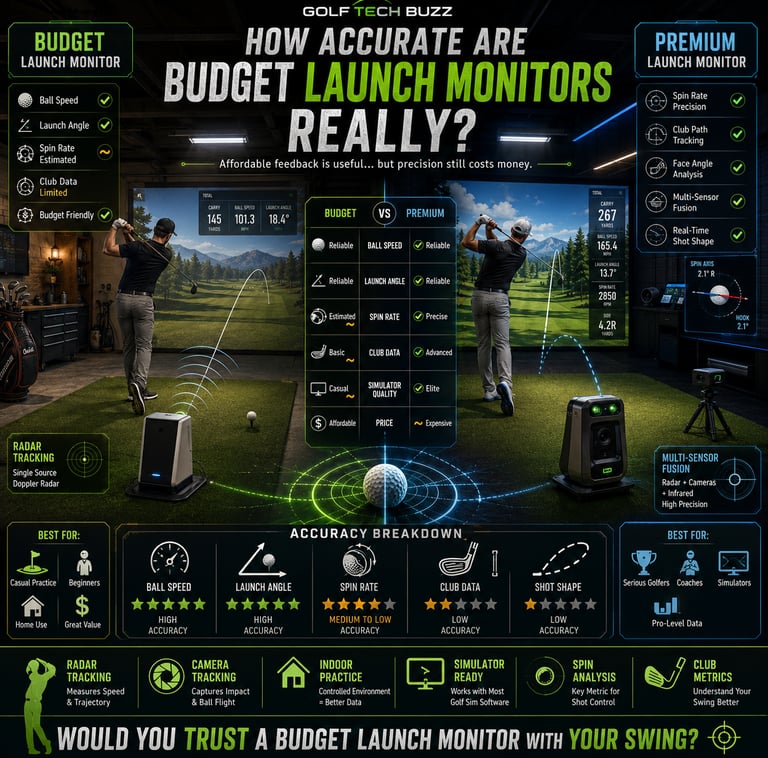
Budget launch monitors reliably measure ball speed and launch angle, making them great for casual practice.
Spin rate and club data accuracy tend to take a hit on affordable models.
Indoor use with good lighting and proper setup significantly improves accuracy.
Premium models are worth it if you want pro-level feedback, simulators, or comprehensive swing analysis.
Understanding How Budget Launch Monitors Work
To understand accuracy, you’ve got to understand the tech behind these devices. Budget models typically use one of two main technologies: radar Doppler or optical sensor cameras. Doppler radars bounce radio waves off the ball to track its speed and trajectory. Cameras, on the other hand, snap rapid images during impact or ball flight.
Radar tends to be more reliable for ball speed and launch angle, but it’s less precise on spin data at the low-cost end. Camera-based systems depend heavily on lighting and background contrast, so indoors with poor lighting? Forget it. Unlike premium launch monitors that use sensor fusion—combining radar, high-speed cameras, and sometimes even infrared to get a full picture—budget devices usually stick with one tech, which limits the depth and accuracy of the data.
If you're newer to golf tech, How Launch Monitors Work explains the core technologies and tracking systems in much more detail.
Key Metrics Measured by Budget vs Premium Launch Monitors
Ball Speed and Launch Angle
These two metrics are where budget launch monitors shine. Because measuring how fast the ball leaves the clubface and the initial angle is relatively straightforward from radar data or video frames, these figures tend to be consistently reliable. For practice sessions, especially inside your garage or basement setup, this is gold.
For golfers trying to understand what all these numbers actually mean, What Data Do Launch Monitors Track breaks down the most important swing and ball flight metrics.
Spin Rate
Here’s where most budget devices trip up. Accurately measuring spin requires complex tracking, often with a multi-camera array or sophisticated radar setups. Many budget monitors either estimate spin or provide unreliable data that can fluctuate wildly from shot to shot. If you’re obsessing about spin control, you’ll want to consider stepping up.
Club Head Data
Affordable models rarely track club head speed, path, or face angle accurately. Those metrics require high-res cameras and precise sensor calibration. If you want to glean serious swing fault details, budget options won’t cut it.
Setting Up Your Budget Launch Monitor for Best Accuracy
You can’t just slap one of these gadgets down anywhere and expect flawless numbers. Setup is king, especially with budget tech.
Space Requirements
Most budget launch monitors need around 10-15 feet between the device and the hitting area. Tight quarters will clutter your readings and lead to inconsistent results.
If you're building a simulator space at home, Golf Simulator Room Size Requirements and Minimum Ceiling Height for Golf Simulator can help avoid expensive setup mistakes.
Lighting and Background
Try to hit in a well-lit room with a solid, non-distracting background behind the ball flight area. Avoid busy patterns or bright windows right behind the target zone, as camera-based units need good contrast to lock on.
Device Positioning
Follow the manual to the letter on where to place the monitor. Too close or too far, angled wrong—it all affects data quality.
Calibration and Updates
Regular firmware updates and calibration routines improve accuracy and fix bugs, so keep the device updated. Skipping setup steps is the biggest accuracy killer I’ve seen.
Common Pitfalls and Mistakes With Budget Launch Monitors
Expecting them to perform like $3,000-plus premium models. Just don’t.
Using them outdoors in poor lighting or gusty wind, which messes with sensor tracks.
Not leaving enough space or setting up in cramped areas.
Ignoring the need for calibration or skipping device firmware updates.
Taking all data metrics at face value; spin rates and club data are often unreliable.
Real-World Use Cases for Budget Launch Monitors
If you’re a beginner or weekend warrior, budget launch monitors are great allies. Picture this: you’re stuck inside during winter (welcome to my world), and you want to track your progress. These devices give you useful feedback on ball speed and launch angle, so you’re not just guessing with every swing.
Golf instructors love these monitors for group lessons when they need quick, basic data without carting high-end gear. Casual players who want some swing insight but aren’t chasing tour stats also find good value here.
And yes, you can set up affordable simulators with some of these launch monitors to enjoy at-home practice and entertainment with modest investment. If that interests you, Best Home Golf Simulators and Best Golf Simulators for Garage are good starting points for planning a setup.
When to Consider Upgrading to a Premium Model
If your golf obsession runs deeper—and your budget—premium launch monitors bring the full bag: multi-sensor fusion, precise spin tracking, club head angles, shot shaping, and integration with advanced simulators. If you play competitively or coach serious players, spending more is an investment in better, actionable data.
Also, if you want a seamless simulator setup for realistic golf gameplay, most budget models won’t sync well or provide consistent performance outdoors or in dynamic environment conditions.
Many golfers comparing upgrade paths eventually look into Best Launch Monitors to better understand the differences between entry-level and premium systems.
Frequently Asked Questions About Budget Launch Monitors
How accurate are budget launch monitors compared to premium ones?
They’re good for ball speed and launch angle but lack the precision for spin rates and detailed club data that premium models offer.
What golf swing data can I reliably expect from a budget launch monitor?
Ball speed and launch angle—those are the bread and butter. Spin rate and club metrics should be treated with caution.
Can budget launch monitors be used effectively indoors and outdoors?
Indoor use in controlled lighting works best. Outdoors, variable lighting and wind can degrade performance.
What setup space do I need for a budget launch monitor?
Ideally, 10 to 15 feet of space between the device and the hitting area, with a clear, flat surface and minimal background distractions.
Are budget launch monitors compatible with golf simulators or apps?
Some are compatible with basic simulator software or apps, but the experience may not match what you get with premium devices.
How do environmental factors affect launch monitor accuracy?
Lighting, background contrast, wind, and space constraints can all negatively affect accuracy, especially for optical-based budget units.
What features are missing in budget launch monitors compared to high-end models?
Advanced spin measurement, club head tracking, shot shaping data, multi-sensor fusion, and robust simulator integration.
Is it worth upgrading from a budget to a premium launch monitor?
If you want detailed, reliable data for competitive play, coaching, or high-quality simulation, yes. Otherwise, budget monitors deliver good value for practice and casual rounds.
Conclusion
Look, if you’re just getting into golf tech or need a no-frills way to measure your ball speed and launch angle without breaking the bank, budget launch monitors are a surprisingly solid option. They won’t replace the big guns, but they give you enough info to fix swing flaws, track progress, and keep your game honest.
Just spend the time getting your setup right, know what data to trust, and keep your expectations in check. After all, golf is a game of patience—both on the course and with your gear. When the bankroll and ambitions grow, stepping up to premium tech is a worthy gamble.
If you’re debating whether simulator tech is worth the investment overall, Are Golf Simulators Worth It and Do You Need a Launch Monitor for Golf Improvement? help break down the long-term value for different types of golfers.
Golfers comparing specific budget-friendly models should also check out Garmin R10 vs Rapsodo MLM2Pro and SkyTrak vs Garmin R10 to see how popular launch monitors stack up in real-world use.
Until then, these affordable devices can be your trusty winter league partner, helping you shave strokes without shaving your wallet.
Now, go hit one true, buddy.
© 2026 GolfTechBuzz. All rights reserved.
Golf Tech Buzz
Performance Through Data
Practical guides, real-world setups, and unbiased comparisons for golfers building smarter practice environments.
General Inquiries: