
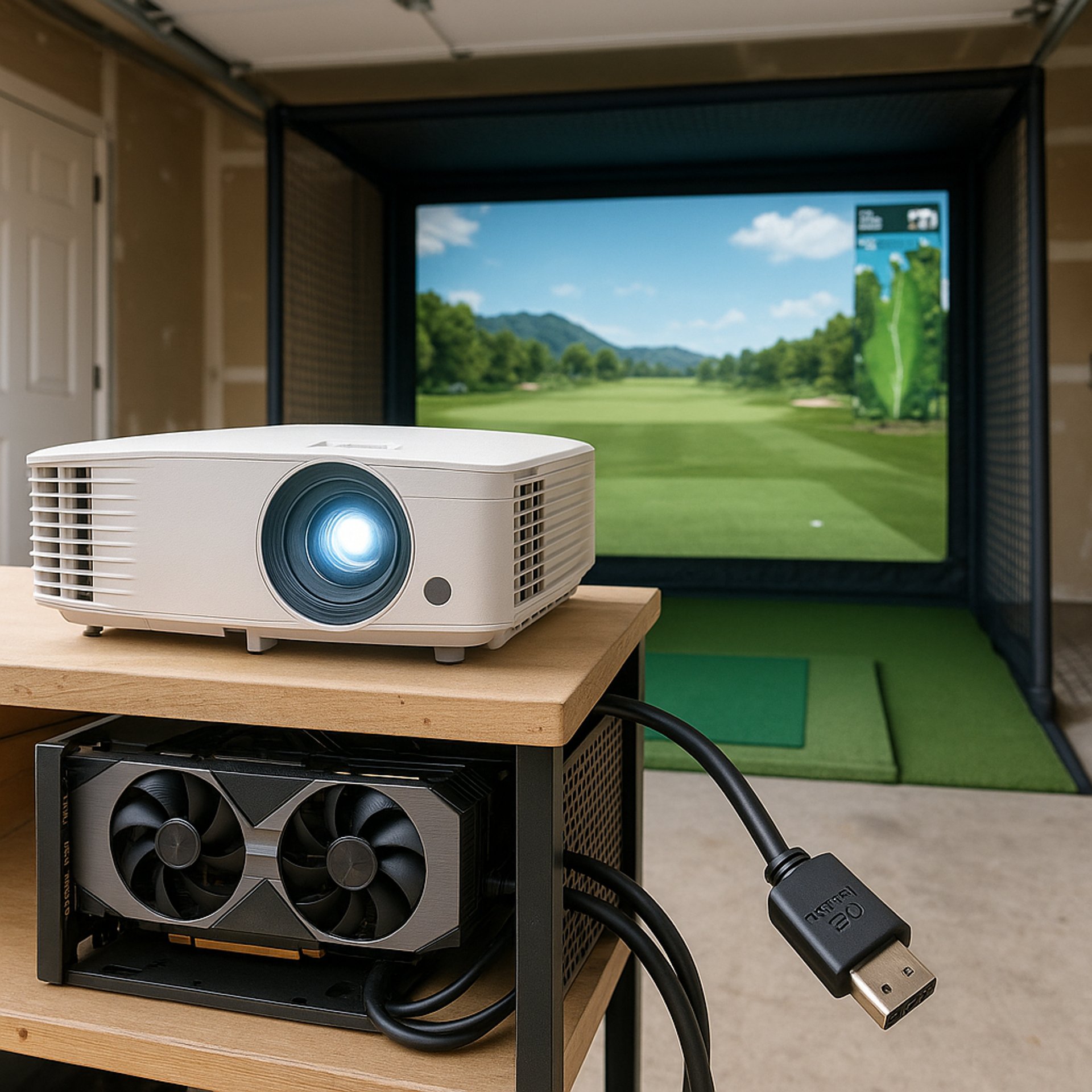
Can You Use a Regular Home Theater Projector for Golf Sims?
Explore whether a regular home theater projector meets the brightness, resolution, and input lag needs for golf sim setups at home.
PROJECTORS
Golf Tech Buzz Editorial Team - Led by AJ “Buzz” Eichman
5/20/20267 min read
If you've been daydreaming about bringing the golf course indoors without dropping a fortune, you might be wondering if that regular home theater projector you’ve been eyeing or already own could double up as your golf sim projector. Here’s the deal: technically, yes, a regular home theater projector can project the virtual golf course image onto your screen. But if you want something that doesn't make you squint, lag, or throw a tantrum on every swing, there’s a bit more to unpack.
If you're still comparing different setups inside the Golf Sim Projectors category, understanding projector brightness, throw distance, and room requirements becomes incredibly important before buying anything.
Let me break down what really matters when it comes to the projector side of your golf simulator setup — and whether your off-the-shelf home theater projector makes the cut.
Quick Verdict
You can use a regular home theater projector for golf sims, but it has to meet minimum requirements for brightness, resolution, and input lag.
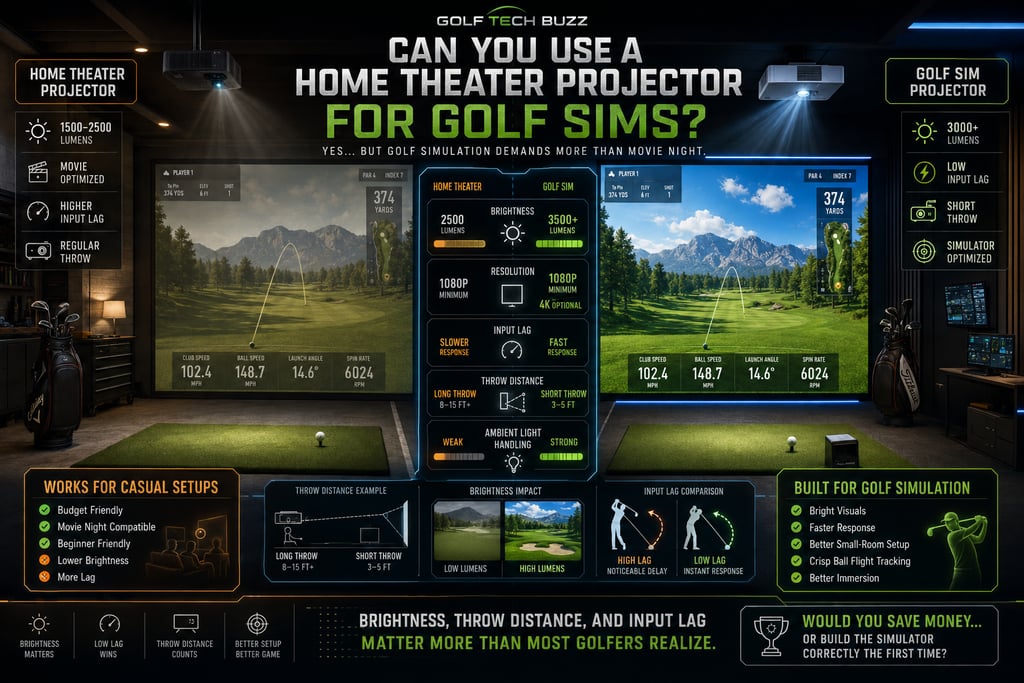
Most home theater projectors fall short on brightness, typically less than the 3000 lumens recommended for clear, punchy golf sim visuals.
Resolution matters: 1080p is the baseline for crisp images, with 4K optional but mostly overkill unless you're also doing serious media streaming.
Throw distance and projector placement are key — short throw models shine in smaller rooms.
If you want silky smooth ball flight graphics and minimal input lag, specialized golf sim projectors are usually the safer bet.
What Is a Golf Simulator Projector and How Does It Work?
At its core, a golf simulator projector is just a machine that beams those fancy, photorealistic golf course images onto an impact screen or wall so you can swing away indoors. Nothing magical about the gadget itself — it’s the combination of software, sensors, and the projector’s quality that pulls off the trick.
But unlike your typical movie night, golf sims have unique requirements. The image has to be bright, sharp, and most importantly, responsive enough to keep up with your swing and ball flight. Slow refresh rates or laggy input? You’ll feel it, and it’s as frustrating as a chunked chip shot.
If you’re still learning the basics of golf simulator projection setups, Golf Simulator Projector Guide breaks down the core features and setup requirements in more detail.
Key Projector Requirements for Golf Simulation
Brightness
This one’s a killer. Most home theater projectors strut around with 1500-2500 lumens, which is fantastic for dark living rooms. But golf sims often get set up in spaces with ambient light — think garages, basements, or multi-purpose rooms — where that brightness just won’t cut it.
Aim for 3000 lumens or brighter. Why? Because the higher the brightness, the clearer and more vibrant the golf course images will appear on your screen, especially when hitting the ball. Nobody wants a dull, washed-out fairway.
If brightness is confusing, What Lumens Do You Need for a Golf Simulator? explains how projector brightness affects simulator visibility and realism.
Resolution
Resolution isn’t just about pretty pictures—it impacts how much detail you can catch on the virtual greens. Most golf sim software recommends a minimum of 1080p (Full HD). Anything lower than that and the visuals get fuzzy, making it tough to read distances or yardages on screen.
4K projectors do offer a stunning upgrade, crisp enough to scrutinize the tiniest fringe detail on that slippery green. But if you’re not splurging on top-tier gear, 1080p gets the job done just fine.
If you’re debating higher resolutions, 1080p vs 4K Golf Simulator Projectors: Does It Matter? compares the real-world differences between both setups.
Throw Distance and Placement
How far your projector sits from the screen dictates your image size and setup flexibility. Short throw projectors (which can sit just 3-5 feet from the screen) are awesome for small indoor setups or garages. Regular throw projectors, on the other hand, need more room to throw a giant image.
Make sure to check your space's dimensions because no one wants a tiny projected image or a forced setup that kills their swing zone.
Before choosing projector placement, What Throw Ratio Do You Need for a Golf Projector? and Best Projector Placement for Small Golf Simulator Rooms can help avoid major setup headaches.
Input Lag and Refresh Rate
If you’re serious about golf sim accuracy, input lag (the delay between your swing and what you see on screen) is a silent killer. Home theater projectors usually prioritize movie visuals over real-time responsiveness, meaning slower refresh rates and higher latency.
Specialized golf sim projectors tend to have faster refresh rates and lower input lag, delivering smoother ball flights and more precise swing feedback. If you’ve tried a cheap projector and felt delays in tracking your ball, that’s why.
Can You Use a Regular Home Theater Projector for Golf Sims?
Here’s the raw truth: you can absolutely start with a regular home theater projector. If your space is small, and lighting conditions are controlled (nice, dark room), and your projector pushes at least 3000 lumens with 1080p resolution, it might hold its own for casual golf practice.
But tread carefully. Most home theater projectors aren’t built with golf simulation in mind and could disappoint if you want realistic visuals, smooth tracking, and low-latency performance. You’ll want to:
Check the projector’s brightness rating; less than 3000 lumens? It’s going to struggle with ambient lighting.
Ensure it has Full HD resolution at a minimum.
Take note of input lag specs if available — lower is better.
Be ready to optimize your room lighting and screen type to get the best results.
Many golfers comparing setups eventually explore Best Projectors for Golf Simulators or Best Projectors Under $1,000 to find models better suited for simulator use.
Understanding Brightness and Resolution Needs
Let me paint you a picture: trying to play golf on a dim, blurry projected image is like trying to putt in fog. You can do it, but you won’t enjoy it.
Brightness has to punch through ambient light, while resolution keeps the images sharp. 3000 lumens isn’t just a recommendation—it’s an industry standard that balances visibility with image quality.
Resolution-wise, anything below 1080p will leave you squinting at jagged fairway lines and rough edges. 4K? That’s more about future-proofing and pure visual luxury than necessity—valuable but not game-changing.
Throw Distance and Placement Considerations
Imagine this scenario: you buy a great projector but realize your room is too small to get the image size you want because the projector requires 10 feet of throw distance. That’s the nightmare we want to avoid.
Short throw projection is a blessing for indoor golf sims. They can produce a huge image just a few feet away from the screen, giving you more freedom to swing and set up sensors without hitting your setup neighbors.
If you’re tight on room space, Do You Need a Short Throw Projector for Golf Sims? and Short Throw vs Standard Projectors for Golf Sim Setup explain why throw style dramatically changes indoor usability.
Common Mistakes When Choosing a Golf Simulator Projector
Assuming “all projectors are created equal.” Nope. Golf sims are demanding.
Ignoring brightness specs — this kills visibility fast.
Overlooking input lag, resulting in frustrating delays between your swing and on-screen action.
Not considering throw distance, ending up with wrong image size or setup.
Forgetting ambient light conditions—too bright a room and that pricey projector looks like a nightlight.
Using regular screens instead of impact screens designed for golf simulation, which enhance image clarity and durability.
Another issue many golfers run into is image obstruction. Why Your Golf Simulator Projector Has Shadows (Fix Guide) explains how poor placement can ruin an otherwise great setup.
Real-World Setup Examples
I’ve seen guys hack a setup in a basement with a 2500-lumen home theater projector. They got by with blackout curtains and small screen size, but the experience wasn’t winning any awards.
Contrast that with my winter league buddy who dropped on a 3300-lumen short throw projector paired with a genuine impact screen in a well-lit garage. The difference was clear as day — crisp images, real-time tracking, and no headaches.
Projector comparisons like Optoma UHZ35ST vs XGIMI HORIZON 20 Pro help show how different projector styles handle brightness, image sharpness, and simulator performance.
Final Recommendations and Upgrade Options
If you’re testing the waters and on a budget, start with your current home theater projector—just don’t expect miracles. Optimize your room for light control, pick the right screen, and keep expectations realistic.
If your golf sim addiction grows (it usually does), look into projectors tailored for golf sims. They usually meet or exceed the brightness and input lag benchmarks needed for a satisfying setup.
For most indoor home setups, 3000 lumens and 1080p resolution are the bare minimum. Short throw projectors are a solid upgrade if you’re tight on space.
FAQ
Can a regular home theater projector be used effectively for a golf simulator?
Yes, but only if it meets minimum requirements like 3000 lumens brightness and 1080p resolution. Otherwise, image quality and responsiveness may suffer.
What brightness level is ideal for a golf simulator projector?
Around 3000 lumens or higher is recommended to ensure clear, vivid projections, especially in rooms with ambient lighting.
Is 4K resolution necessary for golf simulation projection?
No, 1080p is the baseline for good image quality. 4K is a nice upgrade but not essential for most users.
How does throw distance affect golf simulator projector choice?
Throw distance dictates how large an image your projector can create from a given spot. Short throw projectors suit smaller rooms, while regular throw ones need more space.
What are the main differences between home theater and golf sim projectors?
Golf sim projectors generally have higher brightness, lower input lag, and optimized throw distances tailored for swing space and responsiveness.
Can I use a short throw projector for indoor golf sims?
Absolutely. Short throw projectors often work better in tight spaces where regular projectors can’t get the image size needed.
How important is input lag for a golf simulator projector?
Very important. Low input lag ensures your swing and ball flight show up on screen instantly, making for realistic feedback.
What setup space do I need for a golf simulator projector installation?
It depends on the projector’s throw ratio, but generally, at least 10 feet for regular throw; 3–5 feet for short throw models works well for smaller rooms.
Conclusion
If you’re serious about building a golf simulator that feels real, don’t just slap in any old projector and hope for the best. Your home theater projector might get you started, but to really hit that sweet spot between stunning visuals and seamless tracking, it needs to meet specific requirements.
Focus on brightness, resolution, throw distance, and input lag. If those boxes are ticked, your regular projector can hold its own. If not, be ready to upgrade to equipment designed with golf simulation in mind. Because when it comes to golf sims, seeing your shot clearly and in real time isn’t just a nice-to-have — it’s the whole game.
© 2026 GolfTechBuzz. All rights reserved.
Golf Tech Buzz
Performance Through Data
Practical guides, real-world setups, and unbiased comparisons for golfers building smarter practice environments.
General Inquiries: