
1080p vs 4K Golf Simulator Projectors: Does It Matter?
Explore whether a 1080p golf simulator projector suffices or if upgrading to 4K truly enhances your golf simulation experience, based on budget and setup.
PROJECTORS
Golf Tech Buzz Editorial Team - Led by AJ “Buzz” Eichman
5/20/20267 min read
If you’ve ever shopped for a simulator setup inside the Golf Sim Projectors category, you’ve probably stumbled upon this blazing debate: Should you go with a 1080p golf simulator projector or splurge on the shiny new 4K golf simulator projector? On paper, 4K sounds like the clear winner—after all, it boasts four times the pixels of 1080p. But here’s where things get interesting: Does that higher resolution truly translate into a noticeably better golf simulation experience for most players? Or is it just tech bling that makes your wallet sweat?
Let me overthink this so you don’t have to. In this deep dive, we’ll break down what those numbers mean, how they affect your simulator visuals, practical setup considerations, and whether the bump to 4K is really worth it for your game.
Quick Verdict
1080p projectors deliver solid image quality and are usually enough for smaller or budget-conscious setups.
4K projectors provide crisper, more detailed images but require more money, better hardware, and space to shine.
Room size, screen distance, and simulation software compatibility affect how much you’ll actually notice the difference.
Consider your budget, space, and how much visual fidelity really matters in your practice before upgrading to 4K.
Understanding Golf Simulator Projector Resolution: 1080p vs 4K
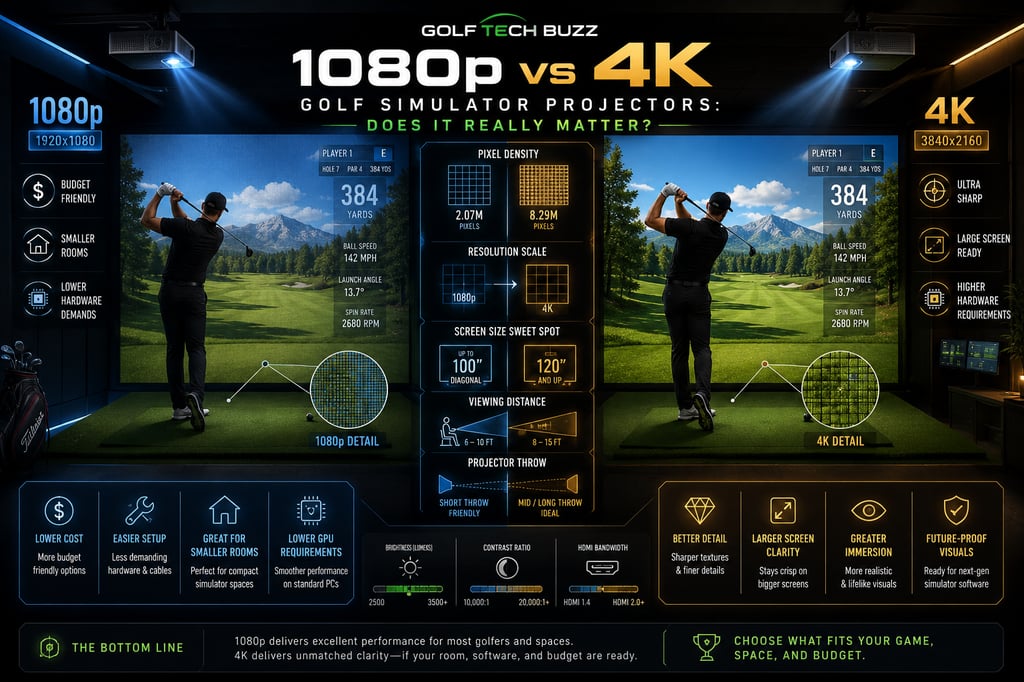
At its core, resolution describes how many pixels make up the image that your projector throws onto the screen. A 1080p projector outputs images at 1920x1080 pixels—what most of us think of as Full HD. Meanwhile, 4K projectors bump that up to 3840x2160 pixels, quadrupling the pixel count.
This increase means more detail and sharper images, which is fantastic in theory. But here’s the catch: the real-world impact isn’t always so dramatic. Your viewing distance plays a major role. If your screen is small or you’re sitting several feet away (common in home simulators), your eye might struggle to tell the difference between the two resolutions.
If you’re still deciding between models, browsing Best Projectors for Golf Simulators or Best Projectors Under $1,000 can help narrow down what actually fits your room and budget.
How 1080p and 4K Projectors Work in Golf Simulators
Golf simulator projectors don’t just blast pixels—they are crucial in rendering your training environment’s graphics, from lush fairways to tiny ball spin numbers. The higher the resolution, the finer the details that can be projected, making the game look more lifelike.
However, you can’t just slap a 4K projector onto any setup and call it a day. These projectors demand not just higher resolution hardware but also a powerful computer or console to push those high-res graphics smoothly. Additionally, 4K projectors usually require HDMI 2.0 or higher ports because of the bandwidth needed.
If you’re building a dedicated simulator space, guides like Golf Simulator Projector Guide and What Throw Ratio Do You Need for a Golf Projector? become incredibly important before choosing a higher-end display setup.
Visual Quality and Performance Differences
Okay, so 4K looks better—no question. The image is sharper, lines are crisper, and textures more refined. When you zoom in on ball flight, course details, or even the HUD information, you can distinguish finer nuances that might be a bit fuzzy on 1080p.
Here’s what that actually means in real use: If you have a large screen (think 120" diagonal or more), sit close to it, and use golf simulation software that supports 4K output, the difference is noticeable and can boost immersion. The image just feels more “real.”
On the flip side, many popular golf simulation software titles either don’t stream natively at 4K resolution or offer only selective 4K content. So even the best 4K projector might not always receive a true 4K signal. That’s a case of diminishing returns to consider.
Projectors like those featured in Optoma UHZ35ST vs XGIMI HORIZON 20 Pro show how different brightness, sharpness, and processing styles can affect golf simulator visuals beyond just resolution numbers.
Room Size and Setup Requirements for Different Resolutions
Space matters way more than most folks realize. For a 4K projector to shine, you generally need a larger dedicated area. That means a bigger screen and enough distance between the projector, the screen, and the golfer.
In tighter spaces, a 1080p projector often makes better sense. You’ll get crisp visuals without the headaches of complicated setup or projecting too close, which can cause blur or distortion regardless of resolution.
Additionally, controlling ambient light is crucial. Both 1080p and 4K projectors can suffer if the room isn’t properly darkened but 4K’s finer details are more sensitive to washed-out light conditions.
If your simulator room is compact, Best Projector Placement for Small Golf Simulator Rooms and Do You Need a Short Throw Projector for Golf Sims? can save you from expensive setup mistakes.
Cost Considerations: Budgeting for 1080p vs 4K
Here’s where wallets start sweating. 4K projectors can cost two to three times more than their 1080p counterparts—and that’s just the projector price. Factor in the need for capable computing power, compatible cables, and possibly larger screen upgrades, and your costs stack up quickly.
Conversely, 1080p projectors tend to be more affordable and still deliver great image quality for smaller to medium rooms. This makes them popular among casual golfers or budget builders who don’t need ultra-premium visuals but want a reliable simulator experience.
Many golfers comparing projector value also end up researching Short Throw vs Standard Projectors for Golf Sim Setup because projector placement and room flexibility often matter just as much as raw image resolution.
Compatibility with Golf Simulation Software
One big puzzle piece that gets overlooked is software compatibility. Not all golf simulation programs output true 4K graphics, and some even limit resolution to improve frame rates or reduce processing load.
Before investing in a 4K projector, check the specs of your preferred software. If it primarily runs well at 1080p or 1440p, the 4K projector might only display upscaled images, lessening the supposed visual upgrade.
Brightness also matters heavily here. Guides like What Lumens Do You Need for a Golf Simulator? can help determine whether your setup will actually benefit from higher-resolution visuals.
Common Misconceptions About Projector Resolution
4K Is Always Better: Not necessarily. If your room setup, screen size, or software can’t support it, 4K won’t make a big difference.
Brightness Doesn’t Matter Much: Actually, projector brightness and contrast can impact picture quality more in some setups than resolution alone.
Software Always Supports 4K: Many golf simulators are optimized for 1080p, so check first.
You Can Upgrade Cheaply Later: Upgrading often means swapping out multiple components, not just the projector.
Another issue golfers overlook is image obstruction. Why Your Golf Simulator Projector Has Shadows (Fix Guide) explains why projector placement can sometimes impact immersion more than resolution itself.
Upgrading Your Golf Simulator Projector: When and Why
If you currently run a 1080p setup and are considering 4K, ask yourself:
Do I have the space for a larger screen and optimal viewing distance?
Is my simulation software optimized for 4K?
Can my computer handle the bump in graphics processing?
How much do I care about image fidelity versus cost?
If you answered yes to most, a 4K upgrade could future-proof your simulator and enhance immersion. Otherwise, sticking with a high-quality 1080p projector might be the smarter, more affordable route.
Common Mistakes When Choosing Resolution
Assuming Resolution Alone Determines Quality: Brightness, contrast ratio, and color accuracy are equally vital.
Neglecting Room Size: Buying a 4K projector for a tiny room won’t unlock its benefits.
Overlooking Software Compatibility: No 4K output means minimal gains.
Ignoring Budget Impact: Higher upfront and operating costs add up.
Forgetting Setup Limitations: 4K projectors can generate more heat and require better ventilation.
FAQs About Golf Simulator Projector Resolutions
Does 4K really improve the golf simulator experience compared to 1080p?
Yes, but the improvement depends heavily on your room size, screen distance, and software. If these align well, 4K offers noticeably sharper and more immersive visuals.
How much more expensive is a 4K golf simulator projector than 1080p?
Generally, 4K projectors can cost 2-3 times more upfront. Plus, you may need upgraded hardware and cables, increasing total costs further.
What room size is needed for 4K projectors to show a clear advantage over 1080p?
Larger rooms with screens measuring 100 inches or more diagonally and viewing distances under 10 feet usually benefit most from 4K resolution.
Is my golf simulator software compatible with 4K projectors?
It depends. Some popular simulators support 4K output fully, others only partially, and some not at all. Always verify with your software’s specifications.
Will a 4K projector require a different setup than a 1080p projector for golf simulation?
Yes. 4K demands better cooling, HDMI 2.0+ ports, more processing power, and often stricter lighting control.
Can I upgrade my 1080p projector to 4K later?
In most cases, no. Upgrading requires replacing the projector and potentially other hardware, meaning significant additional cost.
Does projector brightness matter more than resolution for golf simulators?
Brightness and contrast are crucial for a clear image, especially indoors. A dim 4K projector won’t outperform a bright, high-quality 1080p model.
What is the best resolution for a home golf simulator projector?
For most home setups, 1080p strikes the best balance of image quality, affordability, and ease of installation.
Conclusion
So, does it really matter if your golf simulator projector is 1080p or 4K? The short answer: yes and no. Four times more pixels absolutely sounds impressive—and 4K can deliver stunning, razor-sharp golf visuals in the right environment. But many golfers will find that a high-quality 1080p golf simulator projector is more than adequate to enjoy immersive practice and entertainment without emptying the bank.
Think about your space, budget, and software first. If you have a large dedicated simulator room, the hardware muscle to handle it, and the desire for top-tier visuals, 4K could be an awesome future-proof move. For cozy spaces or cost-conscious players, 1080p remains the workhorse that delivers great golf simulation performance without fuss.
Here’s the takeaway: Don’t get dazzled by just the numbers. Match your projector resolution choice to what will genuinely improve your practice experience, so you can spend more time perfecting your swing instead of scratching your head over pixels.
© 2026 GolfTechBuzz. All rights reserved.
Golf Tech Buzz
Performance Through Data
Practical guides, real-world setups, and unbiased comparisons for golfers building smarter practice environments.
General Inquiries: