

Can You Use a Gaming PC for a Golf Simulator?
Discover how a gaming PC for golf simulator can perfectly power your home golf setup with ideal specs and smooth software compatibility.
Golf Tech Buzz Editorial Team - Led by AJ “Buzz” Eichman
5/28/20267 min read
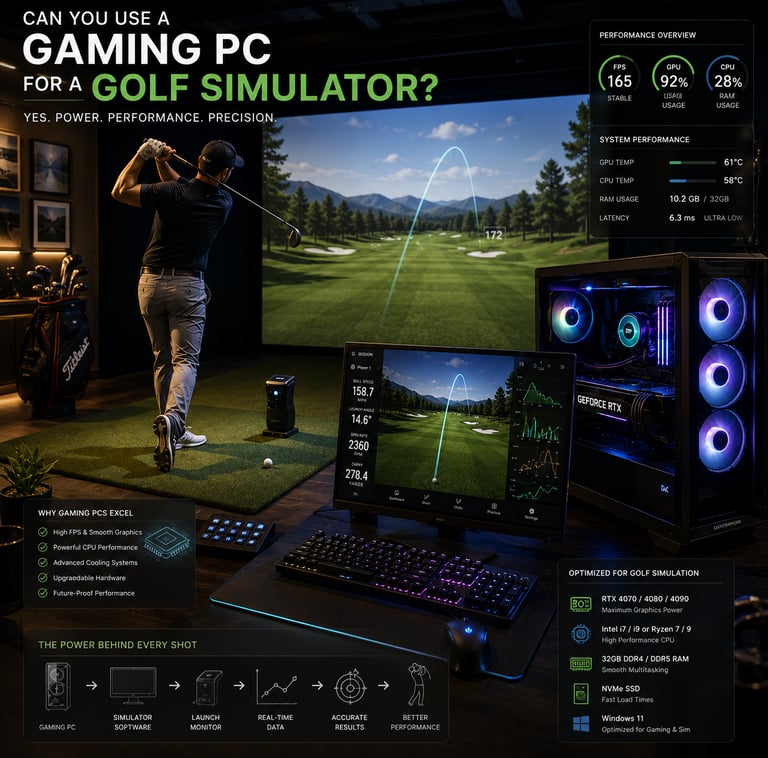
If you’re a tech-savvy golfer or just someone curious about setting up an immersive golf simulator at home, you’ve probably wondered: can you use a gaming PC for a golf simulator? The short answer? Absolutely. But as with anything tech-related, there’s more to it than just plugging in your favorite gaming rig and swinging away. Golf simulators have specific hardware and software needs that overlap nicely with what a gaming PC delivers — mainly strong GPUs, fast CPUs, and smooth software compatibility.
If you’re still building out your setup plan, our Golf Sim Computers guide and Complete Golf Simulator Computer Guide both help explain the hardware side of modern simulator setups and what actually matters for long-term performance.
This is where things get interesting… gaming PCs naturally handle demanding graphics and real-time processing, both crucial for the realistic ball flight physics and immersive environments golf simulators require. But you still want to make sure your setup ticks all the right boxes without overpaying or ending up with bottlenecks. Let me break it down for you, so you don’t have to overthink it.
Quick Verdict
Gaming PCs generally meet or exceed the system requirements for most popular golf simulator software.
Key specs to focus on include a powerful GPU, multi-core CPU, 16GB+ RAM, and SSD storage.
Software compatibility and peripheral connections (like launch monitors) must be checked before committing.
Space and hardware considerations are as important as raw specs for a smooth simulation experience.
How Golf Simulators Work: Technology Overview
At its core, a golf simulator blends real-world golf swing data with immersive software-driven visuals to replicate the feel of playing on an actual course. Sensors and launch monitors capture your club speed, ball spin, launch angle, and trajectory. Then, the PC running the simulator software calculates the ball flight physics, applying realistic environmental factors like wind or terrain.
All that data crunching has to happen instantly, and the visuals need to keep pace without lag or stutter. That’s why golf simulators demand strong computational muscle, particularly:
A multi-core processor to handle physics calculations and sensor inputs simultaneously.
A capable graphics card for rendering lush, detailed courses in high resolution.
Plenty of RAM to let the software load courses smoothly and process multiple tasks efficiently.
Fast storage so maps, textures, and game assets don’t cause long loading delays.
Gaming PC Specs Ideal for Golf Simulation
Here’s what that actually means when you’re shopping or upgrading your gaming PC for a golf simulator:
Processor (CPU): Look for a mid to high-end Intel Core i5/i7 or AMD Ryzen 5/7 with 4-6 cores or more. These processors excel at multi-threading, critical for ball flight physics and real-time input handling. Avoid older dual-core chips, as they may bottleneck your simulation experience.
Graphics Card (GPU): This is where gaming PCs really shine. Popular golf simulator software recommends GPUs like NVIDIA GeForce RTX 3060/3070 or AMD Radeon RX 6600/6700 series or better to smoothly handle high-definition course graphics and complex shadows. Integrated graphics just won’t cut it here.
If you’re trying to understand how graphics cards actually impact simulator performance, our guide on What GPU Do You Need for a Golf Simulator? explains how different GPU tiers affect gameplay, visuals, and long-term software support.
Memory (RAM): At least 16GB RAM is recommended for most golf simulator software. While 8GB might run some programs, swapping and lag will tank your experience, especially with simultaneous software running (like launch monitor interfaces).
Storage: A solid-state drive (SSD) is a must-have for quick load times of courses, player data, and software assets. A good 500GB+ SSD will give you enough room for multiple courses and regular updates.
Connectivity & I/O Ports: Many golf simulators connect sensors and launch monitors via USB or Bluetooth. Your PC should have multiple USB ports (including USB 3.0) and support for Bluetooth if required. Ignore this, and you could end up frustrated with incompatible or missing connections.
Operating System: Most golf simulator software favors Windows OS for broad compatibility. While Macs are playable with some titles, a Windows gaming PC will offer the smoothest and most flexible experience.
Compatibility of Popular Golf Simulator Software with Gaming PCs
Most big names in the golf simulation world—such as E6Golf, The Golf Club, TruGolf, and OptiShot—publish clear system requirements that gaming PCs meet or beat. The main challenge is ensuring your gaming rig’s specs align closely with the recommendations for whichever simulator software you choose.
For example, if your favorite golf simulator needs an NVIDIA RTX GPU, a Ryzen 5 CPU, 16GB RAM, and Windows 10 or newer, a mid-tier gaming PC from the last few years will often be well suited. Just double-check that your PC is running updated drivers and has sufficient USB ports to hook up sensors or launch monitors.
If you’re investing in a gaming PC before buying simulation software, consider the software’s future updates and expansions. Gaming PCs have a distinct advantage here since modular components mean easier upgrades—for example, swapping GPUs or adding RAM later as software demands grow.
For golfers wanting stronger long-term upgradeability and performance headroom, our Best Computers for Golf Simulators guide breaks down some of the strongest desktop systems currently available.
Setting Up Your Gaming PC Golf Simulator: Space and Hardware Needs
Specs aren’t everything! One common oversight is space planning. Your golf simulator needs enough room for a full golf swing, sensor placement, and projection or monitor viewing.
Ideally, you want a room or garage with:
Minimum ceiling height of about 9 feet (to accommodate your swing without hitting the ceiling).
Swing space at least 10 feet wide and 15 feet deep.
Wall or floor space for a high-definition projector screen or large monitor to display the courses.
Adequate ventilation, especially if your gaming PC runs hot during extended sessions.
Your PC should be positioned where it can easily connect to peripherals without cable clutter or risk of accidental disconnection during a swing.
Benefits of Using a Gaming PC Over Other Systems
Some players wonder why not just buy a dedicated golf simulator PC or a standard consumer computer? Gaming PCs hit a sweet spot:
Powerful hardware built specifically for performance and high-resolution graphics.
Upgrade-friendly architecture lets you swap out parts as simulators evolve.
Often more cost-effective than specialized golf simulation computers priced with niche hardware premiums.
Optimized cooling and power supply for prolonged, intensive use.
Broad ecosystem compatible with game controllers, VR headsets, launch monitors, and other peripherals.
Common Mistakes When Using a Gaming PC for Golf Simulation
Here are a few classic pitfalls — and how to avoid them:
Assuming any gaming PC is golf simulator ready without checking software compatibility or port needs.
Buying a powerful PC but neglecting display resolution and refresh rate, which impacts the visual smoothness of the simulation.
Overlooking the importance of space and physical setup requirements, resulting in cramped or unsafe practice areas.
Skimping on adequate cooling solutions that cause thermal throttling and performance drops during long sessions.
Ignoring the need for regular software and driver updates that maintain compatibility and performance.
Failing to verify peripheral compatibility, leading to costly or frustrating sensor and launch monitor integration issues.
If you’re debating whether buying a prebuilt gaming system is enough for simulator use, our breakdown on Are Prebuilt Gaming PCs Good Enough for Golf Simulators? explains where prebuilts shine and where they can become limiting.
Frequently Asked Questions
Can I use any gaming PC for all golf simulator software?
Not necessarily. While most gaming PCs offer solid hardware, always verify the specific simulator’s system requirements and connectivity needs before committing.
What are the minimum and recommended specs for a gaming PC to run golf simulators?
Minimums often include a quad-core CPU, a dedicated GPU (e.g., NVIDIA GTX 1050 or better), 8GB RAM, and an SSD. Recommended specs push to multi-core CPUs like Intel i5/i7 or Ryzen 5/7, RTX 3060+ GPUs, 16GB+ RAM, and SSD storage.
Is a dedicated graphics card necessary for golf simulation?
Yes. Dedicated GPUs provide the graphical horsepower needed for smooth, realistic golf course rendering and avoid stutter or lag caused by integrated graphics.
How much space do I need to set up a golf simulator at home?
Plan for a ceiling height of around 9 feet, with at least 10 feet wide by 15 feet deep swing space to accommodate full swings safely.
Can I use my existing gaming PC or should I buy a new one for golf simulation?
If your current PC meets or exceeds the simulator’s recommended specs, it can work well. Otherwise, consider upgrading components or purchasing a new gaming PC tailored for simulation.
Do I need special peripherals like sensors or launch monitors with a gaming PC?
Yes. The PC alone won’t capture your swing data—the sensors and launch monitors are essential to translate your real-world golf actions into the virtual environment.
How important is the PC’s operating system for golf simulator compatibility?
Most golf simulators prefer Windows OS due to broader support and driver compatibility. Mac OS is less common for high-end simulators.
What upgrades should I consider if my current gaming PC is struggling with golf simulators?
Focus on upgrading the GPU, increasing RAM to at least 16GB, switching to SSD storage if you’re using HDD, or ensuring your CPU supports multi-threading for physics calculations.
Practical Conclusion
So yes, you can absolutely use a gaming PC for a golf simulator—and in fact, it’s often the best choice. Gaming PCs provide the balance of power, upgradeability, and compatibility that golf simulation demands. Just remember to check all the boxes: right CPU and GPU specs, ample RAM and SSD storage, peripheral support, and enough physical space to swing safely and enjoy the visuals.
Thinking through these details might feel like overanalyzing—but hey, that’s what I’m here for. Nail the PC setup, and you get a smooth, realistic golf simulator experience right in your home or garage. Now get ready to take your golf game to the digital green with confidence!
© 2026 GolfTechBuzz. All rights reserved.
Golf Tech Buzz
Performance Through Data
Practical guides, real-world setups, and unbiased comparisons for golfers building smarter practice environments.
General Inquiries: