

Do You Need a Dedicated PC for a Golf Simulator?
Explore whether you need a dedicated PC for golf simulator setups, focusing on power, performance, and practical advice for all skill levels.
COMPUTERS
Golf Tech Buzz Editorial Team - Led by AJ “Buzz” Eichman
5/28/20267 min read
Getting into golf simulation can feel like stepping into a whole new ballgame, literally. One question I hear all the time from guys looking to set up their own gear is: “Do I need a dedicated PC for a golf simulator?” Short answer: it depends. But before you start throwing cash at some fancy tower or console, let’s break down what really goes into running a smooth, realistic golf simulator setup.
If you’re still comparing different hardware routes, our Golf Sim Computers guide and Complete Golf Simulator Computer Guide both help explain the biggest differences between casual setups and serious simulator systems.
Here’s the deal—some simulators come as all-in-one units or work just fine on consoles. Others, especially the high-end or custom setups, benefit from a dedicated PC that can handle the heavy lifting behind the scenes. I’ve been around the block running winter leagues and troubleshooting setups that span from the casual weekend hacker to the serious golfer chasing that +3 handicap vibe. So, let me walk you through what you actually need, why it matters, and how to avoid common rookie mistakes.
Quick Verdict
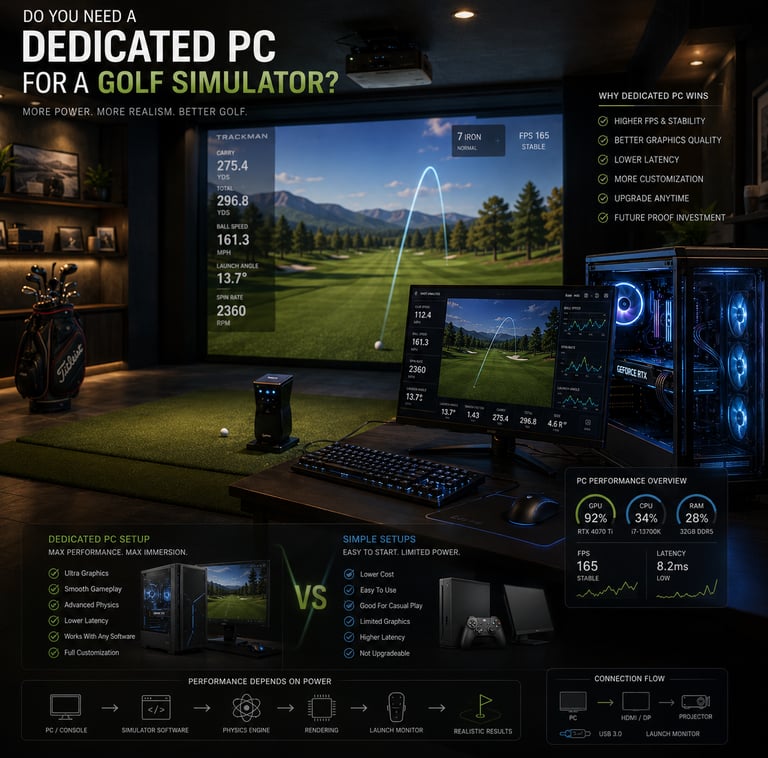
Many golf simulators perform best with a dedicated PC that can flex strong CPU and GPU power.
Not all sims require a PC; consoles and all-in-one systems work fine for casual or space-limited setups.
A dedicated PC lets you upgrade parts over time, future-proofing your setup and improving realism.
Budget, space, and skill level should guide your decision, not just what’s shiny and new.
What Is a Golf Simulator and How Does It Work?
Alright, before we dive into specs and gear, let’s get a quick refresher on what a golf simulator actually does. At its core, a golf simulator blends high-speed cameras or sensors with physics-based software to track your swing, ball speed, spin, launch angle, and then render that data into a virtual environment on screen. The more accurate and responsive the system, the closer you get to feeling like you’re actually on the course—even if you’re in your basement wearing slippers.
The heart of all this is software that processes tons of data in real time and turns it into a visually immersive experience. That’s why the computer you use matters. If the machine doesn’t have enough juice under the hood, you’ll see lag, stuttering graphics, or worse—a simulator that just isn’t trustworthy for training or fun.
Typical Computer Requirements for Golf Simulators
Here’s where things get a little more technical. Most serious golf simulator software recommends:
A multi-core CPU, preferably Intel i5/i7 or AMD Ryzen 5/7 or higher. The CPU handles the calculations and physics models.
A dedicated graphics card—think NVIDIA GTX series or better—to render realistic courses and frame rates.
At least 8GB of RAM, though I always suggest 16GB if you can swing it to keep things smooth.
Solid state drive (SSD) storage to ensure quick loading of software and maps.
Windows 10 or later, since most sims are optimized for that OS.
Proper USB and HDMI ports for sensors, launch monitors, and display connections.
If you’re eyeballing a $300 laptop with integrated graphics, you might be disappointed quickly. I’ve seen guys try this and spend hours troubleshooting performance issues that vanish once they upgraded to a real gaming rig.
If you’re unsure what hardware actually matters most, our guide on What PC Specs Do You Need for a Golf Simulator? breaks down how CPUs, GPUs, RAM, and storage impact overall simulator performance.
Advantages of a Dedicated PC for Golf Simulation
If you're serious about your setup—especially if you're running a league or using the simulator for training—the dedicated PC is your best friend. Here’s why:
1. Power and Performance
Dedicated PCs can handle complex physics calculations and high-fidelity graphics. That means swings get captured with precision, and ball flight looks lifelike without lag or crashes.
2. Upgradability
Tech moves fast, and with a standalone PC, you can swap out your graphics card, add more RAM, or upgrade storage as needed. No more tossing the whole system when your sim software demands more power.
3. Compatibility
Some simulators require specific graphics APIs (like DirectX) or USB sensor connections that are easier to manage and troubleshoot on a proper PC.
4. Flexibility
Using a PC lets you customize your simulator experience with different software options, courses, and even data analysis tools that often don’t run on consoles or all-in-one units.
For golfers wanting stronger long-term performance and upgrade flexibility, our Best Computers for Golf Simulators guide highlights some of the strongest desktop systems currently available for GSPro, TrackMan, and projector-based setups.
Alternatives: Consoles and All-in-One Systems
Now, I get it—not everyone wants to mess with building or maintaining a PC. Consoles, like Xbox or PlayStation, and all-in-one simulators promise plug-and-play simplicity. Heck, I’ve helped set up a few of these for guys with minimal space or budgets, and they definitely have their place.
Consoles can run popular golf simulation games and sometimes work with sensor packages. Still, they usually limit you to fewer software choices and often can’t match the raw fidelity of PC sims.
All-in-one units cram the hardware and sensors into a single box with built-in software. These are sleek and quick to install, great for smaller spaces or beginners. But you lose some flexibility and can get stuck with expensive upgrade paths or limited graphics.
If you’re casual or working with constraints, these alternatives work. But if you’re aiming to fine-tune your swing or use the simulator as a serious training aid, you’ll likely want a dedicated PC down the road.
Setting Up Your Golf Simulator: Space and Hardware Considerations
Before you rush out and buy whatever rig looks good online, think about your physical setup. Dedicated PCs mean you’ll need space for a tower or laptop, monitor(s), cables, and possibly external sensors or launch monitors.
Keep these in mind:
Ventilation matters. Your PC’s gonna sweat during long rounds or practice sessions, so don’t box it in tight without airflow.
USB and HDMI ports should match your sensor requirements. Count how many devices you’ll connect.
Make sure your space accommodates a quality projector or large screen if you’re not just using a monitor.
Sound setup can enhance realism, so consider speakers or a soundbar.
Power outlets and cable management—boring but crucial to a tidy, functional space.
Common Mistakes When Choosing a Computer for Golf Simulation
I’ve seen some painful setups in my day, so let me save you a few headaches with the usual mistakes:
Assuming every golf simulator absolutely needs a top-tier dedicated PC when some models can run fine on consoles or all-in-ones.
Buying a PC blindly without checking the recommended specs of your simulator software.
Forgetting about hardware compatibility—like needing certain USB ports or display outputs.
Neglecting to keep your PC’s drivers and software up to date, which can cause glitches.
Over- or under-spending based on hype instead of your actual needs and budget.
Confusing gaming consoles for PC hardware and assuming software cross-compatibility without verifying.
If you’re debating whether a prebuilt gaming system is enough for simulator use, our guide on Are Prebuilt Gaming PCs Good Enough for Golf Simulators? explains where prebuilts work well and where they can become limiting long term.
Upgrading and Maintaining Your Golf Simulator PC
One of the best perks of a dedicated PC is that you can breathe new life into it with smart upgrades. Want smoother graphics? Upgrade your GPU. Need faster load times or better multitasking? Grab a bigger SSD or more RAM. Keeping your operating system, graphics drivers, and simulator software updated is a must, too.
Keep your PC clean and cool—dust buildup kills performance, and overheating will ruin your fun fast. A little preventive maintenance goes a long way in preserving your simulator’s accuracy and longevity.
Buyer Guidance: Matching Your PC Choice to Your Budget and Skill Level
If you’re a weekend hacker just trying to have some fun during winter, chances are a console or all-in-one setup might be right up your alley. It’s faster to set up, simpler to use, and costs less upfront.
But if you’re chasing data to shave strokes, running a league, or just want the absolute best virtual golf experience, investing in a dedicated PC pays dividends in performance and versatility.
Here’s a quick snapshot:
Beginner or limited space/budget: All-in-one unit or compatible console.
Intermediate player wanting better swing analysis: Mid-range dedicated PC with solid CPU, GPU, and RAM.
Advanced golfer or commercial facility: High-end customized PC rig with room for upgrades and powerful components.
Ultimately, your setup should fit your playing goals, technical comfort, and wallet.
Frequently Asked Questions
Do all golf simulators need a dedicated PC?
No, not all golf simulators require a dedicated PC. Some all-in-one units and consoles can run certain golf simulation software adequately, especially for casual use.
What are the minimum computer requirements for a golf simulator?
Generally, a multi-core processor (Intel i5 or AMD Ryzen 5), dedicated graphics card (NVIDIA GTX series or equivalent), 8GB RAM, and SSD storage, running Windows 10 or later, are recommended.
Can I use a gaming console instead of a PC for a golf simulator?
Yes, but your options may be limited to certain software titles, and you might sacrifice performance and customizability compared to a dedicated PC.
What are the benefits of a dedicated PC over an all-in-one golf simulator system?
Dedicated PCs offer better performance, flexibility to upgrade components, broader software compatibility, and improved accuracy in analysis and graphics.
How much should I budget for a PC for golf simulation?
For a solid mid-range dedicated PC, expect to spend around $800 to $1500, depending on components and upgrades.
Are there specific parts I should prioritize when buying a PC for golf simulation?
Focus on a strong CPU and dedicated GPU first, then RAM and SSD storage. Ports and connectivity options should also meet your hardware needs.
Can I upgrade my golf simulator PC later to improve performance?
Absolutely. One of the key advantages of a PC is the ability to upgrade graphics cards, add RAM, or replace other components as software demands evolve.
What common compatibility issues should I be aware of?
Ensure your PC has enough USB ports for sensors, supports necessary graphics APIs like DirectX, and that your operating system is compatible with your simulator software.
Conclusion
If you’re serious about your golf simulator, a dedicated PC is usually your best bet to get the smoothest swing tracking, sharpest graphics, and longest system life. That said, it’s not mandatory for every player or space. Consoles and all-in-one systems carve out their own nice niche for casual use or smaller setups.
The trick is to match your computer choice to your goals, budget, and how deep you want to get into your golf tech. Don’t just grab the fanciest box you see online—look at those specs, check compatibility, and keep your wallet and space in mind.
At the end of the day, a good simulator setup is like a good golf swing: efficient, reliable, and built for improvement. Make your computer choice part of that foundation, and you’ll be holed out before you know it.
© 2026 GolfTechBuzz. All rights reserved.
Golf Tech Buzz
Performance Through Data
Practical guides, real-world setups, and unbiased comparisons for golfers building smarter practice environments.
General Inquiries: