
What PC Do You Need for a Garage Golf Simulator Setup?
Discover the key specs your PC for golf simulator needs to deliver smooth graphics, fast load times, and real-time performance in your garage setup.
COMPUTERS
Golf Tech Buzz Editorial Team - Led by AJ “Buzz” Eichman
5/28/20266 min read
If you’re thinking about getting serious with a garage golf simulator, this is one piece of the puzzle you can't afford to mess up: the PC. Sure, you can have the fanciest projector and launch monitor money can buy, but if your computer can’t keep up, you’re stuck watching a slideshow instead of silky smooth swings and real-time feedback. Here’s the deal — a good PC tailored for golf simulation is what makes your setup sing, from realistic graphics to instant data analysis. I’ve seen guys try to cut corners with weak machines and end up frustrated and broke from wasted upgrades. Let’s walk through what you actually need so you can spend time hitting balls, not troubleshooting.
If you’re still comparing different setup routes, our Golf Sim Computers guide and Golf Simulator PC Requirements by Software breakdown both help explain what kind of hardware modern simulator software actually needs.
Quick Verdict – What Your Golf Simulator PC Needs Right Now
A quad-core processor or better keeps your software running smoothly without hiccups.
A dedicated mid-range or better graphics card (think NVIDIA GTX/RTX or AMD Radeon) is non-negotiable for crisp visuals and smooth frame rates.
16GB of RAM is the sweet spot to juggle simulation software and background apps without slowdowns.
An SSD (preferably NVMe) slashes load times and makes loading courses and shot data seamless.
Plenty of USB 3.0 ports and reliable Wi-Fi or Bluetooth for connecting sensors and cameras.
Solid cooling and ventilation considerations — garages can get hot, and overheating kills performance.
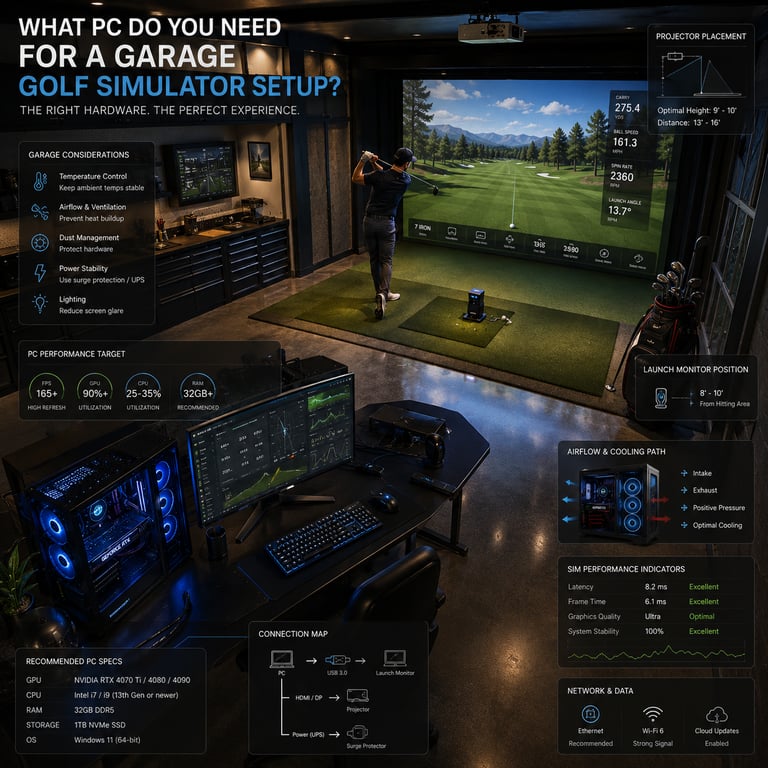
Understanding Golf Simulator PC Requirements
For a garage golf simulator, you’re basically running some pretty demanding software that tracks your swing, renders complex 3D golf courses, and calculates physics in real time. To pull that off, you need a PC that’s up to par — pun intended.
Processor, Graphics Card, and RAM: The Core Components
Processor (CPU)
When it comes to simulating golf, a strong processor isn’t optional; it’s the foundation. Most golf simulator software recommends at least a quad-core CPU, and honestly, you want something like a recent Intel i5 or Ryzen 5 at minimum. I’ve run setups on weaker dual-core CPUs, and the lag — oh boy, the lag — never lets you feel right about your swing. If you’re the kind of player who loves all the bells and whistles and futureproofing, stepping up to a six-core CPU is a smart move.
Graphics Card (GPU)
Look, I get it — not everyone wants to drop grand after grand on a beast gaming rig. But here’s where you don’t want to scrimp. The GPU handles rendering the golf courses and tracking shot visuals at high resolutions without stuttering. A dedicated GPU like an NVIDIA GTX 1660 Super or better will deliver smooth frame rates and sharp visuals. The newer RTX series brings ray tracing and higher fidelity but isn’t strictly necessary unless you’re building a top-tier setup. Avoid onboard graphics chips — they just don’t cut it for simulation needs.
If you’re trying to understand how much graphics power really matters, our guide on What GPU Do You Need for a Golf Simulator? explains how different GPU tiers affect simulator visuals, FPS, and long-term performance.
RAM
Golf simulator software loves memory. You’ll want at least 16GB of RAM. Anything less means your system will struggle to juggle input from sensors, keep course graphics flowing, and run any background apps like coaching tools or video analysis simultaneously. I’ve found 16GB almost always hits that “just right” balance for performance and price. If you’re loading up on apps or streaming your practice rounds, even 32GB might be worth considering.
Storage and Connectivity Needs
Storage
Gone are the days when hard drives (HDD) cut it for heavy simulation software. If I’m being honest, SSD storage is a must-have. This drastically reduces load times as you launch the simulator and load different courses or rounds. Ideally, an NVMe SSD (faster than standard SATA SSDs) speeds things up even more but isn’t absolutely required.
Aim for at least 500GB SSD to start. Trust me, golf courses with detailed textures and shot history data eat up space quickly. A hybrid storage setup (SSD for the software + HDD for backups or video files) is a nice touch if your budget allows.
Connectivity
You need solid USB 3.0 ports or higher — this is how your PC connects to launch monitors, sensors, cameras, and other peripherals. Wireless options like Bluetooth and Wi-Fi are also essential for newer sensor tech, so your PC can seamlessly talk to multiple devices simultaneously.
Don’t underestimate this. I’ve seen setups where guys bought perfect rigs but skimped on ports and ended up juggling USB hubs and wireless adapters in a mad scramble.
For golfers wanting stronger long-term upgradeability and desktop-level performance, our Best Computers for Golf Simulators guide highlights some of the strongest systems currently available for garage golf bays and indoor simulator rooms.
Setting Up Your Garage Space for the PC and Simulator
Garages are tricky. They can heat up fast, collect dust, and often have crammed layouts. So don’t just grab any PC and slap it by the simulator screen.
Ventilation is key: Make sure your rig has good airflow or external cooling solutions. Enclosed cases with multiple fans or even a small desk fan nearby can keep temps down during long practice sessions.
Space matters: Smaller form-factor gaming PCs can fit cozy corners, but make sure accessibility doesn’t suffer. You want easy reach for plugging and unplugging peripherals.
Noise can be a dealbreaker too. Some high-performance PCs sound like a jet engine under load. If you value a peaceful environment, look toward PCs known for quiet operation or invest in better cooling to reduce fan noise.
Common Mistakes to Avoid When Choosing Your PC
Underestimating GPU needs: A weak graphics card kills the immersive experience with choppy visuals.
Ignoring software specs: Not checking what your golf simulator software specifically demands leads to wasted cash on incompatible or insufficient hardware.
Overlooking storage speed: Slow HDDs cause frustrating load times and can stall software responsiveness.
Forgetting connectivity: Without enough or right ports, your sensors and cameras might not integrate properly.
Buying a “budget” PC that can’t be upgraded: Simulator technology evolves, so you want room to improve components down the line.
Neglecting garage conditions: Poor cooling setups cause overheating, which throttles performance or causes crashes.
If you’re debating whether prebuilt gaming systems are strong enough for simulator use, our guide on Are Prebuilt Gaming PCs Good Enough for Golf Simulators? explains where prebuilts work well and where they can become limiting long term.
Upgrading and Future-Proofing Your Golf Simulator PC
If you already have a semi-decent PC, you might not need a full rebuild. RAM upgrades are usually the cheapest and easiest path to better performance, while adding or swapping a dedicated GPU will make the biggest bang.
For new buyers, lean toward components with some wiggle room. A CPU with more cores than you currently need, an upgrade-friendly motherboard, and a quality power supply can keep your setup relevant for years.
Don’t forget software updates too—many golf simulators scale better over time with patches, but only if your hardware can keep pace.
Frequently Asked Questions
What are the minimum PC specs needed for a golf simulator?
At minimum, a quad-core CPU (Intel i5/Ryzen 5 or equivalent), a mid-range dedicated GPU like NVIDIA GTX 1660 Super, 16GB RAM, and an SSD. Plus, USB 3.0 ports and good cooling.
Is a gaming PC necessary for a golf simulator setup?
Not strictly “gaming” branded, but you need similar specs to a gaming PC because simulator software demands strong graphics and processing power.
Can a laptop be used for a garage golf simulator?
Some high-end gaming laptops can handle it, but laptops usually have cooling and connectivity limitations. A desktop PC is generally preferred for reliability and upgrade options.
How much RAM is ideal for golf simulation software?
16GB is the sweet spot. More (like 32GB) might help if you’re running extra apps alongside the simulator.
What graphics card brands/models work best?
NVIDIA GTX/RTX series and AMD Radeon RX series are top picks. Avoid integrated graphics or low-end cards.
Do golf simulator software programs have specific hardware requirements?
Yes, always check your simulator’s official specs. Most require Windows OS, a dedicated GPU, and USB 3.0 or better.
How do I connect sensors and cameras to the PC?
Typically via USB 3.0 or wireless connections (Wi-Fi, Bluetooth). Confirm peripheral requirements before purchase.
What upgrades improve golf simulator performance?
GPU and RAM upgrades give the largest performance boost, followed by SSD storage and CPU improvements.
Conclusion
Setting up a garage golf simulator isn’t just about the latest screen or sensor—it’s about having the right PC under the hood. Pick a quad-core or better processor, a dedicated mid-range graphics card, at least 16GB of RAM, and fast SSD storage, then don’t forget to prioritize cooling and connectivity. Get these right, and you’ll enjoy smooth graphics, quick loading, and reliable data tracking every time you tee off indoors. Skip the cheap shortcuts here, and you’ll thank yourself on those long winter days practicing your swing with zero frustration. When it comes to golf simulation, the PC is your secret weapon—choose wisely, and the fairways are endless.
© 2026 GolfTechBuzz. All rights reserved.
Golf Tech Buzz
Performance Through Data
Practical guides, real-world setups, and unbiased comparisons for golfers building smarter practice environments.
General Inquiries: