

Are Golf Simulator Control Boxes Worth It?
Explore how golf simulator control boxes enhance your setup by reducing latency, improving device compatibility, and simplifying management for better performance.
SIMULATORS
Golf Tech Buzz Editorial Team - Led by AJ “Buzz” Eichman
7/9/20265 min read
If you're building a golf simulator setup, especially one that's more than just the basics, you've probably stumbled across the term "control box" a few times. Maybe you're wondering if it's just another gadget selling snake oil or if it actually makes a difference. Here's the deal: golf simulator control boxes aren't some shiny add-on you can easily skip if you're running a simple setup. But for those juggling multiple devices and aiming for seamless integration and top-notch performance, they can be game changers.
If you're still planning your simulator, our Golf Simulators guide covers the core equipment you'll need, while the Golf Simulator Accessories Guide explores upgrades that improve your overall simulator experience.
Quick Verdict
Control boxes centralize and simplify the connections between your launch monitors, sensors, projectors, and software.
They improve data synchronization and can cut down latency for more accurate shot tracking.
Not every golf simulator setup needs a control box—entry-level systems often run just fine without one.
Consider your setup complexity, budget, and goals before investing; they're especially worth it for multi-device or commercial setups.
What Are Golf Simulator Control Boxes?
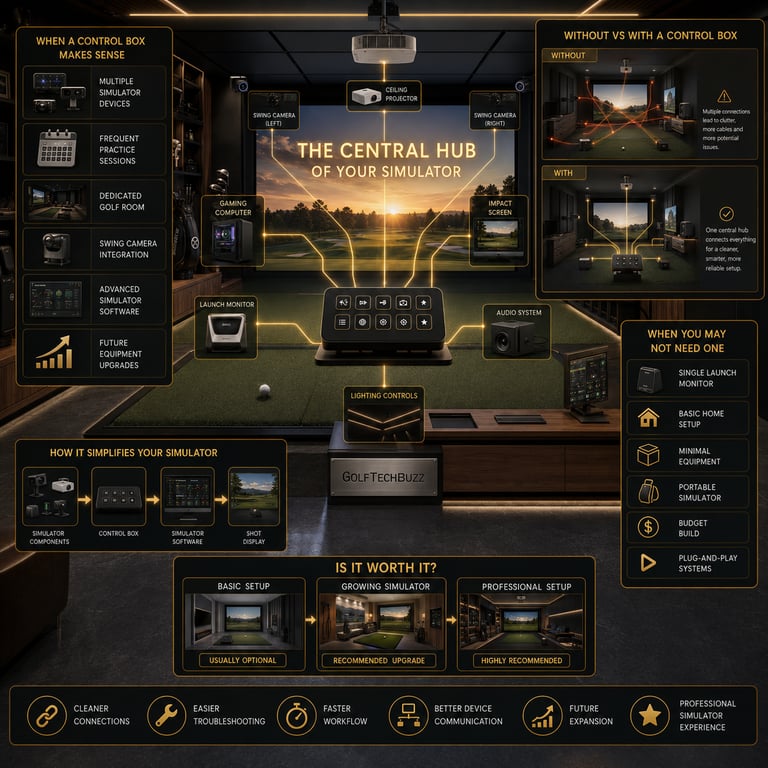
Think of a golf simulator control box as the nerve center of your simulation setup. Instead of your sensors, launch monitors, projectors, and computer all trying to talk to each other independently (like a bad group chat), the control box steps in as the translator and traffic controller. It manages all those inputs and outputs, making sure everything runs smoothly and in sync.
Without one, you're wiring gadgets all over the place, hoping nothing messes up, and spending extra time troubleshooting or dealing with latency. With one, it's about clean connections, easier troubleshooting, and a setup that actually feels like it was made to work together. If you're still deciding whether a dedicated controller is better than simply using your computer, our Golf Simulator Control Box vs Keyboard: Which Is Better? comparison breaks down the advantages and disadvantages of both approaches.
If you're considering adding one to your simulator, our Best Golf Simulator Control Boxes guide compares the top options available today.
How Do Control Boxes Work?
Under the hood, it's mostly about communication protocols. These boxes act as hubs that link hardware, such as sensors and launch monitors, with your simulator software. They often support USB, Bluetooth, Ethernet connections, or a combination depending on your equipment.
They don't just pass information along; many models process data slightly to reduce the lag between your swing and the on-screen result. Firmware updates can also improve compatibility and add support for new hardware over time. Having one means your simulator behaves more like a fully integrated system instead of a collection of separate components.
If you're deciding between different connection methods, our Wired vs Wireless Golf Simulator Control Boxes guide explains the advantages of each.
Benefits of Using a Golf Simulator Control Box
Improved Setup and Management
If you've ever spent hours tangled in cables or swapping connections trying to isolate a problem, you'll appreciate how a control box helps. It centralizes all your connections in one place. Plug your launch monitor, projector, sensors, controls, and computer into it, and let the control box handle the rest. This saves time and headaches, especially if you upgrade equipment or regularly adjust your setup.
Better Compatibility and Communication
Different pieces of golf simulator equipment often rely on varying communication protocols and standards. A control box acts as the universal translator, reducing conflicts and making sure your software and hardware work together smoothly. You'll get more reliable data flow, which means fewer dropped signals and more consistent shot tracking.
Reduced Latency and Improved Tracking
Here's where serious golfers notice the difference. The control box can process input faster than a simple direct hardware connection, cutting down lag between impact and what appears on the screen. That faster response creates a smoother experience and gives you greater confidence in your simulator's feedback.
Future-Proofing Your Simulator
Planning to add cameras, additional sensors, or other accessories later? A quality control box makes expansion much easier. Instead of rebuilding your entire wiring setup, new devices can often be integrated with minimal effort. If you're still deciding what features matter most, our How to Choose the Right Golf Simulator Control Box guide can help narrow your options.
Common Setup Scenarios for Control Boxes
Home golf simulators with multiple devices—launch monitors, foot sensors, projectors, swing cameras, and audio equipment—benefit the most from dedicated control boxes because they simplify wiring and improve communication between components.
Commercial golf facilities, teaching studios, and simulator leagues almost always rely on control boxes because they need dependable performance during long practice sessions and customer use. Downtime simply isn't an option.
For smaller home simulators, however, the benefits depend on the complexity of the setup. Many entry-level systems perform perfectly well without one.
Key Considerations Before Buying a Control Box
Compatibility should always be your first priority. Verify that the control box supports your simulator software, launch monitor, and communication methods before making a purchase.
Next, think about the size of your setup. A basic launch monitor and projector may not justify the added expense, while larger systems with multiple accessories often benefit significantly from centralized control.
You'll also want to consider available space, cable routing, and future expansion plans. Spending slightly more on a quality controller with firmware updates and ongoing support often pays off over time.
If you're building around GSPro, our Do You Need a Golf Simulator Control Box for GSPro? article covers platform-specific considerations.
Common Mistakes to Avoid
Buying a control box without checking compatibility.
Spending premium money on a simple simulator that doesn't need one.
Ignoring cable routing and overall organization.
Skipping calibration or proper installation after setup.
Assuming every control box offers the same features or software support.
Frequently Asked Questions
What exactly does a golf simulator control box do?
It centralizes and manages connections between your simulator's hardware, such as launch monitors and sensors, and your simulator software to improve communication and reduce latency.
Do I need a control box for a home golf simulator?
If your setup is simple, probably not. If you're running multiple devices or planning future upgrades, it can be a worthwhile investment.
How do control boxes improve my golf simulator's performance?
They help reduce latency, improve communication between devices, and create more consistent shot tracking by managing hardware connections more efficiently.
Are control boxes compatible with all golf simulator brands?
No. Compatibility depends on your simulator software and connected hardware, so always verify specifications before purchasing.
Can a control box reduce setup time?
Yes. By centralizing connections, it simplifies wiring and makes future troubleshooting much easier.
Is it worth upgrading my current simulator with a control box?
If you're experiencing connection issues, adding more accessories, or expanding your simulator, a control box can make a noticeable difference.
What features should I look for in a golf simulator control box?
Look for compatibility, connection options, firmware support, build quality, and a button layout that matches your preferred simulator software.
How much do golf simulator control boxes cost?
Prices typically range from around $125 for basic models to more than $300 for premium controllers with additional buttons and wireless functionality.
Should You Upgrade Your Simulator with a Control Box?
If you've built your first golf simulator and thought, "Man, this could run smoother," a control box might be exactly what you're missing. But if your simulator has worked perfectly without one, don't feel pressured to buy another accessory just because it's popular.
For golfers using multiple devices, expanding their simulator, or wanting a cleaner and more reliable setup, a control box often becomes one of the most appreciated upgrades they make.
Conclusion
Golf simulator control boxes aren't essential for every golfer, but they can dramatically improve convenience, organization, and overall usability as your simulator becomes more advanced. The more equipment you add, the more valuable centralized control becomes.
For simple setups, your money may be better spent elsewhere. For larger or growing simulators, however, a quality control box can eliminate daily frustrations and create a smoother, more enjoyable practice experience. Ultimately, the best upgrade is the one that makes you spend more time hitting golf balls and less time managing your technology.
© 2026 GolfTechBuzz. All rights reserved.
Golf Tech Buzz
Performance Through Data
Practical guides, real-world setups, and unbiased comparisons for golfers building smarter practice environments.
General Inquiries: