

How to Choose the Right Golf Simulator Control Box
Learn how to select the perfect golf simulator control box to ensure real-time data, strong compatibility, and smooth indoor golfing performance.
SIMULATORS
Golf Tech Buzz Editorial Team - Led by AJ “Buzz” Eichman
7/9/20266 min read
If you’re serious about dialing in your golf simulator setup, the control box is the magic brain behind the operation. It’s the part that rallies all the sensor data, coordinates with your launch monitor, and pushes info to your screen so you get those sweet, accurate swing stats and ball flight visuals. Skip this step or pick the wrong box, and you end up with sketchy numbers, laggy gameplay, or a headache every time you tee off indoors.
Here’s the deal: choosing the right golf simulator control box isn’t about grabbing the fanciest gizmo or the cheapest option. It’s about matching this hub to your gear, your space, and yes, your wallet to build a system that runs smooth and feels natural. I’ve built more simulators than I can count and trust me, the control box is where things either click or crumble.
If you're building your simulator from scratch, our Golf Simulators guide covers the essential equipment, while the Golf Simulator Accessories Guide explores the upgrades that can improve your overall experience.
Quick Verdict
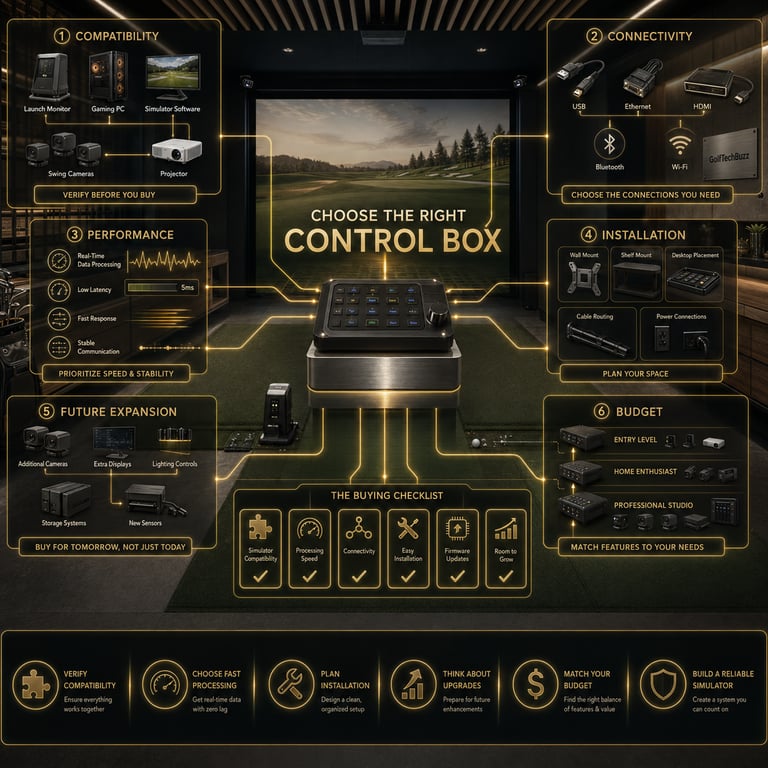
Always check compatibility with your specific golf simulator and launch monitor before buying.
Prioritize real-time data processing, solid connectivity options (USB, HDMI, wireless), and firmware update support.
Consider your installation space—garage setups need something different than commercial indoor ranges.
Budget gear works fine for casual players, but pros and coaches will want the higher-end boxes for precision and expandability.
What Is a Golf Simulator Control Box?
Think of the control box as the control tower of your golf simulator universe. It processes swing and ball data captured by sensors and the launch monitor and communicates that info to your computer or screen. Without it, you’re looking at raw data that doesn’t sync up or, worse, no data at all.
It’s not glamorous, but it’s crucial. The box crunches numbers at lightning speed to give you real-time feedback on your launch angle, ball speed, spin rate, and all those juicy stats. If your control box lags or isn’t up to snuff, your simulated shots won’t reflect reality, which defeats the entire purpose.
If you're still comparing available models, our Best Golf Simulator Control Boxes guide highlights the top options for every type of simulator.
Key Features to Look for in a Control Box
When you browse control boxes, here are the core features that separate the champs from the chumps:
Real-Time Data Processing
This is non-negotiable. The control box needs to handle incoming sensor data instantly to keep your simulator responsive. Delay kills the immersion—and your swing rhythm.
Connectivity Options
Look for USB, HDMI, and if possible, wireless connections via Bluetooth or Wi-Fi. Wired setups are rock-solid for stability, but wireless options make your setup flex-friendly.
Software Update Support
Tech isn’t perfect, which means new features, bug fixes, and compatibility updates matter. A control box that supports firmware and software updates will stay relevant longer.
Multi-Input Compatibility
Your control box should sync easily with your sensors, launch monitor models, and different golf simulation software. Some boxes play nice with multiple brands, which is huge if you like to tinker.
Size and Form Factor
Depending on your space, a bulky unit might cramp your simulator or limit placement options. Smaller, well-designed boxes make cleaner setups and easier installations.
If you're debating connection methods while shopping, read Wired vs Wireless Golf Simulator Control Boxes.
Compatibility Considerations
Hear me out: the worst mistake I see is guys buying a control box that doesn’t play well with their existing hardware. Not all control boxes support every sensor brand or launch monitor. That’s why you need to check product specs carefully and, if you can, chat with other users or forums dedicated to your simulator system.
Compatibility isn’t just hardware—software matters too. Make sure the control box supports the golf simulation software you plan to run, whether it’s something premium or lighter casual stuff.
If you're wondering whether you even need a dedicated controller, check out Are Golf Simulator Control Boxes Worth It?
Installation Tips and Requirements
Installation can be painless or a total mess depending on the control box you choose. Here’s a few pointers:
Mounting options should fit your room layout. Look for boxes with wall brackets or rubber footing if you’re tossing the unit on a shelf.
Power supply needs matter. Some boxes pull power via USB; others need external adapters.
Check cable length and port accessibility. You don’t want cables pulling tight or awkwardly routed.
Wireless control boxes reduce cable clutter but may need a stable Wi-Fi environment.
User-friendly interface and clear instructions can save hours of frustration.
Performance and Upgrade Options
If you’re running a commercial setup or you’re serious about your golf game, spend the extra on a model with faster processing speeds and higher data accuracy. These boxes usually support advanced features like multi-screen setups, expanded sensor arrays, and more frequent software updates.
Also, check the upgrade path. Can you update firmware easily? Is there room for adding accessories or integrating with other devices? Future-proofing here means your investment lasts longer and adapts as your skills or setup evolve.
If you're using GSPro, you may also want to read Do You Need a Golf Simulator Control Box for GSPro?
Budgeting for Your Control Box
This isn’t golf clubs—you’re not always paying for brand flash. But it still pays to be realistic about budget versus needs.
Entry-level or budget control boxes can be just fine for hobbyists or beginners who want occasional play and decent stats. Just don’t expect pro-level precision or luxury features.
Mid-range models hit a sweet spot for most home players, offering solid performance, good compatibility, and decent connectivity without breaking the bank.
High-end units are designed for commercial use, coaches, or players chasing that perfect swing analysis. They deliver ultra-fast processing, top-tier software support, and future expandability.
If you're still deciding between a keyboard and a dedicated controller, see Golf Simulator Control Box vs Keyboard: Which Is Better?
Common Mistakes to Avoid
Buying a control box without verifying it works with your launch monitor or sensors.
Ignoring software compatibility and missing out on critical firmware updates.
Forgetting about physical size and installation constraints, leading to cramped or ugly setups.
Assuming all control boxes are created equal—processing speed and data precision vary widely.
Overlooking future upgrades and expansion possibilities.
Underestimating the importance of power supply stability and appropriate connectivity.
Frequently Asked Questions
What exactly does a golf simulator control box do?
It acts as the central processing unit that manages data flow between your sensors, launch monitor, and display system, ensuring the simulated ball flight and swing metrics are accurate and responsive.
How do I know if a control box is compatible with my golf simulator?
Check the manufacturer’s specs for the control box and your simulator hardware. Look for supported launch monitor models, sensor protocols, and compatible software. Online forums and user reviews can also offer hands-on insights.
Can I upgrade my current control box, or do I need a new one?
Many modern control boxes support firmware and software updates, which can improve performance or add features. However, hardware limitations may require a new unit if you want major upgrades or compatibility with new devices.
What features should I prioritize for better simulator performance?
Real-time processing speed, multi-port connectivity (USB, HDMI), wireless options, and solid software update support top the list. Also, consider whether the control box can handle multiple inputs or attach external accessories.
Are wireless control boxes better than wired ones?
Wireless options add convenience and reduce cable clutter, but they depend on strong, consistent Wi-Fi or Bluetooth signals. Wired connections tend to be more stable and lower latency, which some players prefer for accuracy.
How difficult is the control box installation for beginners?
It depends on the box design and your space. Some units offer simple plug-and-play setups with easy-to-follow guides. Others might require more technical know-how, especially for commercial or multi-sensor setups.
What is the price range for different quality control boxes?
Budget models start around $200–$400, mid-range units can go from $500 to $1500, and high-end commercial-grade boxes can exceed $2000 depending on features and expandability.
Will the control box work with multiple golf simulation software programs?
Top-tier control boxes often support a variety of simulation software, but lower-end models might be limited. Always verify software compatibility before purchase.
Conclusion
Look, the control box might not be the flashiest piece of your golf simulator gear, but it’s the unsung hero that keeps everything connected and firing in sync. Choose the right one, and you’re rewarded with spot-on shot data and smooth, immersive gameplay that makes winter leagues a breeze and your garage into a serious practice zone.
Remember to double-check compatibility, prioritize speed and connectivity, plan installation logistics, and balance your budget smartly. If you do that, your golf simulator will not only work but work well, making every swing feel real and every round a little more fun.
Now get out there and build that perfect setup. I’ve seen guys try to cut corners here, and trust me, it’s rarely worth it. Pick the right control box, and your simulator will be as reliable as your best drive off the tee. Cheers to better indoor golf!
© 2026 GolfTechBuzz. All rights reserved.
Golf Tech Buzz
Performance Through Data
Practical guides, real-world setups, and unbiased comparisons for golfers building smarter practice environments.
General Inquiries: