

Wired vs Wireless Golf Simulator Control Boxes
Explore the key differences and advantages of a wired golf simulator control box to help you choose the ideal setup for your indoor golf experience.
SIMULATORS
Golf Tech Buzz Editorial Team - Led by AJ “Buzz” Eichman
7/9/20266 min read
If you’re diving into the world of golf simulators, here’s the deal: Control boxes are the unsung heroes of your setup. They’re basically the brains behind the whole operation, linking your sensors, cameras, and software so your swing and ball data actually mean something. Choose wisely between wired or wireless control boxes, and you’re golden. Pick wrong, and you could be drowning in latency, interference, or cable spaghetti.
Let me break down what you need to know to pick the control box that suits your game and space.
If you're building your simulator from the ground up, check out our Golf Simulators guide and Golf Simulator Accessories Guide to see how everything works together.
Quick Verdict
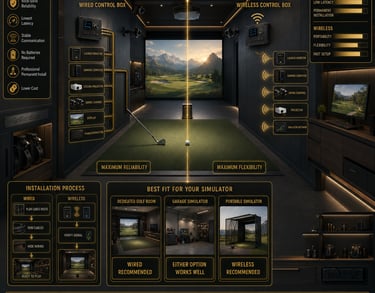
Wired control boxes rock for stable, low-latency connections—perfect for dedicated indoor setups.
Wireless control boxes offer freedom from cables, making them great for flexible or portable setups.
Performance differences are usually small, but wireless can suffer from signal dropouts and interference.
Budget-wise, wired setups tend to save you some cash, while wireless gear often commands a premium.

What Is a Golf Simulator Control Box?
Think of the control box as the central command center in your golf simulator. It processes all the sensor info, coordinates the cameras, and ensures the data that lands on your screen matches the actual swing and ball flight. Without it, all those fancy sensors and high-res displays are just decorative.
In a wired setup, this box links directly to everything via cables—USBs, HDMI, proprietary connections—you name it. In wireless setups, the control box sends data over Wi-Fi or Bluetooth antennas. The method affects how smooth your game looks and how much effort you put in during setup.
If you're still shopping, our Best Golf Simulator Control Boxes guide compares the top wired and wireless models available today.
How Wired Golf Simulator Control Boxes Work
Wired control boxes keep it old school but rock solid: physical cables connect sensors, displays, and the box itself. This means data travels on a direct path, virtually immune to interference, and latency is negligible. We’re talking under 10 milliseconds, so your swing feedback feels instantaneous.
Since the connections are hardwired, you need to plan out cable routes and manage them carefully. This might mean drilling holes, running cables through walls, or using cable ducts. For a basement or dedicated golf room, this is usually no big deal.
Because the tech is straightforward, wired control boxes generally cost less. No fancy radios or batteries draining power mid-game.
If you're wondering whether a dedicated controller is worth buying in the first place, read Are Golf Simulator Control Boxes Worth It?
How Wireless Golf Simulator Control Boxes Work
Wireless control boxes cut the cords—literally. They use Wi-Fi (often 2.4 GHz or 5 GHz) or Bluetooth to beam data from sensors to the box and then on to your simulator software. This flexibility means you’re not tied to fixed cable runs, making setup a breeze and allowing you to rearrange gear on the fly. If you’re tight on space or bring your sim out to friend’s garages or events, this convenience shines.
But wireless connectivity isn’t without flaws. Distance, walls, and interference from other devices can cause data dropouts or lag. Battery life becomes a factor if your wireless box or sensors aren’t plugged in, requiring periodic charging or battery swaps.
Performance Comparison: Wired vs Wireless
If I’m being honest, for most casual users, the performance gap is pretty small. When the conditions are good—strong wireless signal, minimal interference—the difference in accuracy and latency is negligible. But for the serious players chasing every millisecond of delay and razor-sharp data, wired control boxes hold the crown.
The wired connection’s low latency ensures every swing nuance is captured accurately with no timeout. Wireless setups sometimes struggle here, especially in crowded Wi-Fi environments. Signal hiccups can result in missed frames or delayed ball tracking, which drives me nuts when running winter league sessions where everyone wants top-level feedback.
If you're also deciding whether a keyboard might be enough, check out Golf Simulator Control Box vs Keyboard: Which Is Better?
Setup Considerations and Installation Tips
Wired setups need a game plan for cable management—this goes beyond just running cables. You’ll want cable ties, clips, and maybe even raceways to keep cords out of the way and safe from foot traffic. Consider your control box location carefully: too far from sensors can mean excessive cable length, which affects neatness and sometimes performance.
Wireless is more plug-and-play but beware of placing your control box near microwaves, cordless phones, or heavy Wi-Fi traffic zones. Sometimes just moving the box a few feet can clear up signal issues.
If you're still deciding what features matter most before buying, see How to Choose the Right Golf Simulator Control Box.
Pros and Cons: Wired Control Boxes
Pros
Rock-solid, reliable data transmission
Low latency ideal for high accuracy
Usually cheaper upfront
No batteries or charging required
Less prone to interference
Cons
Cable runs can be a hassle and unsightly
Less flexible for rearranging your simulator space
Installation can be time-consuming
Pros and Cons: Wireless Control Boxes
Pros
Simple, cable-free setup and teardown
Flexible positioning in tight or multi-use spaces
Great for portable setups or occasional use
Cons
Potential for interference and signal dropouts
Possible latency increase, though often minimal
Batteries need monitoring and charging
Generally pricier upfront
Common Mistakes With Golf Simulator Control Boxes
I’ve seen guys try this and stumble. Here are common slip-ups to sidestep:
Underestimating the complexity of running cables for wired setups. Don’t just wing it; plan your cable routes well, or you’ll regret it.
Ignoring wireless interference sources. Thick walls, other wireless gear, and appliances can sneak in signal issues.
Assuming wireless always means convenience without trade-offs. If accuracy and reliability matter most, think twice.
Overlooking compatibility. Not all control boxes play nice with every sensor or simulator software.
Skipping firmware updates or battery maintenance. Keep your wireless gear patched and powered, or expect headaches.
If you're a GSPro user, you may also want to read Do You Need a Golf Simulator Control Box for GSPro?
Frequently Asked Questions
What are the key technical differences between wired and wireless golf simulator control boxes?
Wired boxes use physical cables (USB, HDMI, proprietary) for direct data connection, ensuring low latency and stable transmission. Wireless boxes rely on Wi-Fi or Bluetooth networks, which introduce potential interference and latency variability but provide flexibility in placement.
How do wired and wireless control boxes affect golf simulator setup time?
Wired setups generally require more upfront time for cable routing and management, but once installed, they’re low maintenance. Wireless setups are faster to get going since you skip complex wiring, but you need to troubleshoot signal strength and battery levels occasionally.
Are there performance or accuracy differences between the two types?
Wired control boxes typically offer more consistent low-latency and high accuracy, which matters for serious players. Wireless units perform well in optimal conditions but can encounter dropout or lag in noisy wireless environments.
Which is better for a home versus portable golf simulator setup?
Wired control boxes suit permanent home setups with dedicated space, where cable management is feasible. Wireless boxes shine for portable or shared spaces where quick setup/takedown and flexibility trump the last bit of precision.
What are typical maintenance requirements for wireless control boxes?
You’ll need to charge or swap batteries regularly, keep firmware updated to handle connectivity fixes, and occasionally re-pair devices if signal drops occur.
Can I upgrade from wired to wireless control without replacing all equipment?
It depends on your system. Some simulators allow swapping control boxes if sensors and software support wireless protocols, but often you’ll need compatible wireless sensors and possibly new software licenses.
Do wireless control boxes introduce input lag?
Some lag is possible due to wireless transmission delays, but top-tier units minimize this to near imperceptible levels. Still, latency varies by environment and hardware quality.
How important is cable management with a wired control box?
Cable management is crucial. Messy cables can cause wear, signal interference, and pose tripping hazards. Neat cable runs also improve airflow around components, potentially extending hardware life.
Which Control Box Is Right for Your Golf Simulator Setup?
If you’re the guy who loves drilling cables through walls, wants rock-solid data, and expects to train seriously year-round, a wired golf simulator control box is your best bet. You’ll save some bucks and get performance that rivals a tour pro’s setup.
But if your sim journey is about quick setup, portability, or you’re working with a spare corner in a multi-use room, wireless control boxes give you the freedom you need—provided you keep signal quality top of mind.
At the end of the day, weigh your budget, space constraints, and how critical precision is to your game. There’s no shame in picking convenience over minor performance gains, especially when the end goal is just dropping bombs on your virtual tee shots.
Conclusion
Choosing between wired and wireless golf simulator control boxes is really about knowing what you prioritize. Reliability and precision? Go wired. Flexibility and ease? Wireless might be your ace in the hole.
I’ve been in both trenches, running winter leagues and telling guys what won’t work before they even hit the first shot. With the right control box, your simulator won’t just look the part—it’ll perform like a champ. And that, my friend, is how you turn indoor golf time into pure magic.
© 2026 GolfTechBuzz. All rights reserved.
Golf Tech Buzz
Performance Through Data
Practical guides, real-world setups, and unbiased comparisons for golfers building smarter practice environments.
General Inquiries: