

Golf Simulator Control Box vs Keyboard: Which Is Better?
Discover how a golf simulator control box compares to a keyboard, enhancing ease of use and performance in your golf simulator setup.
SIMULATORS
Golf Tech Buzz Editorial Team - Led by AJ “Buzz” Eichman
7/9/20266 min read
When it comes to setting up a golf simulator, you’ve got choices to make beyond just hitting the ball into the screen. One of those key questions is how you’re going to control the simulation software itself—do you stick with the trusty keyboard you’re probably using already, or is it time to invest in a dedicated golf simulator control box? If you’ve been digging around looking for the answer, let me save you some time (and maybe a few headaches) with what I’ve learned after running winter leagues, testing gear, and tinkering with more simulators than I’d care to admit.
Here’s the deal: A golf simulator control box is a purpose-built hardware device designed just for navigating your golf sim software — think buttons, shortcuts, and controls tailored to golf and nothing else. A keyboard, meanwhile, is a jack-of-all-trades input device that’s versatile but not specialized. Both get the job done, sure. But depending on how serious you are and what your setup looks like, one choice will fit better than the other.
If you're building or upgrading your simulator, be sure to check out our Golf Simulators guide and Golf Simulator Accessories Guide to explore additional equipment and upgrades that can improve your setup.
Quick Verdict
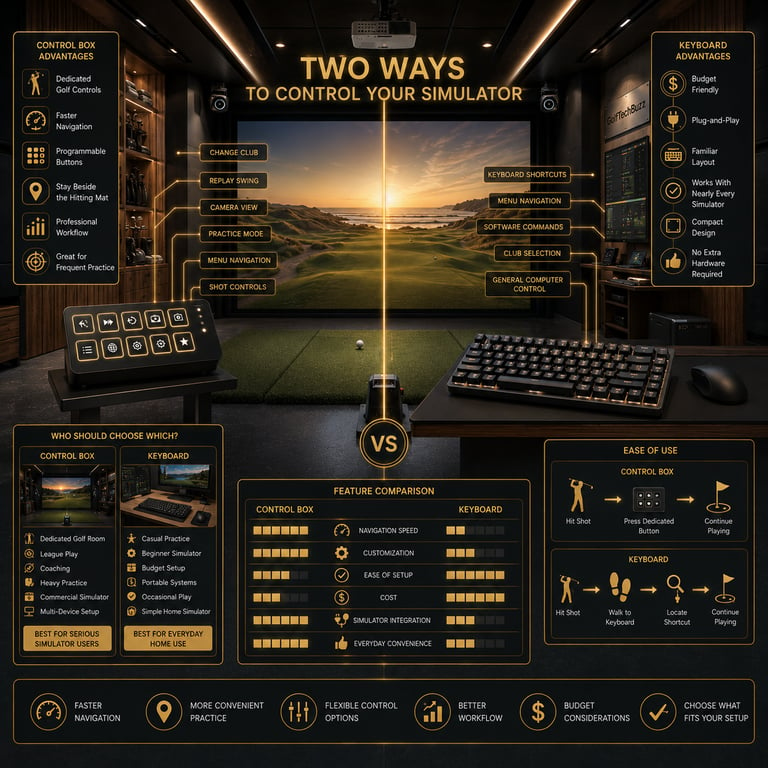
Control boxes offer a smoother, golf-centric navigation experience that can speed up your simulator sessions.
Keyboards are versatile, budget-friendly, and usually plug-and-play with minimal setup.
Control boxes may take up extra space and require some installation, but the ease-of-use payoff is real.
For casual or beginner users, a keyboard might be just fine. Serious players and commercial setups benefit more from a dedicated control box.
What Is a Golf Simulator Control Box?
Picture a custom remote for your golf simulator. That’s essentially what a golf simulator control box is. Instead of fumbling through menus using a keyboard’s generic buttons, you get dedicated keys that map directly to the functions you want—like changing clubs, adjusting shot settings, or switching between modes. Some control boxes even feature tactile feedback, so you know you’ve pressed the right button without looking.
These devices usually connect via USB, sometimes wirelessly with a dongle, and often require software drivers or configuration to get everything working seamlessly. The main selling point? They’re designed to cut down the time you spend navigating menus so you can spend more time actually playing and less time hunting for the right key combo.
If you're considering buying one, our Best Golf Simulator Control Boxes guide compares the top models available today.
How Does a Keyboard Work with Golf Simulator Software?
Keyboards are the OG input device for computers, and because most golf simulator software runs on PC, you can pretty much count on a keyboard working right out of the box. Simulation software maps specific commands to keys—maybe the arrow keys move through menus, the spacebar confirms selections, and letter keys adjust clubs or settings.
While this works, it’s not exactly optimized. You’re playing a golf game with what’s essentially a typewriter, meaning you might press several keys or dive through multiple menus just to change up your tee box or lie. Plus, the generic key layout isn’t designed for quick, intuitive golf sim control — new users often find it clunky until they memorize the key bindings.
If you're still deciding whether a dedicated controller is worth purchasing, read Are Golf Simulator Control Boxes Worth It?
Ease of Use Comparison: Control Box vs Keyboard
If I’m being honest, ease of use is where control boxes really shine. When you’re in the zone, swinging indoors or grinding through practice sessions, the last thing you want is a keyboard layout that feels like a Rubik’s Cube. Control boxes let you tap a dedicated club up/down button or quickly switch shot parameters without thinking twice.
That said, I’ve seen guys get surprisingly proficient with keyboards after a bit of practice. If you’re just messing around or don’t mind the occasional fumbling, the keyboard can be an acceptable, even comfortable option.
Functionality and Performance Differences
Beyond just navigating menus, control boxes tend to offer extra shortcuts and functions that keyboards simply don’t. Some models even have programmable buttons, letting you tailor the controls exactly to your workflow. This can reduce setup times dramatically, especially in commercial settings or serious home studios.
Performance-wise, wired control boxes and keyboards both deliver negligible input latency, meaning your control response feels immediate. Wireless control boxes are convenient for placement flexibility, but they might introduce a tiny lag—nothing game-breaking if you’re mainly navigating menus, but still something to test before committing.
If you're debating connection types, check out Wired vs Wireless Golf Simulator Control Boxes.
Setup and Compatibility Considerations
Here’s where things get a bit sticky. Not all control boxes are plug-and-play with every golf simulator software. Compatibility is a must-check before dropping cash on one. Keyboard controls usually have zero compatibility issues since they rely on standard input.
Control boxes may need driver installations and some initial configuration. Plus, you have to factor in space and power—some boxes require separate power sources or USB ports, whereas keyboards just draw power from the PC.
If you're unsure what features matter most before buying, see How to Choose the Right Golf Simulator Control Box.
Pros and Cons of Control Boxes
Pros
Tailored, golf-specific controls speed up navigation.
Programmable buttons enhance customization.
Often more intuitive to use for quick shot adjustments.
Wireless options add flexibility in placement.
Cons
Additional cost on top of your sim setup.
Takes up extra space and may need power adapters.
Potential compatibility issues depending on your sim software.
Wireless latency, although minor, can be a factor.
Pros and Cons of Keyboards
Pros
Usually included with your PC or laptop; no extra cost.
Simple plug-and-play setup—just start playing.
Familiar interface for most users.
Compact, requiring minimal space.
Cons
Not optimized for golf simulators; slower navigation.
Can be cumbersome to use during quick shot changes.
Requires memorization or reference for key bindings.
No dedicated golf features or tactile feedback.
Buyer Tips: Choosing the Right Control Method for Your Needs
If your setup is a casual home sim with limited space and you’re just looking to knock out some practice swings, a keyboard will probably get you by just fine. You won’t have to shell out extra dough, and you won't wrestle with unfamiliar controls.
On the flip side, if you run leagues, use your sim for serious training, or operate a commercial golf venue, a control box is worth serious consideration. The time saved navigating menus adds up, and the smoother experience keeps players engaged. Make sure to double-check your simulator software’s compatibility before you buy, and consider whether a wireless control box or a wired one fits your space and preferences.
If you're building around GSPro, you may also want to read Do You Need a Golf Simulator Control Box for GSPro?
Common Mistakes Golfers Make When Choosing Between Control Box and Keyboard
Assuming the keyboard is automatically less effective without considering how familiar they are with it.
Buying a control box before verifying it works with their chosen golf simulation software.
Ignoring potential latency issues when opting for wireless control boxes.
Overlooking how much space and power the control box requires during setup.
Not configuring keyboard key bindings properly, which leads to slower navigation and frustration.
Frequently Asked Questions
What are the key differences between a golf simulator control box and a keyboard?
A control box is a specialized device purpose-built for golf simulator software, offering dedicated buttons and shortcuts for faster navigation. A keyboard is a general input device that can control the software but lacks golf-specific optimization.
Does using a control box improve my gameplay experience?
If you value faster menu navigation and quick shot adjustments, yes. Control boxes streamline interaction, saving time and allowing you to focus more on your swing.
Are control boxes compatible with all golf simulator software?
No, compatibility varies. It’s important to check that your simulation software supports the control box model you plan to buy.
Can I use a wireless control box, and does it affect performance?
Wireless control boxes are available and offer flexible placement. They may introduce minimal latency, generally not noticeable for most navigation tasks, but it’s something to consider.
Is it easier to navigate menus with a control box or a keyboard?
Control boxes generally provide a more intuitive setup with dedicated golf-related controls, making menu navigation quicker and more straightforward.
What is the typical cost difference between the two options?
Keyboards typically come free with your PC, while control boxes can cost anywhere from $50 to several hundred dollars depending on features.
Do control boxes require special setup or installation?
Yes, most require driver installation and some initial configuration to work seamlessly with your golf simulator software.
Which option is best for beginners versus advanced users?
Beginners or casual users can get by well with a keyboard. Advanced players or commercial users benefit more from the dedicated control box experience.
Conclusion
At the end of the day, choosing between a golf simulator control box and a keyboard boils down to how deep you want to get into your simulator experience, your budget, and your setup space. If you’re only occasionally using your sim or are new to golf tech, the keyboard’s simplicity and zero cost are hard to beat. But if you’re a gear-head like me who lives for smooth, fast sessions and hates fumbling through menus, a dedicated control box really is the way to go.
No smoke and mirrors here—control boxes are more of an investment, and not every sim software will play nicely with them out of the box. Do your homework, match your choice to your needs, and you’ll have a setup that feels less like work and more like fun. And remember, like golf itself, the right gear makes all the difference in your groove.
Now, go tee it up inside with a control scheme that actually keeps pace with your game.
© 2026 GolfTechBuzz. All rights reserved.
Golf Tech Buzz
Performance Through Data
Practical guides, real-world setups, and unbiased comparisons for golfers building smarter practice environments.
General Inquiries: