

Global Shutter vs Rolling Shutter for Golf Swing Cameras
Explore how global shutter technology enhances golf swing analysis by reducing motion distortion compared to rolling shutters.
SIMULATORS
Golf Tech Buzz Editorial Team - Led by AJ “Buzz” Eichman
7/9/20266 min read
Capturing a golf swing on camera isn’t just about pressing record and hoping the footage looks decent. If you’re serious about analyzing your swing, coaching others, or setting up a golf simulator, the type of camera shutter technology under the hood matters a lot more than many folks realize. Here’s the deal: when you’re recording fast motion—like a club whipping through the air at 100+ mph—the way your camera snaps that frame can make or break the accuracy of your swing analysis.
Two main contenders duke it out in this arena: global shutter and rolling shutter. Each has its own quirks and qualities that impact the clarity of your swing videos and the precision of motion capture. I’ve seen guys try rolling shutter cams initially, then switch to global shutters after realizing their footage looked like a funhouse mirror during fast moves. I’ve also watched others stick to rolling shutters for casual swing recording and be perfectly happy. So, what’s really going on here? Let me walk you through it like I’d explain to a buddy trying to pick a camera for his simulator setup.
If you're still building your setup, be sure to check out Golf Simulators and Golf Simulator Accessories Guide.
Quick Verdict
Global shutter cameras capture the entire image at once, minimizing motion distortion and offering cleaner, more accurate swing analysis.
Rolling shutter cameras shoot line-by-line sequentially, which can introduce skewing or wobbling when capturing fast golf swings.
Global shutters generally cost more and require more careful setup and hardware but shine in pro and biomechanical analysis settings.
Rolling shutters are more affordable and easier to integrate into home simulators or casual golf swing recording but may sacrifice some image accuracy during rapid motion.
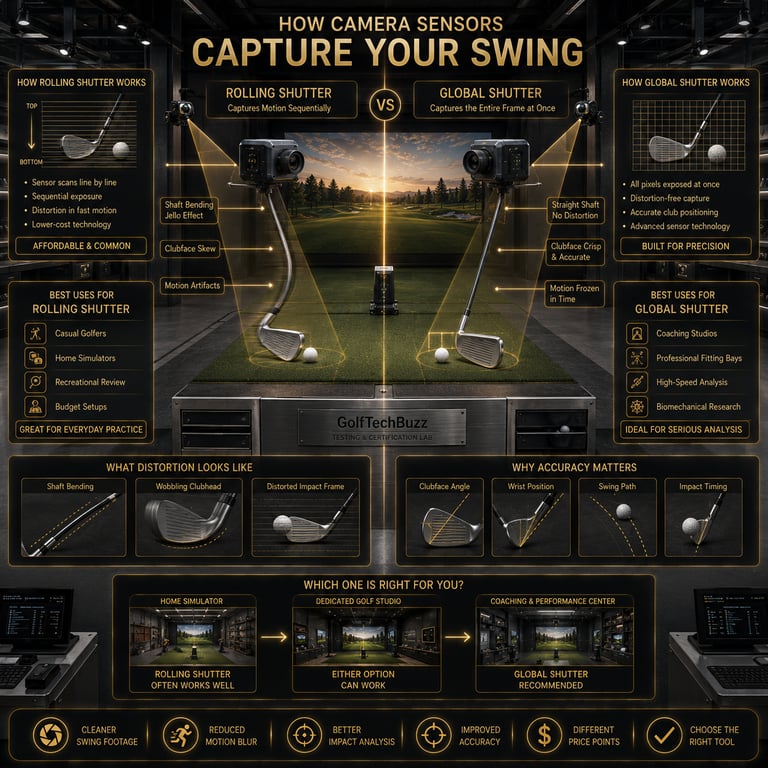
Understanding Camera Shutter Types: Global vs Rolling
Before you commit your hard-earned cash to one type of camera, you need to understand what makes global and rolling shutters tick. They both revolve around how the camera sensor captures light onto its pixels during each frame, but the difference in timing is what causes all the fuss.
A rolling shutter captures pixels row by row—from top to bottom—over a brief span of milliseconds. Imagine reading a page character by character instead of taking it all in at once. If your subject is still, no biggie. But when it comes to a golf swing, where clubheads and wrists blaze through space in fractions of a second, this method can warp the image. You end up with "jello" effects, strange bends, or skewed club shapes that don’t reflect reality.
On the flip side, a global shutter reads every pixel on the sensor simultaneously. It’s like the camera grabs a snapshot of the whole scene in one lightning-fast flash. This means the club’s position is recorded accurately in that instant, with zero distortion caused by motion rolling across the sensor. The clarity this brings is a big deal for anyone analyzing swing mechanics, timing, or biomechanics.
At the end of the day, the right choice depends on how serious you are about swing analysis and the type of setup you plan to build.
How Global Shutter Technology Works
Global shutter cameras use complex sensor designs to expose every pixel at exactly the same time. This usually means specialized, often more expensive hardware—generally found in high-speed and industrial imaging cameras. The payoff is a clean, crisp frame of whatever rapid action is happening.
For golf swing cameras, this means you can film a full swing from start to finish without worrying about the club looking like it’s bending or wobbling weirdly. The data you get is a faithful representation of the real swing, which is gold if you’re measuring launch angles, analyzing wrist snap, or tagging exact moments of clubhead speed peak.
If you're shopping for cameras that use this technology, take a look at Best Golf Simulator Swing Cameras.
How Rolling Shutter Technology Works
Rolling shutter sensors are cheaper to make and just plain more common in consumer cameras, including most smartphones and budget golf simulators. Because they’re capturing the image line by line, fast motion can cause parts of an object to appear displaced or skewed. For example, when a clubhead is moving quick, you might see a slight tilt or compression that’s not actually happening in real life.
That doesn’t make rolling shutters useless—far from it. For slower swings, casual recording, or applications where perfect accuracy isn’t mission-critical, rolling shutter cameras often work just fine. They’re also easier to set up and more budget-friendly, which is why you see them in a lot of recreational golf simulator setups.
If you're wondering whether existing equipment will work, read Can You Use a Regular Webcam as a Golf Swing Camera?
Impact of Shutter Type on Golf Swing Image Quality
If your goal is to capture your golf swing with pinpoint accuracy—perhaps to tweak your form or share precise data with your coach—then shutter type can seriously influence what you see on screen.
Motion distortion from rolling shutters isn’t just aesthetic; it can mislead your analysis. A wobbling clubhead or skewed shaft angle can throw off measurements, causing false conclusions or bad habits if you try to replicate what those warped videos show. Global shutters, by contrast, produce straight, consistent images that give you a factual baseline.
You’ll notice the difference most when playback speed is slowed down and frames are scrutinized—common practice in swing analysis. The “jello effect” of rolling shutters becomes glaringly obvious, while global shutter footage stays rock solid.
For a deeper look at camera speed, check out How Many FPS Do You Need for Golf Swing Analysis?
Real-World Usage Scenarios for Golf Swing Cameras
Here’s where things get practical. If you’re running a high-end coaching studio, an indoor golf training facility, or a motion capture lab focused on biomechanical feedback, global shutter cameras are your go-to. They justify their price tag by delivering accuracy that helps pros and serious amateurs fine-tune technique down to the millisecond.
On the flip side, if you’re setting up a home golf simulator for recreational use, just want decent video feedback, or run a casual winter league, rolling shutter cameras probably serve you just fine. They integrate better with consumer-level hardware, are less sensitive to complex setup, and won’t break the bank.
Outdoor golf course analysis is a mixed bag—rolling shutter artifacts can be more pronounced due to brighter settings and rapid camera moves, but sometimes the convenience outweighs the downsides.
Setups and Hardware Considerations for Each Shutter Type
A quick heads-up: global shutter cameras aren’t plug-and-play like most rolling shutter cams. They usually require more precise calibration and syncing hardware to unlock their full potential. You might be looking at specialized lenses, higher frame rate recording capabilities, and more robust data processing systems. This can make the initial setup more complex, but frankly, if your simulator game is serious, it’s worth it.
Rolling shutter cameras, meanwhile, often come with simpler, all-in-one solutions tailored to consumer simulators. This means less time fussing over sync and calibration and more time swinging.
Camera placement also matters, regardless of shutter type. Read Where Should You Mount a Golf Swing Camera?
Common Mistakes to Avoid
Assuming all cameras handle fast motion the same way. Spoiler: they don’t.
Ignoring rolling shutter distortion artifacts when analyzing swing mechanics—don’t let a wobble fool your eye.
Overlooking the extra cost and complexity global shutters bring—don’t buy one thinking it's just a nicer webcam.
Using rolling shutter cameras for high-speed professional analysis without weighing the consequences.
Failing to match your camera choice to your actual use case and budget needs.
FAQs
What is the difference between global shutter and rolling shutter cameras?
Global shutters expose all pixels on an image sensor simultaneously, freezing motion perfectly. Rolling shutters capture pixels sequentially, row by row, which can distort fast-moving objects.
Why does rolling shutter cause distortion in golf swing videos?
Because the image is captured line-by-line, quick movements like a swinging club are recorded at slightly different times within the frame, causing bending and wobbling in the video.
Are global shutter cameras always better for golf swing analysis?
They’re better if you want precise, distortion-free motion capture. But if you’re just recording casually, rolling shutter cameras may be good enough and much more affordable.
Can I use a rolling shutter camera for casual golf swing recording?
Absolutely. For slower swings and basic video playback, rolling shutters perform adequately and integrate well with most home simulators.
What setup requirements differ between global and rolling shutter cameras?
Global shutters often need more precise calibration, higher-end hardware, and better syncing to utilize their capabilities, while rolling shutters are generally simpler to set up.
Do global shutter cameras cost significantly more?
Yes, due to their sensor design and hardware demands, global shutter cameras tend to be pricier than rolling shutter models.
How does shutter type affect motion capture accuracy in golf simulators?
Global shutters reduce motion artifacts for cleaner, more accurate swing data, whereas rolling shutters can introduce distortion that muddles measurements.
Are there hybrids or newer technologies beyond global and rolling shutters?
Some advanced sensors and processing methods try to mitigate rolling shutter issues or mimic global shutter benefits, but global and rolling remain the main types in golf capture tech.
Conclusion
If you want the real nitty-gritty on your golf swing and you’re serious about data reliability, investing in a global shutter camera is the way to go—it’s like upgrading from a flip phone to a smartphone in terms of capturing true motion. But if you’re a weekend hacker or setting up a home rig on a budget, rolling shutter cameras still get the job done without giving you a headache during setup or denting your wallet too much.
No matter what you pick, remember that the best gear is the gear you understand and use properly. So invest wisely, calibrate carefully, and keep swinging smart. After all, the best swing analysis is the one that actually helps you shave shots, not just look cool on video.
Before you buy, compare the latest options in Best Golf Simulator Swing Cameras.
© 2026 GolfTechBuzz. All rights reserved.
Golf Tech Buzz
Performance Through Data
Practical guides, real-world setups, and unbiased comparisons for golfers building smarter practice environments.
General Inquiries: