

How Many FPS Do You Need for Golf Swing Analysis?
Discover the ideal FPS for golf swing analysis to capture smooth slow-motion video and enhance your swing improvement journey.
SIMULATORS
Golf Tech Buzz Editorial Team - Led by AJ “Buzz” Eichman
7/9/20266 min read
If you’ve ever tried to analyze your golf swing through video, you already know the frustration: the swing either looks like a blur or the replay is too choppy to tell what’s going on. That’s where frames per second (FPS) come in, and honestly, this is where things get interesting. FPS fundamentally controls how smooth and clear your golf swing video is, which directly impacts how well you can break down your mechanics and make meaningful improvements.
So what’s the best FPS for golf swing analysis? Is higher always better? And how do you select a camera with the right settings to capture your swing perfectly? Let me overthink this so you don’t have to. By the end of this article, you’ll have a clear, actionable understanding of exactly how many FPS you need and why it matters for your swing improvement journey.
If you're still planning your simulator setup, be sure to check out Golf Simulators and Golf Simulator Accessories Guide.
Quick Verdict
Aim for at least 120 FPS for clear, usable golf swing video with smooth slow-motion playback.
Higher FPS (180-240) provides more detailed breakdowns of fast swings but requires better lighting and more storage.
Most modern smartphones support 120 FPS or higher, making accessible options for amateur golfers.
Proper camera settings and setup (lighting, focus, angle) are just as important as selecting the right FPS.
What is FPS and Why It Matters in Golf Swing Analysis
FPS stands for frames per second, meaning how many individual images your camera captures each second. Think of it like a flipbook — the more pages (frames) you have per second, the smoother the motion looks.
For golf swing video, FPS determines how much detail you get for your fast, complex swing. A golf swing happens in a split second, but it contains critical phases like takeaway, transition, impact, and follow-through. Capturing these clearly requires enough frames to freeze the motion without blur.
Here’s what that actually means in real use:
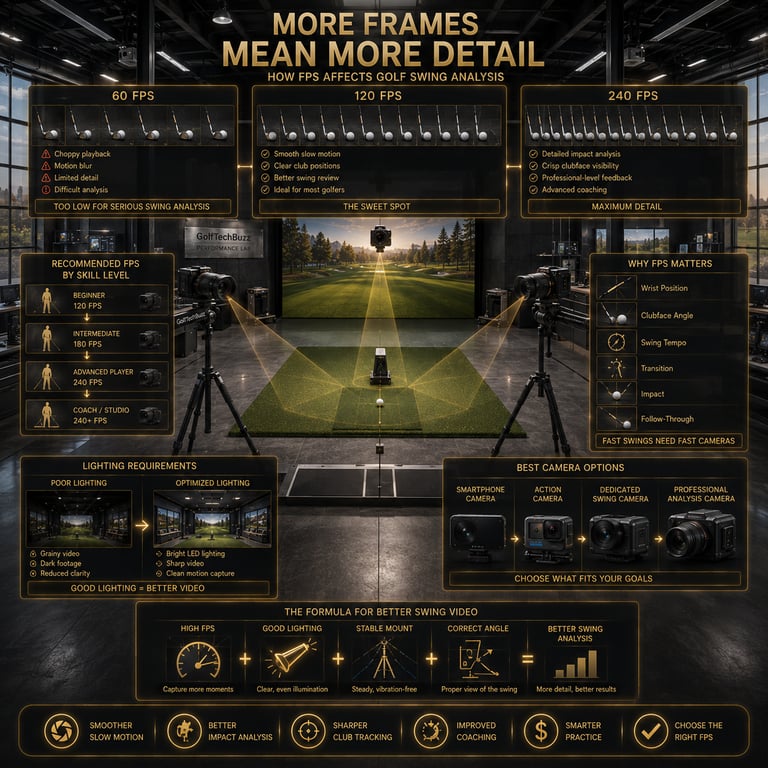
At low FPS (30-60), your video will be jittery and fast, making it hard to see subtle details or properly analyze positions.
At moderate FPS (120), you get a smooth slow-motion effect that reveals most key positions and transitions clearly.
At high FPS (180-240), you get super-smooth slow motion that lets you zoom in on tiny movements like wrist hinge or clubface angle changes.
Most people think that standard video (30 FPS) is sufficient, but that’s just not true if you actually want to improve your swing beyond surface-level observation.
For golfers comparing dedicated camera options, see Best Golf Simulator Swing Cameras.
Recommended FPS Ranges for Different Skill Levels
Here’s a simple breakdown based on how serious you are about analyzing your swing:
Beginner and casual golfers: 120 FPS
This gives smooth slow motion and lets you see your basic mechanics: grip, stance, takeaway. Most smartphones handle this without extra gear.Intermediate golfers and league players: 180 FPS
This level reveals more detailed movements around transition and impact phases, useful for refining timing and sequencing.Advanced and coaches: 240 FPS and above
Ideal for dissecting millisecond timing, wrist angles, and impact face positions. Requires better camera equipment, lighting, and often multiple angles.
Benefits of High FPS for Slow Motion Golf Swing Video
Slow-motion playback is crucial because your golf swing happens so fast you can barely process it live. Thanks to high FPS video, you can play that clip back at standard rates (typically 30 FPS) and see every frame in detail.
The benefits of higher FPS include:
Clear visualization of complicated movements like wrist cocking or clubhead speed changes.
Ability to pause or slow down at precise moments to identify faults.
Easier comparison against professional swings frame-by-frame.
Reduced motion blur that can hide flaws.
Remember, higher FPS videos produce bigger files and need more light for clarity, so your setup matters.
To understand how shutter technology affects high-speed footage, read Global Shutter vs Rolling Shutter for Golf Swing Cameras.
Technical Overview: Cameras and Settings for Golf Swing Capture
You don’t need a Hollywood camera for good golf swing video, but there are a few tech specs to watch:
Camera FPS Settings
Most smartphones today offer 60, 120, and even 240 FPS options. Dedicated slow-motion cameras or action cams (GoPro, Sony RX100) can go higher but cost more.
Lighting
Higher FPS means shorter exposure times per frame, so lighting has to be good to avoid dark or grainy video. Outdoor daylight is perfect; indoors, add strong artificial lighting.
Autofocus and Stabilization
A shaky or blurry image ruins slow-motion analysis. Use a camera or phone with good autofocus that tracks motion and consider tripods or mounts.
Angle and Positioning
Capturing multiple angles (face on, down the line) gives fuller insight. Keep the camera level with your swing plane to avoid distortion.
If you need help positioning your cameras, check out Where Should You Mount a Golf Swing Camera?
Real-World Use Cases: From Home to Course to Simulator
Home Setup with Smartphone at 120 FPS
Perfect for weekend hackers and casual golfers wanting to review swings in practice sessions or at the range. Easy and affordable.Indoor Golf Simulators with 180-240 FPS Cameras
Simulators often pair with dedicated cameras capturing high frame rates to provide detailed, immediate feedback for coaching.On-Course Video Capture
Using portable high-FPS cameras or smartphones, golfers can analyze their driver or iron swings under real conditions.Golf Academies and Pros
Professionals use multi-camera setups with 240+ FPS cameras combined with launch monitors to break down swings in micro-detail.
Common Mistakes in Choosing FPS and Camera Settings
Let’s talk pitfalls — these are classic mistakes I see over and over, and they wreck your swing analysis:
Using too low FPS (30-60) thinking it’s “good enough.” It’s not. You lose critical detail and get choppy slow motion.
Neglecting lighting, especially indoors. Even the highest FPS won’t help if the footage is dark or grainy.
Picking cameras without good autofocus or stabilization, causing blurry or jittery clips.
Forgetting multiple camera angles. A single shot can miss key swing planes or clubface positions.
Not adjusting camera settings out of the box, like defaulting to 60 FPS instead of switching to slow-motion modes or higher frame rates.
Buyer’s Guide: How to Choose the Right Equipment
Here’s where my shop-owner brain kicks in. You want to balance budget, skill, and environment:
For most amateurs: Use your smartphone at 120 FPS. Many newer phones do this natively. Add a tripod mount and ensure good lighting.
Serious hobbyists or coaches: Consider an action camera like the GoPro Hero series or Sony RX100 that shoots 180-240 FPS. They have superior slow-motion modes and stabilization.
Indoor simulators or pros: Invest in specialized slow-motion cameras combined with launch monitors, but be ready for higher costs and setup complexity.
Always test your camera in your typical environment and adjust lighting or angles before deep analysis.
Before buying, it’s worth understanding What Makes a Good Golf Simulator Swing Camera?
Frequently Asked Questions About FPS and Golf Swing Video
What is the best FPS for capturing a golf swing?
For most golfers, 120 FPS is the sweet spot to capture smooth slow-motion video that reveals meaningful swing details without overcomplicating setup.
Can a smartphone record golf swings with high enough FPS?
Yes, most modern smartphones support 120 FPS and some even 240 FPS video recording, making slow-motion golf swing analysis very accessible.
How does frame rate affect the quality of swing analysis video?
Higher frame rates capture more images per second, resulting in smoother slow motion and clearer visualization of fast movements, while lower FPS can appear choppy or blurry.
Is higher FPS always better for golf swing analysis?
Not necessarily. While higher FPS provides more detail, it requires better lighting, creates bigger files, and can be overkill for beginners who don’t need ultra-detailed breakdowns.
What are common camera settings for golf swing video?
Set your camera to at least 120 FPS, ensure autofocus is enabled, stabilize the camera via tripod or mount, and optimize lighting conditions for clear images.
How does lighting impact FPS video capture?
Higher FPS means the camera sensor collects less light per frame, so good lighting is essential to avoid grainy or dark videos that hinder swing analysis.
Do I need a special camera for slow motion golf swings?
Not necessarily. Many smartphones can handle slow-motion capture well. Special cameras help when you want very high frame rates or professional-grade footage.
What space and setup are required for recording golf swings indoors?
Adequate space to swing freely, strong and evenly distributed lighting, and proper camera angle (usually perpendicular or slightly down the line) are essential for accurate indoor capture.
Practical Conclusion
So, how many FPS do you actually need for golf swing analysis? The short answer: at least 120 FPS for effective, smooth slow-motion video that lets you see what really happens during your swing. If you’re diving deeper into coaching or performance, bumping up to 180 or 240 FPS opens the door to ultra-detailed breakdowns, but be prepared for the technical tradeoffs that come with it.
Most golfers don’t need more than their smartphone set to 120 FPS with good lighting and a steady mount. The real magic happens when you combine that with multiple angles, careful positioning, and slow-motion playback. Avoid the common pitfalls of low FPS and poor setup, and you’ll be well on your way to smarter, clearer swing improvement.
This is where tech meets the turf—capturing your swing at the right frame rate can transform how you practice and progress. Now get out there, set your camera right, and swing smarter.
If you're wondering whether the camera you already own will work, read Can You Use a Regular Webcam as a Golf Swing Camera?
© 2026 GolfTechBuzz. All rights reserved.
Golf Tech Buzz
Performance Through Data
Practical guides, real-world setups, and unbiased comparisons for golfers building smarter practice environments.
General Inquiries: