

What Makes a Good Golf Simulator Swing Camera?
Discover the essentials of a good golf simulator swing camera including frame rate, placement, lighting, and connectivity for clearer swing analysis.
SIMULATORS
Golf Tech Buzz Editorial Team - Led by AJ “Buzz” Eichman
7/9/20267 min read
If you’ve ever watched a pro swing in slow motion and thought, “Wow, I wish I could see every tiny muscle and angle in my own game,” then a golf simulator swing camera is your new best friend. These specialized cameras capture your swing with incredible detail and speed, letting you analyze what’s really going on with your clubface, wrist action, and tempo.
Let me overthink this so you don’t have to. This article breaks down exactly what makes a good golf simulator swing camera, why those features matter, and how they fit into real golf practice scenarios. Whether you’re setting up a garage simulator or running a mini indoor golf lab, understanding these details will save you time, frustration, and money.
Whether you're building a simple practice setup or a dedicated simulator room, the right camera can make a huge difference. If you're still planning your build, check out Golf Simulators & Golf Simulator Accessories Guide.
Quick Verdict
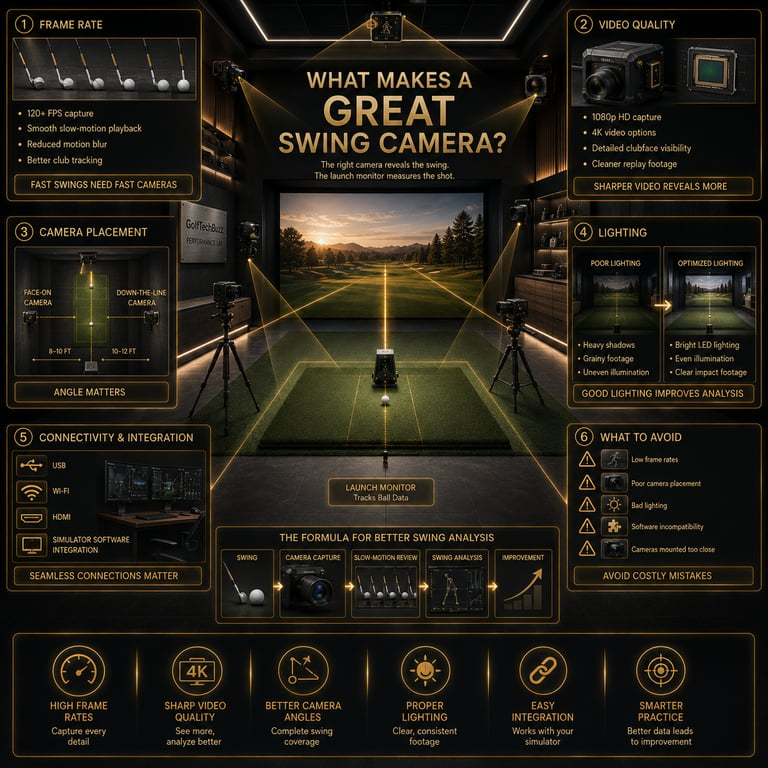
High-speed cameras with frame rates of 120 fps or more are essential to capture fast, smooth swings without motion blur.
Optimal placement angles (down-the-line and face-on) provide the best views for analyzing different swing mechanics.
Good video resolution (at least 1080p) ensures you can see fine details like wrist position and clubface angle.
Proper lighting and connectivity (USB, Wi-Fi, HDMI) are key for clear video capture and seamless integration with simulator software.
What Is a Golf Simulator Swing Camera and How Does It Work?
At its core, a golf simulator swing camera is a high-speed video camera designed to capture your golf swing inside an indoor setup or simulator environment. Unlike your typical smartphone camera or regular webcam, these swing cameras focus on combining fast frame rates and crisp video quality to record every split second of your movement. The goal? To provide you with actionable visual data to improve and refine your swing.
Here’s what that actually means in real use: Imagine trying to analyze a golf swing from blurry footage where the clubhead looks like a streak. You’re missing half the story. A specialized swing camera captures smooth, clear video at 120 frames per second or more. This high frame rate freezes the motion, letting you dissect how your hands move through impact, how square your clubface is at contact, or how your body rotates—all critical for real improvement.
These cameras typically connect directly to golf simulator software running on your computer or integrated simulator consoles. The software may overlay swing speed, ball flight, or club path metrics onto the video feed, providing a powerful combination of visual and data feedback.
If you're wondering whether your existing equipment will work, read Can You Use a Regular Webcam as a Golf Swing Camera?
Key Features of a Good Golf Swing Camera
Now, just listing “high-speed” and “good video” only scratches the surface. Let’s look at the core features that make a golf swing camera truly valuable.
Frame Rate and Video Quality
High frame rates (120 fps or more) are the headline number. That reduces motion blur while capturing the swing’s fastest moments. Most people think 60 fps or lower might be fine, but that’s where blur sneaks in, hiding essential details. Also, video resolution matters a lot. You want at least 1080p HD to zoom in on specific swing mechanics without pixelation. 4K cameras exist and provide superior clarity but require heftier storage and processing power.
If you're trying to decide how much speed you actually need, check out How Many FPS Do You Need for Golf Swing Analysis?
Camera Placement and Setup Tips
The best swing analysis comes from strategically placed cameras capturing multiple angles. Commonly, you’ll set up one camera down-the-line (directly behind the golfer looking toward the target) and another face-on (directly facing the golfer). This dual-angle setup enables analysis of swing path, clubface angle, and body position. Get your camera height and distance right: too close, and you get distortion; too far, and you lose detail.
Need help deciding where each camera should go? Read Where Should You Mount a Golf Swing Camera?
Lighting and Environmental Considerations
Lighting can be a silent dealbreaker. Low light creates grainy or shadow-heavy video that’s hard to analyze. Indoor setups benefit from bright, diffused lighting that minimizes shadows and glare. Avoid overhead lights that cast distracting shadows on your club or hands. LED panels or ring lights strategically placed can help create consistent illumination.
Connectivity and Software Integration
Your swing camera should easily integrate with your simulator software and recording devices. USB connections are common for plug-and-play ease and stable video transmission. Wi-Fi and HDMI options offer wireless flexibility or high-quality video streams, but check compatibility. Some cameras require proprietary drivers or apps, so verify that your simulator software supports the camera before purchase.
Importance of Frame Rate and Video Quality
This is where things truly separate the pros from the pancake-flipped tech setups. Think about speed: a golf swing takes roughly 0.2 to 0.3 seconds from start to finish. At 30 frames per second, you get maybe 6–9 frames—barely enough to catch important positions.
At 120 fps, that’s 24–36 frames, giving you a near-fluid replay to pause and scrutinize. Good video quality means fewer artifacts or pixelated frames when zooming in on details like wrist angle or clubface orientation. It’s the difference between guessing where your clubhead was at impact and seeing it clearly to tweak your follow-through or grip.
For a deeper breakdown of frame rates, visit How Many FPS Do You Need for Golf Swing Analysis?
Camera Placement and Setup Tips
Optimal camera placement isn’t just a suggestion; it’s a necessity. The down-the-line camera lets you check whether your swing path is inside-out or outside-in, critical for fixing slices or hooks. The face-on camera reveals how square the clubface is through impact and your body’s rotation and balance.
For recommended mounting positions and setup ideas, check out Where Should You Mount a Golf Swing Camera?
Here’s what to look for in placement:
Distance: About 6–10 feet away from the hitting mat works well to capture the full swing arc without distortion.
Height: Eye level or slightly above wrist height to avoid perspective skew.
Angle: Exactly behind for down-the-line; perpendicular to the target line for face-on.
Stability: Use sturdy mounts or tripods to avoid shake and maintain consistent angles.
Lighting and Environmental Considerations
Poor lighting is a classic pitfall. Shadows can mask critical details, making analysis guesswork. Ambient light is rarely enough indoors—you need consistent, diffuse light sources. Avoid direct overhead or window light causing harsh contrasts.
Even lighting helps the camera sensors capture clean, noise-free footage. Using LED panels or ring lights around your hitting area reduces shadows and highlights club detail.
Connectivity and Software Integration
This one often trips folks up because even the best camera is useless without seamless integration. USB connections typically offer plug-and-play simplicity but limit mobility. Wi-Fi or HDMI might free up space but require stable networks or compatible hardware.
Before buying, check:
Does your simulator software support this camera’s drivers?
Can you sync video feeds with launch monitor data?
Is the camera compatible with your recording device or computer OS?
If you're comparing specific models, our guide to Best Golf Simulator Swing Cameras breaks down the top options currently available.
Common Mistakes to Avoid When Using Swing Cameras
Using low frame rate cameras (below 60 fps) leading to motion blur and unclear swing analysis.
Placing cameras at awkward angles or too close, resulting in distorted or obstructed views.
Neglecting lighting setup, causing shadows or grainy video that obscures details.
Overlooking compatibility issues between camera output and swing analysis software.
Underestimating space needed for proper camera distance and swing room, causing cramped footage.
Overpaying for high-end features like 4K resolution when 1080p at high frame rate is sufficient for many users.
Choosing the Best Golf Swing Camera for Your Needs
Here’s where things get practical. Your choice depends on a few key factors:
Budget: High-speed cameras with 120+ fps can range from affordable to premium. For most home users, a 1080p camera at 120 fps strikes the best balance.
Skill Level: If you’re a mid or high handicap, focusing on frame rate and placement beats chasing ultra-high resolutions.
Use Case: For pro instructors or indoor training centers, multi-camera setups with advanced connectivity are critical. Home users benefit from simple, reliable USB cameras.
Compatibility: Always confirm that the camera works smoothly with your golf simulator software and hardware environment.
Still comparing options? Start with Global Shutter vs Rolling Shutter for Golf Swing Cameras.
FAQ
What frame rate is best for a golf swing camera?
Ideally, 120 fps or higher to capture smooth, blur-free swing motion.
Where should I position golf swing cameras for best results?
Two common angles: down-the-line behind the golfer and face-on perpendicular to the target line.
Can I use my smartphone as a golf simulator swing camera?
While possible, smartphones often lack the frame rates and lighting control needed for detailed swing analysis.
Do golf swing cameras work in different indoor lighting conditions?
They perform best with consistent, bright, and diffuse lighting to avoid shadows and capture clear footage.
How do golf swing cameras integrate with golf simulators?
Via USB, Wi-Fi, or HDMI connections, paired with compatible simulator software that processes video feeds alongside shot data.
What are the differences between high-speed cameras and standard webcams for swing analysis?
High-speed cameras capture at higher frame rates (120+ fps) and provide clearer video without motion blur, unlike typical webcams that usually max out at 30–60 fps.
Are wireless golf swing cameras reliable for live video capture?
They can be, but require stable network connections to avoid lag, which may complicate live analysis.
What is the ideal resolution for clear golf swing video?
1080p is the common minimum for clear detail; 4K offers more clarity but requires more storage and processing.
Conclusion
So, what makes a good golf simulator swing camera? It’s all about the right balance of high frame rate, sharp video quality, smart placement, solid lighting, and seamless connectivity. Getting these elements right transforms your indoor practice from guesswork to data-driven improvement. Whether refining a hook, smoothing your tempo, or dialing in your release, these cameras give you a detailed, slow-motion mirror to your swing mechanics.
Remember, it’s not about chasing the fanciest gear but choosing tech that fits your space, skill, and simulation setup. Nail the basics—120 fps, 1080p, well-placed cameras, and good lighting—and you’ll get the video clarity to make meaningful swing improvements.
Now, go set up that camera and watch your game get sharper stroke by stroke.
© 2026 GolfTechBuzz. All rights reserved.
Golf Tech Buzz
Performance Through Data
Practical guides, real-world setups, and unbiased comparisons for golfers building smarter practice environments.
General Inquiries: