

Can You Use a Regular Webcam as a Golf Swing Camera?
Explore how a regular webcam can be used for golf swing analysis, covering setup tips, technical requirements, and limitations for clear swing capture.
SIMULATORS
Golf Tech Buzz Editorial Team - Led by AJ “Buzz” Eichman
7/9/20268 min read
If you’re like me and constantly tinkering with golf tech, you’ve probably wondered whether a regular webcam can double as a golf swing camera. Maybe you’re stuck inside for the winter, itching to analyze your swing without splurging on fancy gadgets. Or you just want a budget-friendly way to get some video feedback before heading to the range. Here’s the deal: a webcam can capture your swing, but it’s not quite the same beast as a dedicated golf swing camera or your trusty slow-mo smartphone.
Let’s break down what works, what doesn’t, and how to get the most out of a regular webcam for golf swing analysis.
If you're building your simulator setup from scratch, start with Golf Simulators and Golf Simulator Accessories Guide.
Quick Verdict
Regular webcams can record your swing but often struggle with the clarity and frame rates needed for detailed analysis.
Look for webcams supporting at least 30 FPS, but 60 FPS or higher is where the slow-motion magic happens.
Good lighting and stable mounting are absolute musts to avoid grainy or shaky footage.
Dedicated golf swing cameras or high-frame-rate smartphones still outperform webcams in capturing fast swing motion and key angles.
What Is a Golf Swing Camera and How Does It Work?
Before we shoot the breeze on webcams, let’s get clear on what a golf swing camera is supposed to do. Think of it as your swing’s personal videographer, designed specifically to capture crisp, detailed videos that help you decode every nuance of your swing.
These cameras usually offer:
High frame rates (60 FPS and up) for smooth slow-motion playback.
Good resolution (1080p or better) to catch subtle wrist flicks and hip turns.
Features like autofocus, optical zoom, and sometimes even built-in analysis tools.
Easy mounting options to position the camera face-on or down-the-line, capturing the best swing planes.
So, a golf swing camera is optimized for the speed and complexity of your swing, allowing you to dissect each frame on the way to your next birdie.
If you want a deeper breakdown of the hardware itself, read What Makes a Good Golf Simulator Swing Camera?
Can a Regular Webcam Capture Your Golf Swing Clearly?
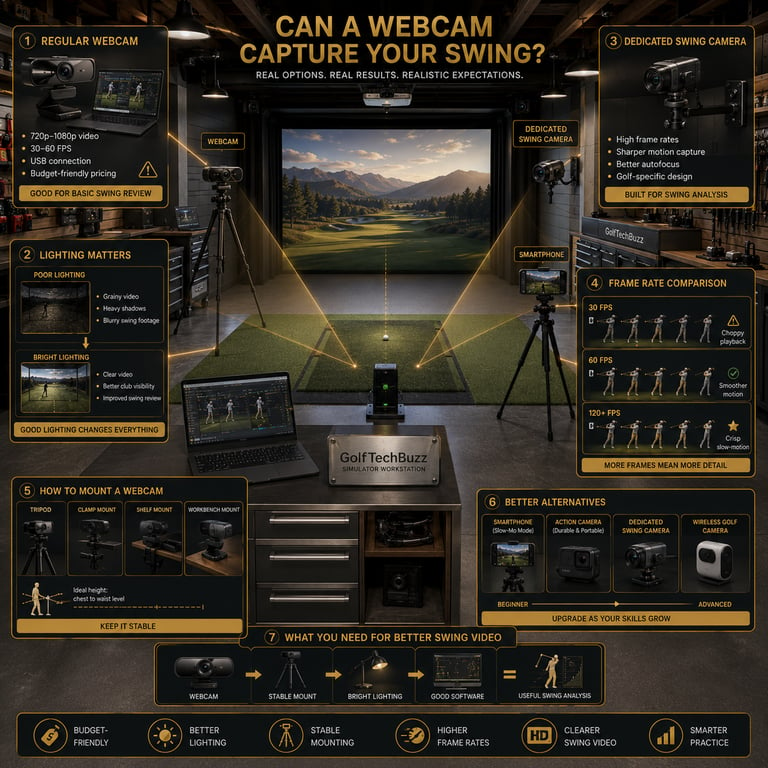
Here’s where the rubber meets the road. Regular webcams, the kind you plug into your laptop for Zoom calls, weren’t designed with a golf swing in mind. Most offer 720p or 1080p resolution, which sounds decent, but the bigger question is frame rate. Many webcams cap out at 30 FPS, which is fine for casual video chats but borderline for high-speed golf swings.
Why? Because your swing moves fast—really fast. At 30 FPS, some of the action blurs together, making it tough to see wrist angles or clubhead positions at impact. If you’re trying to slow things down and catch faults, low-frame-rate footage feels like watching a blurry shadow dance.
That said, if you’re just looking for basic swing videos or a slow-motion effect at around half speed, a webcam can work if your setup is right. I’ve seen guys use webcams in indoor winter setups to track general swing paths and posture. It’s not the tour-pro setup, but it gets the job done without breaking the bank.
For golfers who want better performance, compare the options in Best Golf Simulator Swing Cameras.
Technical Requirements: Resolution, Frame Rate, and Lighting
If you want your regular webcam to pull off the swing-cam gig, pay attention to these technical specs:
Frame Rate: Aim for at least 30 FPS, but 60 FPS or higher is far preferable. Most cheap webcams don’t hit 60 FPS, so check the specs carefully.
Resolution: 1080p is ideal for clear video, but 720p can work if lighting is solid.
Lighting: This is a game-changer. Webcams hate low light. Dim garages or basements will give you grainy, noisy footage. Set up bright, even lights that don’t cast crazy shadows.
Mounting: Stability is key. Use a tripod or mount the webcam on a steady surface. Hand-holding the camera or sticking it on a wobbling laptop won’t cut it.
Angles: Position your webcam for those classic swing views—face-on and down-the-line angles. This helps see your swing plane and club position better.
Understanding frame rates becomes especially important when choosing camera hardware, so check out How Many FPS Do You Need for Golf Swing Analysis?
Setting Up Your Webcam for Golf Swing Analysis
Alright, now you’ve got a decent webcam, some lights, and your driver ready to rip. How do you get your setup optimized?
Pick a stable spot where the camera won’t move. Tripods or clamp mounts near open space in your garage or home are perfect.
Make sure the camera lens is at chest height or a bit lower, pointing straight at your target line. Get the angle right—too far left or right and you miss critical swing mechanics.
Use software on your PC or laptop that lets you record video and scrub frame-by-frame. Many webcams come bundled with basic video capture apps. You can also try more advanced free software like OBS Studio or specialized golf swing analysis programs.
Bright, consistent lighting is non-negotiable. Set up LED panels or bright lamps pointed toward your hitting zone. Avoid harsh overhead lights that cause weird shadows.
Record multiple swings from different angles if you can. One fixed shot can be limiting when trying to diagnose issues like clubface opening or hip rotation.
Once you have your equipment, proper placement matters just as much as the camera itself. Read Where Should You Mount a Golf Swing Camera?
Limitations of Using Regular Webcams for Swing Capture
Let’s be honest—using a regular webcam for swing analysis is a bit of a compromise. Here’s what you’re giving up compared to specialized gear:
Low frame rates mean slower swings or fast clubhead motions may blur.
No optical zoom or autofocus designed for rapid movement.
Webcams can’t handle changing lighting outdoors well—glare, shadows, and weather mess with the footage.
No onboard recording or easy wireless options—your setup depends on a PC and cables.
Poorer video quality overall compared to high-end golf swing cameras or newer smartphones with 240 FPS slow-motion modes.
If you’re looking for pinpoint accuracy or advanced feedback features like instant frame-by-frame review or angle overlays, webcams won’t cut it. But if you want a budget-friendly way to see your swing and fix the basics, they’re a solid starting point.
Software Tools to Enhance Webcam Swing Analysis
Just recording your swing video isn’t enough. You want to analyze that footage to really improve, and that means good software. Here are a few free or low-cost options that work well with webcam footage:
V1 Golf: A favorite among instructors. It offers swing comparison, slow-motion playback, and drawing tools to mark swing planes.
Hudl Technique: Simple and user-friendly, great for frame-by-frame review and slow down.
Coach’s Eye: Similar tools with side-by-side video comparison.
OBS Studio: While not golf-specific, it’s free for recording with webcam inputs and can be paired with other analysis apps.
The key is to pick software that supports frame stepping, slow motion, and basic annotations. This turns your humble webcam footage into a valuable training tool.
Alternatives to Regular Webcams for Better Swing Video
If your budget allows, or you’re craving better swing footage, consider stepping up from a regular webcam:
Smartphones: Newer phones can shoot 1080p at high frame rates (120 FPS or even 240 FPS). Their autofocus and zoom are way better than webcams.
Dedicated golf swing cameras: Devices like Swing Caddie or Garmin Approach cameras offer high-speed recording, easy mounting, and sometimes built-in analysis.
Action cameras: GoPros and similar offer rugged design, wide-angle lenses, and high frame rates.
Wireless cameras: Some golf-specific cams come with wireless options for easier setup.
These options cost more but pay off with better video quality, more versatility, and less frustration.
To understand why some cameras capture motion more accurately than others, read Global Shutter vs Rolling Shutter for Golf Swing Cameras.
Buyer Tips: Choosing the Right Webcam for Golf Training
If you decide to roll with a regular webcam, here’s what to look for:
Check frame-rate and resolution specs carefully. Don’t settle for anything under 30 FPS, and prioritize 1080p.
Look for webcams with manual focus or fixed focus to avoid blurry auto-focusing as you move.
USB connection is standard—make sure your PC or laptop can handle streaming and recording smoothly.
Consider the physical build—stable mounting accessories are a plus.
Budget realistically. You’re getting what you pay for, but there are decent mid-range webcams around $50–$100 that strike a balance.
Common Mistakes When Using Webcams for Golf Swing Analysis
If you’re new to this, don’t fall into these classic traps:
Assuming any webcam will capture crystal-clear swing video without checking frame rates.
Mounting the camera poorly so it misses the key swing angles.
Ignoring lighting needs and ending up with grainy, hard-to-see footage.
Trying to use webcams outdoors without compensating for changing light and weather.
Expecting a webcam to perform like a high-speed golf swing camera or modern slow-mo phone camera.
Forgetting that good analysis needs proper software, not just raw videos.
If you avoid these rookie moves, your webcam swing videos will be far more useful.
FAQs About Using Regular Webcams as Golf Swing Cameras
Can a standard webcam capture a golf swing clearly enough for analysis?
It can, but with limitations. Most webcams cap at 30 FPS, which may cause motion blur. With good lighting and stable mounting, you can get workable footage for basic swing review.
What frame rate should I look for in a webcam to record golf swings?
Aim for at least 30 FPS, but 60 FPS or higher is better for smooth slow-motion playback.
How do I set up a webcam to record my golf swing at home?
Mount your webcam at chest height on a stable tripod or clamp, ensure bright and even lighting, position for face-on or down-the-line views, and use video software for recording and slow-motion playback.
Are webcams good for outdoor golf swing recording?
Generally no. Webcams are less adaptable to changing lighting, shadows, and weather conditions compared to dedicated cameras or smartphones.
What software can I use to analyze swing videos recorded from a webcam?
Popular options include V1 Golf, Hudl Technique, Coach’s Eye, and, for recording, OBS Studio combined with analysis apps.
How does webcam video quality compare to smartphone slow-motion cameras?
Smartphones typically offer higher frame rates, better autofocus, and superior video quality, making them preferable for swing analysis.
Can I use a webcam wirelessly to record my swing?
Most regular webcams require a wired USB connection to a PC or laptop. Some specialized cameras offer wireless options, but regular webcams typically do not.
What budget considerations should I keep in mind if I want to buy a webcam for golf swing analysis?
Expect to spend around $50–$100 for a decent webcam with 1080p and a minimum of 30 FPS. Cheaper webcams often lack the necessary specs and build quality.
Conclusion
If you’re looking to save some cash and just get your swing on video for quick reviews, a regular webcam can pull it off. Just don’t expect tour-pro quality or flawless slow motion by default. The biggest factors are frame rate, lighting, and mounting stability. Nail those, and your webcam can be a handy tool for winter practice or casual swing checks.
But if you’re serious about detailed swing analysis or want to see every wrinkle in your motion, it’s worth investing in a dedicated golf swing camera or leveraging your smartphone’s high-frame-rate slow-motion capabilities. Either way, seeing your swing in action is a game-changer—because what you can’t see, you can’t fix.
So grab that webcam, set it up right, and start dialing in your swing like the pro you plan to be. Cheers to better golf and fewer duffs!
© 2026 GolfTechBuzz. All rights reserved.
Golf Tech Buzz
Performance Through Data
Practical guides, real-world setups, and unbiased comparisons for golfers building smarter practice environments.
General Inquiries: