
Where Should You Mount a Golf Swing Camera?
Discover expert golf swing camera mounting tips to capture the perfect angle for precise swing analysis and better performance.
SIMULATORS
Golf Tech Buzz Editorial Team - Led by AJ “Buzz” Eichman
7/9/20266 min read
If you’re looking to get serious about improving your golf swing, recording yourself is where the magic starts. But here’s the deal—just slapping a camera anywhere won’t do you much good. Where you mount that golf swing camera can make or break your ability to actually see what’s going on in your swing. I’ve seen guys try this and that, and trust me, you want that camera position dialed in if you're serious about analysis.
So, in this article, we’re diving into the best golf swing camera positions—behind you, face-on, over-the-shoulder—and breaking down why each angle matters. You’ll walk away knowing exactly how to set up your camera for the clearest, most actionable swing video possible, whether you’re in a garage, home simulator, or out on the course.
If you're building out your setup, start with Golf Simulators and Golf Simulator Accessories Guide.
Quick Verdict
Mount the camera behind you for a crystal-clear view of your swing path and clubface alignment.
Face-on angles reveal your body rotation, weight shift, and overall posture during the swing.
Over-the-shoulder shots give a unique glimpse into your club path at impact and address position.
Consistent camera height at about waist level avoids distortion and keeps your swing plane in focus.
Why Camera Position Matters in Golf Swing Analysis
Look, video analysis isn’t just some tech gimmick. It’s the bread and butter of how you catch swing flaws you can’t feel or see in real-time. But if your camera is badly placed, you end up with angles that distort your movement or hide key parts of your swing. That’s like trying to fix a leaky roof by looking through the basement window.
The point is this: different camera angles highlight different parts of your swing mechanics. Where you place the camera determines what you’ll actually be able to see and fix. Miss positioning it, and you’re basically flying blind.
To get the most out of your setup, it helps to understand What Makes a Good Golf Simulator Swing Camera?
Common Golf Swing Camera Mounting Positions
Behind the Golfer
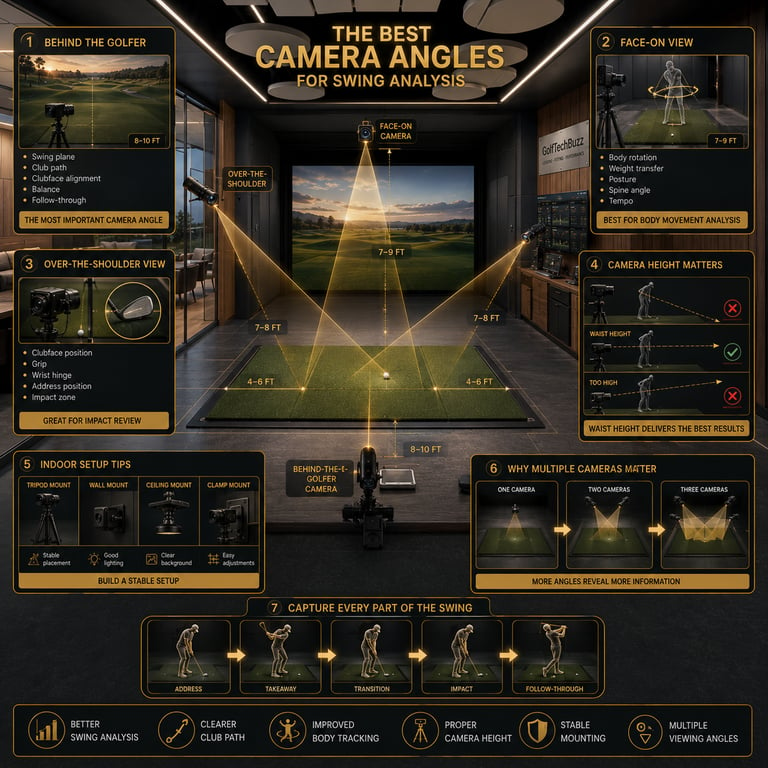
This is the classic swing cam spot. Set the camera about 8 to 10 feet behind you, roughly aligned with the target line. This angle gives you a clean view of your entire swing arc—from takeaway to follow-through. It’s perfect for spotting if your club is swinging too far inside or over the top, checking balance, and watching how square your clubface stays through impact.
Pros:
Shows club path and swing plane clearly.
Easy to spot early release or casting.
Great for checking balance and weight shift from behind.
Cons:
Doesn’t give much info on body rotation from the front.
Need a decent distance behind for full swing capture.
Face-On Camera Placement
Positioned directly facing you, the camera here captures your body rotation, weight transfer, and overall swing rhythm. From this angle, you can see if your hips and shoulders are syncing up, whether you’re swaying off the ball, and how your spine angle holds up through impact. It’s the best angle to break down your posture and alignment.
Pros:
Perfect for monitoring body rotation and weight shift.
Helps identify early lateral movement or sway.
Great for posture and spine tilt analysis.
Cons:
Limited view on clubface and path.
Can be tricky to set up indoors due to space.
Over-the-Shoulder Angles
Placing the camera just above and behind your lead shoulder gives a unique perspective on impact and address positions. It’s like how the pros see it on TV. This angle shows your grip pressure, how the clubface aligns at impact, and how your hands and arms move through the hitting zone.
Pros:
Shows clubface and hand position at impact in detail.
Offers a real insight into posture and shoulder turn.
Helps with grip and wrist hinge analysis.
Cons:
Harder to set up without specialized mounts.
Might require a second camera for full swing view.
For examples of cameras that work well in these positions, check out Best Golf Simulator Swing Cameras.
How to Set Up Your Camera for Home and Indoor Use
Indoor setups, especially those in garages or simulators, come with their own quirks. Space is usually tighter, and natural lighting can be limited, so tripod stability and camera placement are mission-critical.
First off, use a sturdy tripod or wall mount. Nothing kills video quality like shaky footage — I’ve been there when a cheap tripod wobbled mid-swing, making analysis impossible. Aim to have the camera at waist or mid-torso height. This aligns the lens roughly parallel to your swing plane and avoids distortion like making your arms look too long or too short.
Lighting is another factor. If you can, place your camera facing a light source, or set up soft, diffuse artificial lights. Poor lighting results in blurry, grainy footage, and you’ll miss out on key details like clubface angles.
If you’re limited on space, a face-on camera can be tucked closer to the net or projection screen, and a behind-the-golfer camera can be near the simulator’s enclosure. Just keep the camera steady and at the right height.
Before mounting anything permanently, consider How Many FPS Do You Need for Golf Swing Analysis?
Tips for Mounting Your Golf Swing Camera Correctly
Avoid mounting your camera too low or too high. Too high can make you look like a bobblehead, too low distorts your arm angles. Waist height is your Goldilocks zone.
Use stable mounting hardware. Tripods with adjustable legs, wall mounts with vibration dampeners, or even clamps designed for swing cams are your friends.
Don’t place the camera too far from the swing area. If you’re over 10–12 feet away, you might lose detail on clubface and hand position.
Test different angles and review your footage to fine-tune positioning before committing.
If you want comprehensive analysis, go multicam. Getting one camera behind, one face-on, and if possible, one over-the-shoulder means no swing fault hides from you.
Avoiding Common Mounting Mistakes
Mounting a golf swing camera sounds simple, but I've seen all sorts of misfires that cost serious practice time.
Mounting too low or high, which skews the swing's natural lines and hides errors.
Using wobbly or cheap tripods that shift mid-swing, ruining video clarity.
Relying on just one angle—trust me, you need at least two views to understand your full motion.
Poor lighting or cluttered backgrounds that distract or obscure details.
Positioning the camera too far back or too close, either losing critical detail or cutting out parts of your swing.
Understanding shutter technology can also help avoid misleading video distortion, especially at higher speeds. Read Global Shutter vs Rolling Shutter for Golf Swing Cameras.
Using Multiple Angles for Comprehensive Analysis
One camera is better than none, but if you really want to analyze your swing with precision, two or three cameras are the way to go. It’s like having multiple sets of eyes on all the moving pieces—club path, body rotation, head stability.
Just keep in mind, syncing the footage later adds another step, but it’s worth it when you can cross-check what you see head-on matches up with the behind-the-back arm path. Indoor setups with simulators often encourage multiple mounting spots, while outdoor practice may rely on handheld or tripod-swapped shots for variety.
If you already own a webcam and are considering using it, see Can You Use a Regular Webcam as a Golf Swing Camera?
FAQs About Golf Swing Camera Setup
What is the best position to mount a golf swing camera?
Behind the golfer is the all-around best spot for swing path and clubface tracking, but face-on and over-the-shoulder angles offer important complementary views for body rotation and impact position.
How many cameras do I need for effective golf swing analysis?
Ideally, at least two: one behind and one face-on. Three cameras, including an over-the-shoulder angle, provide the most comprehensive feedback.
Can I use a smartphone for golf swing camera setup?
Absolutely. Modern smartphones record high-quality video and are great for casual use. Just make sure you have a sturdy tripod or mount to keep the phone stable.
What tripod or mounting hardware works best for golf swing cameras?
Invest in a tripod with adjustable legs and a stable head. Wall mounts or clamp mounts designed for sports cameras also work well, especially indoors.
Should the camera height be fixed or adjustable during recording?
Keep the camera height consistent throughout your session to avoid perspective errors, ideally aligned at your waist or mid-torso height for accurate swing plane tracking.
How do indoor and outdoor setups differ for golf swing video capture?
Indoor setups require stable mounts, good lighting, and space awareness, while outdoor setups benefit from natural light but may require portable and weather-resistant gear.
What video angle shows the most important swing faults?
The behind-the-golfer angle reveals the critical club path and face alignment faults, but combining it with face-on footage unearths body movement issues.
How do I avoid distortion or angle errors in golf swing videos?
Keep the camera at waist height, use lenses with minimal wide-angle distortion, avoid shooting too close or from awkward angles, and maintain stable mounts to prevent shaking.
Practical Conclusion
Mounting your golf swing camera isn’t something to wing—or worse, neglect. The right position captures the details that your eyes and feelings miss, helping you make meaningful changes and track real progress. From behind-the-golfer clarity on your club path to the face-on view that highlights your rotation and weight shift, each angle serves a purpose.
If you’re rocking a home simulator or your garage setup, take the time to dial in tripod height, stability, and lighting. Don’t settle for one angle if you can swing it—pun intended—and get multiple views. And remember, it’s not just about recording swings, it’s about recording them right.
Get your camera mount sorted, take those swings on video, and trust me, you’ll shave strokes before you know it.
© 2026 GolfTechBuzz. All rights reserved.
Golf Tech Buzz
Performance Through Data
Practical guides, real-world setups, and unbiased comparisons for golfers building smarter practice environments.
General Inquiries: