

Are Launch Monitor Screen Protectors Worth It?
Discover how launch monitor screen protectors enhance screen durability, reduce scratches, and maintain clarity for your golf tech investment.
MONITORS
Golf Tech Buzz Editorial Team - Led by AJ “Buzz” Eichman
7/11/20267 min read
If you’ve ever eyed your launch monitor screen and winced at the thought of a scratch or fingerprint smudge ruining your crisp data view, you’re not alone. These pricey gadgets aren’t exactly cheap, and keeping that screen in pristine condition is more than just vanity—it’s about maintaining performance and longevity. So, here’s the deal: do launch monitor screen protectors actually make a difference, or are they just another gimmick some companies sell to pad their accessory lineup? I’ve put in my fair share of hours with launch monitors—tested gear, fixed a few, and yes, even managed a winter league where these devices go through way more abuse than they probably should. Let’s break down what launch monitor screen protectors are all about, when they’re useful, and how to pick one that doesn’t suck.
For a complete breakdown of the technology behind these devices, check out our guide to Launch Monitors.
Quick Verdict
Screen protectors prevent scratches and reduce glare, keeping your monitor screen sharp and clear.
They can extend the lifespan of your launch monitor by preserving screen durability.
Choosing the right protector means paying attention to material, fit, and how easy it is to install without bubbles.
Not all protectors are created equal—some reduce touch sensitivity or clarity, so quality matters.
If you’re still deciding which device to buy, our roundup of the Best Golf Launch Monitors can help.
What Are Launch Monitor Screen Protectors?
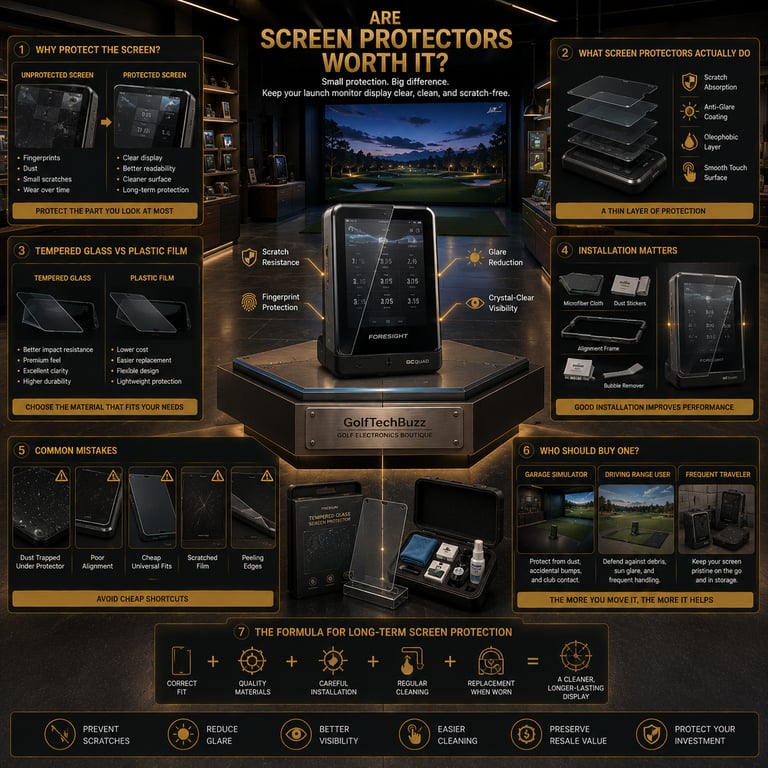
Think of launch monitor screen protectors as the thin defensive shield between your expensive launch monitor’s screen and the occasional accidental scratch, fingerprint, or dust particle. They’re made from either tempered glass or plastic films designed specifically (or semi-specifically) to fit the size and shape of your device’s display.
Their job? To keep that screen looking flawless and functioning smoothly no matter if you’re trucking out in the garage, sweating it on an outdoor range, or channeling your Tiger Woods in an indoor simulator.
If you want to see the best cases, cages, and accessories available today, take a look at Best Golf Launch Monitor Protection Systems.
How Do Screen Protectors Work to Protect Your Launch Monitor?
Here’s how they function in plain terms: when you slap a protector on, it absorbs the brunt of small knocks, scratches, and scuffs that otherwise would hit your monitor’s actual glass surface. Some come with special coatings, too—anti-glare layers reduce reflections that can mess with your screen’s readability, especially when angled toward bright lights or outdoors. Others have oleophobic coatings that basically repel fingerprints and smudges, helping you keep the screen clean without constant wiping.
And before you ask—no, applying a good quality screen protector won’t mess with your launch monitor’s sensor accuracy or data output. The protector is just a barrier on the display, not on the sensors themselves.
Before buying accessories, it’s worth asking yourself, Do You Need Protection for Your Golf Launch Monitor?
Benefits of Using Launch Monitor Screen Protectors
Let me be straightforward: if you’re moving your launch monitor around a lot, or if it’s part of a setup in a garage or range that isn’t exactly a cleanroom, a screen protector is usually worth it. Here’s why:
Scratch Prevention: I’ve seen guys try this without protection, and within weeks, the screen is speckled with scratches from range balls, tool drops, or just finger nails. Scratches aren’t just ugly; they can seriously hinder readability.
Longevity: Preserving that screen means the whole unit stays in good shape longer. If you’re looking at your launch monitor as an investment—and you should be—you want to protect it from early wear and tear.
Better Screen Clarity: Anti-glare protectors reduce reflections that can turn data into a guessing game, especially under bright overhead lights or outdoor sun.
Fingerprint Management: Oleophobic coatings make cleaning less of a pain and keep your touchscreen responses smooth.
Resale Value: If you decide to upgrade later, a well-kept, scratch-free screen will fetch a better price.
Protection goes beyond the display, which is why many golfers also read Best Ways to Protect a Golf Launch Monitor from Shanks and Mishits.
Types of Screen Protectors: Tempered Glass vs. Plastic Films
There’s a bit of a debate here, but both have pros and cons worth knowing.
Tempered Glass: This is the thicker, glass-like protector that’s super durable and feels closest to your original screen. It offers excellent protection against scratches and impacts and usually maintains good clarity and touch sensitivity. Downside? It can be pricier and a little trickier to install without bubbles or misalignment.
Plastic Films: These are thinner, more flexible protectors that are usually cheaper and easier to replace. They generally do a fine job preventing scratches but don’t offer the same impact resistance as tempered glass. Some lower-quality films can reduce screen clarity or create a slight “plastic” feel, and occasionally they reduce touch sensitivity if they’re not designed well.
If you’re deciding between different styles of protection, compare the options in Launch Monitor Case vs Protective Shield: Which Should You Buy?
How to Choose the Right Screen Protector for Your Launch Monitor
It’s tempting to just grab the cheapest universal protector out there, but that’s a mistake I’ve seen more than once. Here’s what to look for:
Compatibility: Check your launch monitor’s model and screen size. An ill-fitting protector will cause bubbles, lift at the edges, or poorly cover the screen.
Material: Decide if you want the durability of tempered glass or the convenience of plastic film.
Coatings: Anti-glare and oleophobic coatings can be lifesavers if you frequently use your monitor outdoors or in bright environments.
Installation features: Some protectors include kits with dust removers and alignment tools, making application less of a hassle.
Touch Sensitivity: Make sure the protector doesn’t degrade your screen’s touch response. Reading customer reviews or testing a sample are good ways to verify this.
Where you place your launch monitor can also affect how much protection it needs, so be sure to read Where Should You Place a Launch Monitor in a Golf Simulator?
Proper Installation and Maintenance Tips
If you’re buying a protector, take the time to install it right. Here’s my no-BS approach:
Clean the screen thoroughly with a lint-free cloth and alcohol wipe to get rid of oils and dust.
Work in a dust-free environment (bathroom after a hot shower can work due to steam settling dust).
Use the included dust stickers or tape to pick up leftover particles.
Align carefully before sticking it on to avoid bubbles.
If you get bubbles, try pushing them to the edges with a credit card or squeegee.
For maintenance, keep a microfiber cloth handy to wipe fingerprints regularly without scratching. And once your protector gets scratched or worn, swap it out—you don’t want your “guard” turning into the weak link.
Common Mistakes
I can’t count the number of times I’ve seen guys ruin a good protector or struggle with bad installs. Avoid these rookie errors:
Using a screen protector that isn’t sized or shaped for your specific launch monitor model. Universal fits often mean compromised coverage.
Skipping screen cleaning before application, which traps dust or fingerprints and leads to bubbles or reduced clarity.
Going with cheap, low-quality protectors that fog the screen, reduce sensitivity, or peel.
Neglecting to replace scratched or worn protectors, allowing damage to eventually reach the screen.
Assuming all screen protectors have the same features—some don’t offer anti-glare or anti-smudge coatings, which can make a big difference in everyday use.
Golfers who practice outside regularly should also know Can Golf Launch Monitors Be Used Outdoors Safely?
Should You Invest in a Launch Monitor Screen Protector?
If you value keeping your gear in top shape and want your data screen crystal clear through hundreds of practice sessions, the honest answer is yes, a screen protector is worth it. Especially if your launch monitor is your daily driver or you tote it around to different venues. These devices aren’t exactly replaceable on a whim, and a small upfront investment in a well-made protector can save you headaches (and money) down the line.
FAQs
Are launch monitor screen protectors necessary for all models?
Not necessarily. If you have a dedicated simulator setup with minimal handling, you might get by without one. But for users who move their devices around or use them in environments where scratches and dust are risks, screen protection is smart.
Can a screen protector affect the accuracy or responsiveness of the launch monitor?
A good-quality screen protector won’t impact the sensor accuracy or data output. Some lower-quality films might affect touch sensitivity slightly, but tempered glass protectors designed for your model generally maintain responsiveness well.
What types of screen protectors work best for golf launch monitors?
Tempered glass protectors typically offer the best balance of durability, clarity, and touch sensitivity. Plastic films can work but may compromise on those aspects.
How do I properly apply a screen protector to avoid bubbles or dust?
Clean the screen thoroughly, work in a low-dust environment, use provided dust stickers, align carefully, and smooth out bubbles by pushing them to the edges with a card.
Will a screen protector reduce glare on the launch monitor screen?
Anti-glare coated protectors can reduce reflections significantly, improving readability in bright or outdoor conditions.
How often should I replace the screen protector?
Replace it once you notice scratches, reduced clarity, or peeling. For heavy users, every 6 to 12 months is a reasonable guideline; casual users might go longer.
Are there any launch monitors that come with built-in screen protection?
Some premium models include durable or coated screens that resist scratches better, but additional protectors are often still recommended for optimal protection.
Does a screen protector affect the device warranty?
Generally, applying a screen protector does not void the warranty, but be sure to check the manufacturer’s terms.
Conclusion
Look, protecting your launch monitor screen isn’t just about keeping it pretty—it’s about keeping your precious data readable and the device working smooth for years. When you’re dropping serious cash on one of these bad boys, it pays to cover your bases. A quality screen protector, installed right, is like a reliable caddie—quietly working behind the scenes to keep things perfect so you can focus on your swing. Skip the cheap knockoffs, get one tailored to your unit, and treat that screen like the expensive piece of tech it is. You’ll thank yourself next time you glance at an immaculate display instead of a scratched-up mess. Cheers to smarter gear moves—and cleaner screens.
© 2026 GolfTechBuzz. All rights reserved.
Golf Tech Buzz
Performance Through Data
Practical guides, real-world setups, and unbiased comparisons for golfers building smarter practice environments.
General Inquiries: