

Best Ways to Protect a Golf Launch Monitor from Shanks and Mishits
Learn how to protect golf launch monitor devices from shanks and mishits with practical barriers, strategic placement, and regular maintenance tips.
MONITORS
Golf Tech Buzz Editorial Team - Led by AJ “Buzz” Eichman
7/11/20266 min read
Golf launch monitors are fantastic pieces of technology that give you deep insight into your game — ball speed, launch angle, spin rates, and more. But as someone who’s installed dozens of these systems over 25+ years, I can tell you straight: they’re sensitive devices, and if you don’t protect them properly, shanks and mishits can quickly turn costly. What actually matters here is preserving your launch monitor’s accuracy and longevity without getting in the way of its operation. This means practical protection tailored to how and where you use it — not just flashy accessories or flimsy covers.
If you're still comparing different technologies and setups, our Launch Monitors guide breaks down everything you need to know before buying.
Quick Verdict
Use a sturdy protective case or housing designed to absorb impact without blocking sensors
Position the monitor off to the side or behind the hitter, out of direct swing or ball paths
Utilize shock-absorbing mounts or mats to reduce vibration damage from stray strikes
Regularly inspect and maintain all protective gear to catch wear before it leads to failure
For a broader look at keeping expensive launch monitors safe from everyday damage, check out Do You Need Protection for Your Golf Launch Monitor?

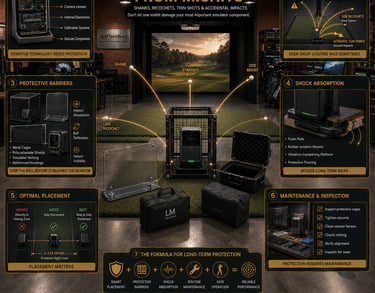
How Golf Launch Monitors Work: Basics of Technology and Sensitivity
Launch monitors rely on advanced sensor arrays — whether it’s photometric camera systems or Doppler radar — to track ball and club data. These sensors are sensitive to direct impacts and vibrations. A shanked ball or club head smashing into the device can misalign sensors, damage delicate components, or crack protective lenses. Even minor repeated knocks cause vibration damage, which subtly degrades accuracy over time.
That’s why the first rule of launch monitor protection is respecting what the device needs: a clear line of sight to the ball flight path, but also a buffer zone where it’s safe from wayward shots or accidental club hits.
Proper placement matters just as much as physical protection, which is why it's worth reading Where Should You Place a Launch Monitor in a Golf Simulator?
Common Risks: Shanks and Mishits Explained
In most home installs, space is tight. You’re juggling hitting mats, nets, and cramped room boundaries. Shanks — those nasty, off-center hits that send the ball flying sideways — or outright mishits happen. When the monitor is placed directly behind or nearby the hitting area with no barrier, it’s an easy target for these stray balls.
Even if you’re careful, the occasional mishit happens to the best players, especially during practice sessions. Over time, repeated exposure to these impact risks can lead to costly repairs or sensor misalignment. The bottom line: don’t rely on luck to keep your monitor safe.
Outdoor practice introduces even more risks, which are covered in Can Golf Launch Monitors Be Used Outdoors Safely?
Practical Protection Methods: Barriers, Cases, and Shock Absorption
Hard Protective Cases
A solid, hard case or housing around your launch monitor is the most straightforward way to fend off stray balls and club strikes. These cases are typically made from durable plastic or metal composites designed to absorb and disperse impact forces. When shopping for cases, look for options specifically built for your monitor model to ensure proper fit without obstructing sensors.
Nets and Screens
Another practical layer of protection is placing a high-tensile net or clear polycarbonate screen behind the monitor. This doesn’t interfere with tracking because it doesn’t block the sensor’s field of view but will catch most errant balls before they reach the device. In pro and training centers, I’ve seen this barrier save monitors from costly impacts more times than I can count.
Shock-Absorbing Mats and Mounts
Shock absorption is often overlooked yet crucial, especially when your monitor is close to the hitting bay floor. High-quality foam mats or vibration-dampening mounts reduce the transfer of shockwaves from nearby ball impacts or accidental knocks. These systems extend the life of your monitor’s internal sensors by minimizing those subtle vibrations causing wear over time.
If you're debating which style of protection makes the most sense, compare the pros and cons in Launch Monitor Case vs Protective Shield: Which Should You Buy?
Optimal Placement Strategies for Different Use Cases
In most home setups, the key is to keep the launch monitor out of the direct line between the ball and hitting area. Common recommendations include placing it to the side — generally about 3-5 feet off the hitting lane — or slightly behind the golfer but well-shielded by netting.
For indoor garage installations, space is tighter, so using a combination of protective housings plus nets and selecting a spot behind the natural flight zone works best. Outdoors, environmental factors like wind and rain add another layer of vulnerability, so waterproof cases combined with sturdy mounting systems are a must.
I’ve seen setups fail when players put their launch monitor just feet in front of the tee, thinking a direct front-facing angle is best. That’s a quick way to get shanked balls hitting the unit and cause early damage.
Many golfers also add display protection to portable units, which is discussed in Are Launch Monitor Screen Protectors Worth It?
Maintenance and Inspection Tips to Preserve Monitor Health
Protection is not “set it and forget it.” You need to routinely inspect your launch monitor’s protective gear for signs of wear, cracking, or loose mounts. Regularly check that nets remain taut and haven’t been punctured by stray balls. For covered units, ensure no dust or debris is accumulating on sensor lenses, as this kills accuracy.
Also, take time to educate everyone using the setup on safe swing zones and how to avoid reckless shots toward the monitor. Prevention here helps avoid unnecessary impacts.
Buyer Considerations: Durability, Budget, and Use Environment
When choosing protection solutions, match them to your environment and budget. Casual home users might get by with affordable foam mats and netting, but serious players or pro centers need rugged hard cases and professional-grade mounts.
Some launch monitors boast higher durability ratings out of the box — look for models designed with tough rubberized housings or reinforced sensor windows if you expect heavy use or outdoor exposure.
Whatever you pick, make sure it doesn’t interfere with tracking accuracy — bulky covers blocking sensor views are counterproductive.
If you're still deciding which devices deserve that extra protection, take a look at our picks for Best Golf Launch Monitors.
Common Mistakes in Protecting Golf Launch Monitors
Placing the monitor directly in front of the hitting zone without any barrier or protection
Relying on only thin mats or soft covers that don’t stop hard impacts
Ignoring manufacturer guidelines about minimum recommended distances and placement
Underestimating the long-term effect of repeated minor impacts and vibrations
Failing to secure mounts or housings properly, leading to accidental falls or displacement
Not considering whether the setup is indoors or outdoors and how environmental factors affect protection needs
For cages, shields, stands, and model-specific enclosures, browse our guide to the Best Golf Launch Monitor Protection Systems.
Frequently Asked Questions on Launch Monitor Protection
How can I best protect my golf launch monitor from shanks?
Place it off to the side or behind the hitter with a protective case or netting barrier, and use shock-absorbing mats or mounts to minimize vibration damage.
What types of protective gear or cases are recommended?
Hard impact-resistant cases tailored to your monitor, durable nets or polycarbonate screens behind the monitor to catch balls, and vibration-dampening mats or mounts are the best choices.
Where should I place the launch monitor to avoid damage?
Ideally, keep it 3–5 feet off the direct hitting line, either to the side or behind the golfer, ensuring it’s shielded from errant balls and club strikes.
Does protecting a launch monitor affect its tracking accuracy?
Properly designed protective cases and barriers do not interfere with sensor signals or accuracy, but bulky or poorly placed covers can degrade performance.
What are common damages caused by mishits to monitors?
Impacts can crack lenses or sensor covers, misalign internal sensors, cause electronic failures, or loosen mounting hardware.
Can I repair a damaged golf launch monitor?
Minor damages like cosmetic scratches can be handled, but sensor damage and internal misalignment often require professional repair or replacement.
Are some launch monitors more durable than others?
Yes, some models feature reinforced housings and rubber bumpers designed to withstand mishits better than others.
What maintenance is recommended to keep launch monitors safe?
Regularly inspect protective gear, clean sensor lenses, keep mounting secure, and maintain proper distance and positioning safeguards.
Summary and Final Tips from the Veteran Installer
Protecting your golf launch monitor from shanks and mishits boils down to a realistic approach based on how you really use the gear. I’ve seen setups fail completely by ignoring simple precautions, yet a handful of good habits can save you hundreds or even thousands down the line.
Prioritize a rugged case or hard barrier that won’t obstruct sensors, carefully place your launch monitor out of harm’s way, and add shock-absorbing mounts or mats whenever possible. Don’t forget regular inspections and user education to catch issues before they cause serious damage.
In my experience, combining common-sense placement, quality protective gear, and ongoing care is the only real recipe to get maximum life and reliable accuracy from these otherwise sensitive devices. Protect your investment like you protect your swing — with focus, respect, and attention to what actually works in the real world.
© 2026 GolfTechBuzz. All rights reserved.
Golf Tech Buzz
Performance Through Data
Practical guides, real-world setups, and unbiased comparisons for golfers building smarter practice environments.
General Inquiries: