

Do You Need Protection for Your Golf Launch Monitor?
Essential golf launch monitor protection tips to keep your device safe from drops, dust, and weather, ensuring consistent performance and longevity.
MONITORS
Golf Tech Buzz Editorial Team - Led by AJ “Buzz” Eichman
7/11/20266 min read
If you’ve ever dropped your phone or cracked a screen, you know the gut punch of damage to a pricey piece of gear. Now multiply that frustration by your golf launch monitor—a precision device that measures your ball speed, launch angle, spin, and a host of other stats you rely on to dial in your swing. Here’s the deal: these bad boys aren’t cheap, and they sure as heck aren’t indestructible. Protecting your golf launch monitor is not just a good idea; it’s essential if you want consistent readings and to squeeze every penny out of your investment.
You can learn more about the different technologies, setup requirements, and available models in our Launch Monitors guide.
Quick Verdict
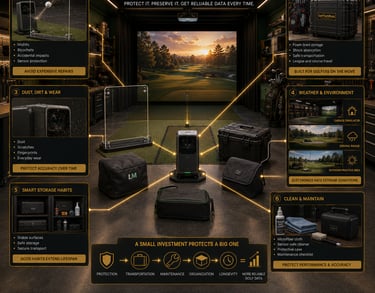
Use a hard or padded case for transport. It’s your launch monitor’s best friend against drops and shocks.
Covers or sleeves keep dust, dirt, and minor bumps from messing with sensitive sensors.
Avoid extreme temperatures and moisture—your monitor’s electronics hate that stuff.
Clean your device regularly but gently, following the manual to keep accuracy sharp.
If you are still comparing units before deciding what level of protection you need, start with Best Golf Launch Monitors.

What is a Golf Launch Monitor and How Does It Work?
A golf launch monitor is basically the tech guru at the range, tracking every minuscule detail of your shot through radar, infrared, or high-speed cameras. It crunches numbers like ball speed, trajectory, and spin to give you instant feedback. If you’re a gearhead, these devices are pure gold. But they’re precision instruments—packed with delicate sensors and electronic guts that need babying.
Think of it like a fancy camera: drop it or let grit build up on the lens, and your shots won’t come out clear. Same with a launch monitor. If sensors get scratched or dusty, you’ll lose data quality—and that’s a hole in your game you don’t need.
For model-specific shields, cages, stands, and screen protectors, compare the options in Best Golf Launch Monitor Protection Systems.
Why You Should Protect Your Golf Launch Monitor
I’ve seen guys try this and–no surprise–it ends poorly. Launch monitors are not toys. Without some protection, you’re asking for damage from shock, dust, dirt, weather, and the usual mishaps that come with travel and storage. Dust and dirt in particular are silent killers, leaving sensors dirty and skewing readings after even a few uses.
Leave your monitor in a harsh environment—like a hot garage or outdoors under the sun—all day? Expect electronic components to degrade faster. Plus, a good case or cover extends longevity and maintains resale value. Bottom line, protecting your launch monitor isn’t about being paranoid; it’s about being smart.
For more ways to defend exposed equipment during practice, read Best Ways to Protect a Golf Launch Monitor from Shanks and Mishits.
Types of Protection: Cases, Covers, and Sleeves
Alright, so there are a few ways to keep your golf launch monitor safe, and knowing when to use which is key.
Hard Cases
If you’re carting your launch monitor around—traveling to the course, leagues, or tournaments—a rugged hard case with foam inserts is your golden ticket. These cases absorb shocks from drops, jostles, and knocks, shielding fragile components inside. Many manufacturers offer custom-fit options, but there are also universal padded cases that work just fine if you throw in some foam padding. Trust me, carrying your monitor in its original box isn’t protection—it’s a lawsuit waiting to happen.
Soft Covers and Sleeves
For storage and everyday use, lightweight covers and sleeves guard against dust, fingerprints, and minor scratches. Some have an optically clear design or cutouts so sensors stay unobstructed, which is critical for accuracy. Store your monitor on a shelf or inside a bag with a cover on, and you’ll reduce grime buildup dramatically.
Environmental Protection
If you’re setting up outdoors or in garage setups, consider water-resistant covers or even small tents/shelters to block moisture and UV rays. Don’t leave your launch monitor baking in direct sunlight or chilling in freezing temps. Electronics don’t like that kind of ride.
To decide which style makes the most sense for your setup, compare the differences in Launch Monitor Case vs Protective Shield: Which Should You Buy?
Setting Up and Using Your Launch Monitor Safely
Where you put your launch monitor matters more than most guys realize. Setting it on an unstable surface is a rookie move. One accidental elbow or a curious kid and you’re down for repairs. Always place it on a flat, stable surface with no risk of falling. If you’re using it outdoors, choose a solid table, and avoid uneven ground.
Transport Tips
When moving it in a bag or case, make sure the monitor is secured and doesn’t shift around. Also, keep it away from heavy objects that might crush or scratch it, and never toss your gear around like a gym bag. Treat your launch monitor like the prized cigar it is—handle with care.
Before finalizing your hitting bay layout, use Where Should You Place a Launch Monitor in a Golf Simulator? to reduce impact risks and maintain proper tracking.
Cleaning and Maintenance Tips for Longevity
You wouldn’t blast your clubs with a pressure washer, right? Same goes for launch monitors. Use a microfiber cloth to gently clean screens and sensors. Check your user manual for safe cleaning agents—usually just a little bit of screen-safe cleaner or water on the cloth is enough.
Never spray cleaner directly on the device, and avoid abrasive materials or harsh chemicals. I’ve seen guys ruin their expensive gear trying to “clean” dust off with canned air or rough wipes. If you’re serious about accuracy, make cleaning part of your routine, not an afterthought.
For units with exposed displays, Are Launch Monitor Screen Protectors Worth It? explains what they protect and where their limitations begin.
Choosing the Right Protection Based on Your Usage
Your setup and habits dictate what kind of protection makes sense.
Indoor Simulators: Go for covers and sleeves to keep dust out since your launch monitor is mostly stationary.
Outdoor or Course Use: Invest in a hard case for transport and weather-resistant covers to shield against dirt and moisture.
Garage Setups: Dust is a menace here, so covers plus careful storage is key. Watch out for temperature swings too.
Frequent Travelers: A padded hard case is non-negotiable, paired with covers that fit snugly for quick on/off protection.
Home Use with Kids or Pets: You need something rugged—hard cases plus covers—and a secure place to keep it when not in use.
For weather, temperature, transport, and range-use considerations, read Can Golf Launch Monitors Be Used Outdoors Safely?
Common Mistakes to Avoid When Handling Your Launch Monitor
Let me save you some headaches here—these are the mistakes I’ve seen guys make way too often:
Skipping cases or covers because “it’s just easier” and ending up with scratched sensors.
Shoving the monitor loosely in a bag with no padding, inviting shock damage.
Leaving it out in dust or moisture, especially during outdoor or garage sessions.
Using harsh cleaning methods that degrade or scratch sensitive lenses and sensors.
Assuming any case or cover fits every monitor—compatibility matters, or you’ll get gaps in protection.
Putting heavy stuff on top of stored gear, crushing your device or the case.
Avoid these, and you’ll get years of reliable use without nasty surprises.
FAQs About Golf Launch Monitor Protection
Do I really need a cover or case for my golf launch monitor?
If you want it to last and provide consistent accuracy, absolutely yes. These devices aren’t cheap, and protection pays off in peace of mind and preserving value.
What types of cases or covers are best for launch monitor protection?
Hard cases with foam inserts are best for transport. Covers and sleeves work well for dust and scratch protection during storage or use. Choose water-resistant covers if you’re outdoors often.
Can using a case or cover affect the launch monitor’s performance?
Good question. Quality covers designed for your model or optically clear materials won’t impact sensors. Avoid thick or opaque covers that block cameras or radar.
How should I clean and maintain my golf launch monitor safely?
Use a microfiber cloth, mild screen-safe cleaner, and follow your manufacturer’s guidelines. Avoid spraying liquids directly and never use abrasive materials.
Is it safe to use a launch monitor outdoors or on the golf course?
Yes, but be mindful of weather, moisture, and stability. Use appropriate covers and cases, and avoid extreme temperatures or wet conditions.
What should I look for when buying protection accessories for launch monitors?
Fit and compatibility are key. Check for shock absorption, material quality, ease of use, and whether the design allows sensors to function unobstructed.
Are there differences in protection needs for high-end versus beginner launch monitors?
Higher-end models often benefit from custom hard cases and more careful handling due to cost and complexity. Beginners can start with padded cases and simple covers, but protection is important either way.
How can I avoid common damage during transport or setup?
Secure your device in a proper case, avoid loose packing, set up in stable locations, and handle with care—think like you’re carrying a high-end camera rig.
Protect Your Investment and Keep Your Shots Reliable
If you’re serious about your golf game, then protecting your launch monitor isn’t a luxury—it’s a necessity. These devices are packed with delicate tech that dirt, drops, and weather don’t play nice with. The right gear—cases, covers, and some good habits—keeps everything running smoothly and ensures your numbers don’t lie.
So next time you’re tipping your shot on the simulator or working the range, remember: a little protection goes a long way. Trust me, your launch monitor (and your golf wallet) will thank you.
© 2026 GolfTechBuzz. All rights reserved.
Golf Tech Buzz
Performance Through Data
Practical guides, real-world setups, and unbiased comparisons for golfers building smarter practice environments.
General Inquiries: